
Not sure which WordPress SEO plugin is worth installing? Some plugins charge for features others include for free, while others overwhelm you with settings you’ll rarely use.
I’ve narrowed down the 10 best SEO plugins for WordPress in 2027 to help you find one that fits your website and budget. I’ll compare what each plugin does well, where it falls short, and whether its paid features are worth your money.
Best WordPress SEO Plugins – Quick Comparison
Here’s a side-by-side comparison of my 10 picks, including what each plugin does best, whether it offers a free version, and how much its premium plan costs.
| SEO Plugin | Best For | Free Version | Starting Price |
|---|---|---|---|
| Rank Math | Overall SEO features | Yes | $5.59/mo |
| Yoast SEO | Beginners and bloggers | Yes | $118.80/year |
| All in One SEO (AIOSEO) | Small businesses | Yes | $49.50/year |
| SEOPress | Agencies and professionals | Yes | $49/year |
| The SEO Framework | Lightweight SEO | Yes | $84/year |
| Slim SEO | Automatic SEO optimization | Yes | $59/year |
| SEO Engine | AI-powered SEO and automation | Yes | $19/year |
| SureRank | Simple SEO management | Yes | $99/year |
| SmartCrawl | SEO audits and optimization | Yes | $50/year |
| SiteSEO | Affordable SEO tools | Yes | $49/year |
10 Best SEO Plugins for WordPress in 2027
1. Rank Math
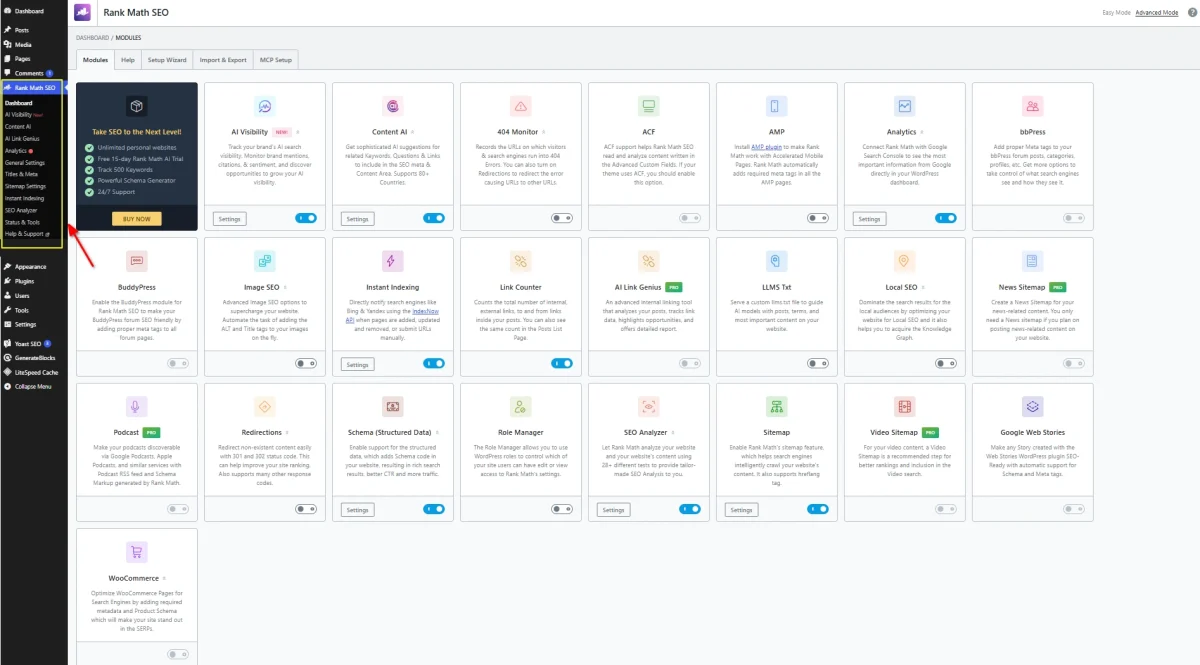
Rank Math is my top pick for WordPress users who want advanced SEO features without paying for every essential tool. Its free version includes content optimization, XML sitemaps, schema markup, redirects, and Google Search Console integration.
One thing I particularly like about Rank Math is its modular design. You decide which features to activate, so your dashboard isn’t cluttered with tools you never use.
Key Features
- Content Optimization: Analyze posts using multiple target keywords, with recommendations for titles, descriptions, headings, and keyword placement.
- Schema Markup: Add structured data for articles, products, recipes, and other content types. The Pro version includes a more advanced schema generator.
- Google Search Console Integration: View search impressions, clicks, and keyword performance directly inside WordPress.
- XML Sitemaps: Automatically generate sitemaps for posts, pages, and custom post types.
- Redirection Manager: Create and manage 301, 302, and other redirects without installing another plugin.
- Keyword Rank Tracking: Monitor up to 500 keywords with the Pro plan using connected Google Search Console data.
- Content AI: Get AI-assisted content recommendations, writing tools, and internal linking assistance through a separate credit-based service.
Pros and Cons
Pros
- Generous free version with useful technical SEO features.
- Modular design gives you control over active features.
- Built-in redirect management and schema support.
- Pro license supports unlimited personally owned websites.
- Import tools simplify switching from Yoast SEO or AIOSEO.
Cons
- The number of settings and modules might overwhelm beginners.
- Advanced schema tools and extensive ranking reports require Pro.
- Content AI has separate usage limits and pricing.
- Pro licenses don’t cover client websites.
Rank Math Pricing
| Plan | Price | Website Limit |
|---|---|---|
| Free | $0 | Unlimited |
| Pro | $5.59/month | Unlimited personal websites |
| Business | $17.59/month | 100 client websites |
| Agency | $38.59/month | 500 client websites |
2. Yoast SEO
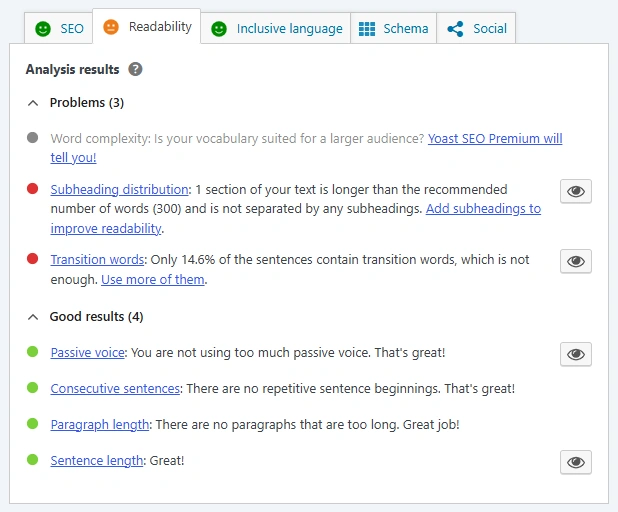
Yoast SEO is one of the most established WordPress SEO plugins, with over 13 million websites using it. Its biggest strength is the feedback it provides while you’re writing, especially when optimizing blog posts and improving readability.
I like how Yoast separates SEO analysis from readability checks. You get clear suggestions without needing to understand every technical SEO setting.
Key Features
- SEO Analysis: Uses a traffic-light system to evaluate keyword placement, title length, meta descriptions, and other on-page elements.
- Readability Analysis: Checks sentence length, paragraph structure, transition words, and passive voice to help make content easier to read.
- Google Search Previews: Shows how your SEO title and meta description will appear in desktop and mobile search results.
- Cornerstone Content: Mark important articles as cornerstone content and receive additional optimization guidance.
- Internal Linking Suggestions (Premium): Recommends relevant pages and posts while editing content and identifies orphaned articles.
- Redirect Manager (Premium): Creates redirects when you change or delete URLs, with support for bulk management.
- AI Optimization (Premium): Provides AI-assisted content improvements, title suggestions, and meta description generation.
- Additional SEO Plugins (Premium): Includes Local SEO, Video SEO, and News SEO tools for websites with specialized content.
Pros and Cons
Pros
- Excellent readability analysis with practical writing suggestions.
- Straightforward interface for optimizing individual posts.
- Free version includes essential on-page and technical SEO tools.
- Supports content analysis in more than 25 languages.
- Premium includes 24/7 support and Yoast SEO Academy.
Cons
- Only one target keyphrase per page in the free version.
- Internal linking suggestions and redirect management require Premium.
- Readability recommendations aren’t always appropriate for technical or specialized content.
- Premium costs more than several competing SEO plugins.
Yoast SEO Pricing
| Plan | Price |
|---|---|
| Yoast SEO Free | $0 |
| Yoast SEO Premium | $118.80/year |
| Yoast WooCommerce SEO | Separate paid package |
Yoast SEO Premium includes AI optimization, internal linking suggestions, redirect management, and additional Local, Video, and News SEO plugins.
The Premium price excludes VAT and covers one website license. A 30-day money-back guarantee applies.
3. All in One SEO (AIOSEO)
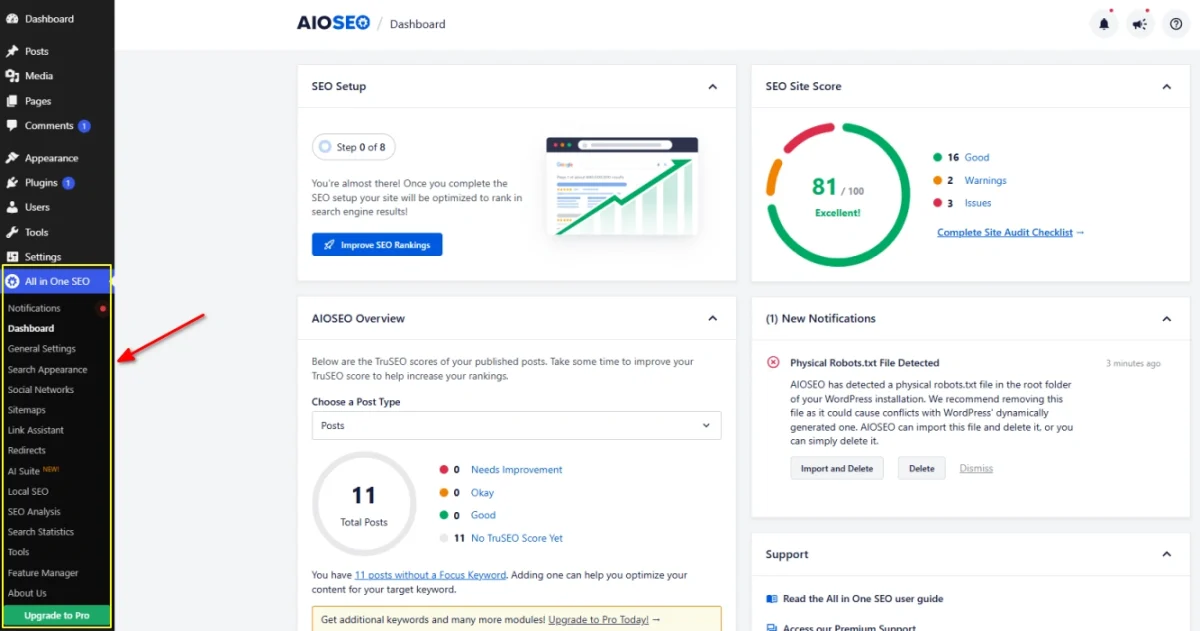
All in One SEO (AIOSEO) is a WordPress SEO plugin used by over 3 million website owners. What stands out to me is how much attention it gives to business-specific SEO, particularly local search, WooCommerce products, and content performance.
Its setup wizard handles the initial configuration, while the TruSEO analysis provides actionable recommendations for individual pages. AIOSEO also includes tools for tracking SEO changes and identifying content that needs improvement.
Key Features
- TruSEO Analysis: Evaluates content against on-page SEO checks and provides recommendations for improving titles, descriptions, keyword usage, and internal links.
- Link Assistant (Pro): Identifies internal linking opportunities, detects orphaned posts, and helps add relevant links without manually searching your entire website.
- Local SEO (Plus and Above): Adds business information, opening hours, location schema, and Google Maps integration. Supports businesses with multiple locations.
- WooCommerce SEO: Provides dedicated optimization settings for product pages, product categories, and eCommerce search visibility.
- Search Statistics (Elite): Integrates Google Search Console data to monitor keyword rankings, search performance, indexing status, and declining content.
- Author SEO (Plus and Above): Adds author profile information and structured data to help search engines understand who created your content.
- SEO Revisions: Tracks changes to SEO metadata, making it easier to review updates and identify what changed on individual pages.
- AI Writing Tools: Generates titles, meta descriptions, and other content using AI credits included with paid plans.
Pros and Cons
Pros
- Guided setup wizard simplifies initial configuration.
- Dedicated tools for local businesses and WooCommerce stores.
- Link Assistant identifies internal linking opportunities across existing content.
- Search Statistics combines several useful Google Search Console reports inside WordPress.
- SEO revision tracking helps manage changes to important pages.
Cons
- Link Assistant requires the Pro plan or higher.
- Search Statistics and keyword rank tracking are restricted to Elite.
- Local SEO and Author SEO aren’t included in the Basic plan.
- Annual renewal prices are higher than first-year promotional prices.
- AI generation is limited by available credits.
AIOSEO Pricing
| Plan | First-Year Price | Websites |
|---|---|---|
| AIOSEO Lite | Free | Unlimited |
| Basic | $49.50/year | 1 |
| Plus | $99.50/year | 3 |
| Pro | $179.55/year | 10 |
| Elite | $239.60/year | 100 |
The paid plans are billed annually. Basic includes core SEO tools, Plus adds Local SEO and Author SEO, Pro unlocks Link Assistant, and Elite provides Search Statistics and keyword tracking.
All paid plans include a 14-day money-back guarantee. Promotional prices apply to the first year, with renewals charged at regular rates.
4. SEOPress
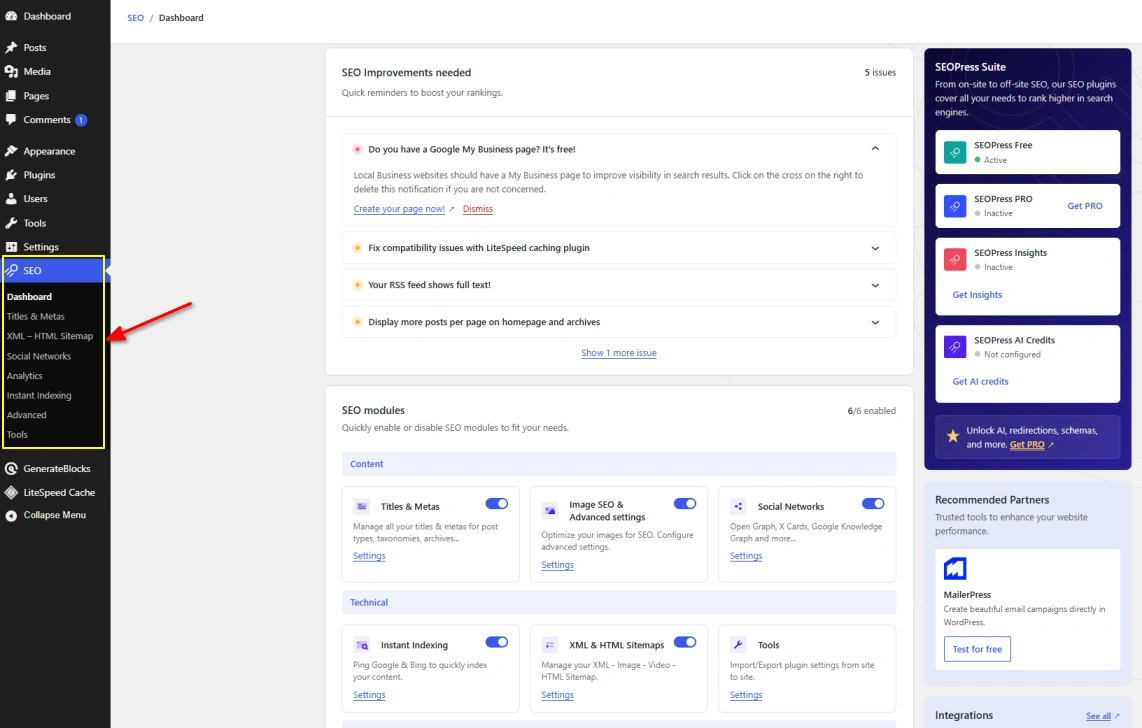
SEOPress is a WordPress SEO plugin with a particularly useful advantage for agencies and developers: its paid features are available across all PRO licenses, including the $49 single-site plan.
I also like its white-label functionality, which lets agencies remove SEOPress branding from the WordPress dashboard. Combined with bulk editing, developer tools, and unlimited-site licensing, it offers a practical solution for managing SEO across client websites.
Key Features
- Content Analysis: Optimize posts using unlimited target keywords, with checks for headings, metadata, links, and content structure.
- Bulk SEO Management: Import and export SEO metadata using CSV files, making large-scale updates easier for websites with hundreds of pages.
- White Label (PRO): Remove SEOPress branding from the WordPress admin area for a cleaner client experience.
- Site Audit (PRO): Identify technical SEO problems, including indexing issues, missing metadata, and other site-wide errors.
- AI Assistant (PRO): Generate content, SEO titles, descriptions, and image alt text using supported AI services such as OpenAI, Claude, and Gemini.
- Developer Tools: Use REST API, WP-CLI, hooks, and filters to manage SEO settings and automate repetitive tasks.
- Google Search Console (PRO): View clicks, impressions, average positions, and indexing information inside WordPress.
- MCP Integration: Connect compatible AI assistants to WordPress SEO tools, with 14 tools included in the free version and 13 additional tools in PRO.
Pros and Cons
Pros
- Every PRO license includes the same premium SEO features.
- White-label functionality is useful for client websites.
- CSV tools simplify bulk SEO updates.
- Strong developer support through APIs, hooks, and WP-CLI.
- Annual renewal pricing remains the same as the initial purchase price.
Cons
- The interface has fewer beginner-oriented explanations than Yoast SEO.
- Site audits, advanced structured data, and redirect management require PRO.
- AI generation requires a configured AI provider or separate AI credits.
- Keyword position and backlink monitoring through SEOPress Insights costs extra.
SEOPress Pricing
| Plan | Price | Websites |
|---|---|---|
| SEOPress Free | $0 | Unlimited |
| SEOPress PRO | $49/year | 1 |
| SEOPress PRO | $59/year | 5 |
| SEOPress PRO | $149/year | Unlimited |
All PRO plans include premium features, updates, and customer support. Prices exclude VAT, and renewals remain at the same rate unless special promotional terms apply.
SEOPress also offers Insights for $99/year per website, which adds keyword ranking, competitor monitoring, and backlink tracking.
A 14-day money-back guarantee applies to PRO purchases.
5. The SEO Framework
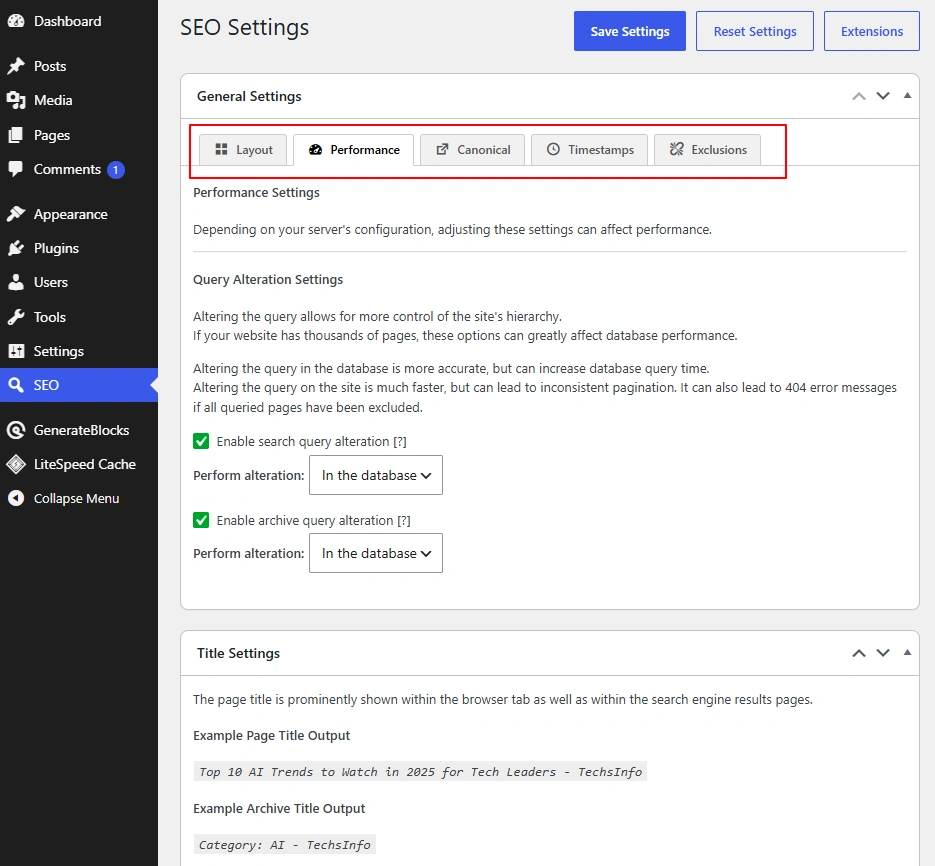
The SEO Framework takes a different route from most WordPress SEO plugins. Instead of filling your dashboard with SEO scores, keyword density warnings, and upgrade notices, it automatically handles essential SEO settings with minimal user input.
What I particularly like is its clean, unbranded interface. There are no promotional banners or constant reminders to upgrade. It also generates SEO titles and descriptions based on your existing content, reducing the amount of manual work needed when publishing new pages.
Key Features
- Automatic Metadata Generation: Creates SEO titles, meta descriptions, canonical URLs, and social sharing metadata based on your WordPress content.
- SEO Bar: Uses color-coded indicators to identify potential SEO problems across posts and pages, with more than 70 checks.
- Indexing Protection: Handles canonical URLs, robots directives, and pagination issues to help prevent unwanted or duplicate URLs from appearing in search results.
- Focus Extension (Premium): Provides content optimization guidance using target keywords, synonyms, and word variations.
- Articles Extension (Premium): Adds structured data to blog posts and supports Google News sitemaps.
- Local Extension (Premium): Generates structured business information for local SEO.
- Monitor Extension (Premium): Tracks website SEO configuration and reports technical issues that need attention.
- Extension Manager: Lets you install optional functionality separately instead of loading every feature into the main plugin.
Pros and Cons
Pros
- Clean WordPress dashboard without ads or upgrade notices.
- Automatically configures essential SEO settings after activation.
- Lightweight design with an emphasis on efficient database usage.
- Core SEO features are available without a paid subscription.
- Optional extensions keep unnecessary features out of the main plugin.
Cons
- No traditional keyword-based content scoring in the free version.
- Advanced content guidance and article schema tools require premium extensions.
- Fewer built-in content writing tools than Rank Math or Yoast SEO.
- Premium licenses limit the number of websites using paid extensions.
The SEO Framework Pricing
| Plan | Price | Website Limit |
|---|---|---|
| Free | $0 | Unlimited |
| Pro | $84/year | 2 websites |
| Business | $204/year | 20 websites |
| Agency | $324/year | 200 websites |
All paid plans unlock the premium extensions. The main differences are website limits, monthly API requests, and support levels.
Pro includes 5,000 API requests per month, Business increases that to 50,000, and Agency provides 500,000.
The core plugin remains free, so purchasing a subscription is only necessary when you need the additional extensions.
6. Slim SEO
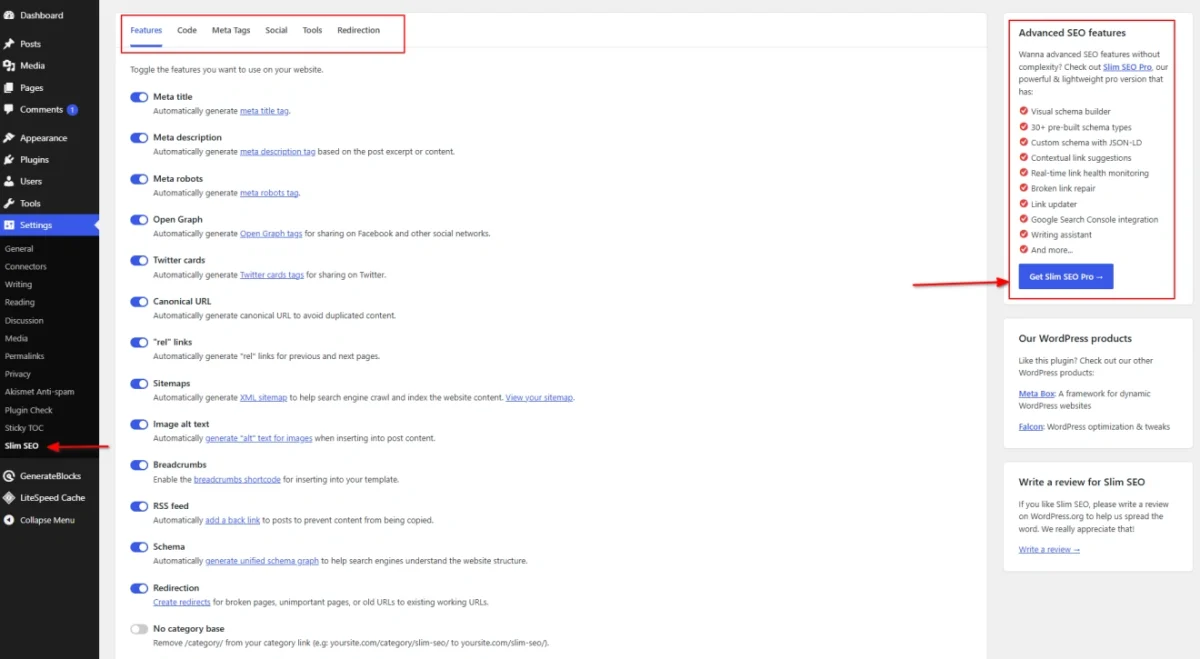
Slim SEO is built around one simple idea: WordPress SEO shouldn’t require hours of configuration. Most essential settings work automatically after installation, making it a practical alternative to plugins with lengthy setup wizards and dozens of options.
What interests me most is its automatic metadata generation. If you don’t write a custom meta description, Slim SEO creates one from your post excerpt or content. You still have the option to edit titles and descriptions manually when a page needs special attention.
Key Features
- Automatic SEO Setup: Configures essential SEO settings immediately after activation, including metadata, canonical URLs, and indexing directives.
- AI Meta Tag Generation: Generates SEO titles and descriptions using OpenAI, Gemini, Claude, or OpenRouter. Supports bulk generation and requires your own API key.
- XML Sitemaps: Creates XML sitemaps automatically, including support for image and Google News sitemaps.
- Breadcrumbs: Generates navigation breadcrumbs based on your website structure, with options for custom styling.
- Automatic Schema Markup: Adds connected JSON-LD structured data for your website and content without manual configuration.
- Redirect Management: Handles URL redirects, monitors 404 errors, and automatically redirects visitors when post slugs change.
- Visual Schema Builder (Pro): Provides more than 30 predefined schema types, custom field mapping, and support for custom JSON-LD.
- Link Manager (Pro): Suggests relevant internal links, monitors link health, identifies broken links, and helps update links across your website.
Pros and Cons
Pros
- Essential SEO settings work automatically after installation.
- Free version includes redirects, schema markup, and sitemap generation.
- AI metadata generation supports multiple providers.
- No lengthy setup wizard for basic SEO configuration.
- Premium plans include the same advanced features regardless of license size.
Cons
- Limited keyword-based content analysis compared with plugins offering detailed SEO scoring.
- Advanced schema customization and internal linking tools require Pro.
- AI metadata generation requires an external API key, with usage charges determined by the selected AI provider.
- Automatic metadata generation doesn’t replace manually reviewing important pages.
- The Pro version is a separate plugin rather than a simple extension of the free version.
Slim SEO Pricing
| Plan | Price | Website Limit |
|---|---|---|
| Slim SEO Free | $0 | Unlimited |
| Personal | $59/year | 1 website |
| Freelancer | $119/year | 10 websites |
| Agency | $179/year | Unlimited* |
All three premium plans include the same features, one year of updates, and customer support.
Renewals are charged at the listed annual rates, and purchases include a 14-day refund policy.
The unlimited-site license excludes certain commercial uses, including hosting providers, SaaS companies, and website maintenance providers, which require separate licensing arrangements.
7. SEO Engine
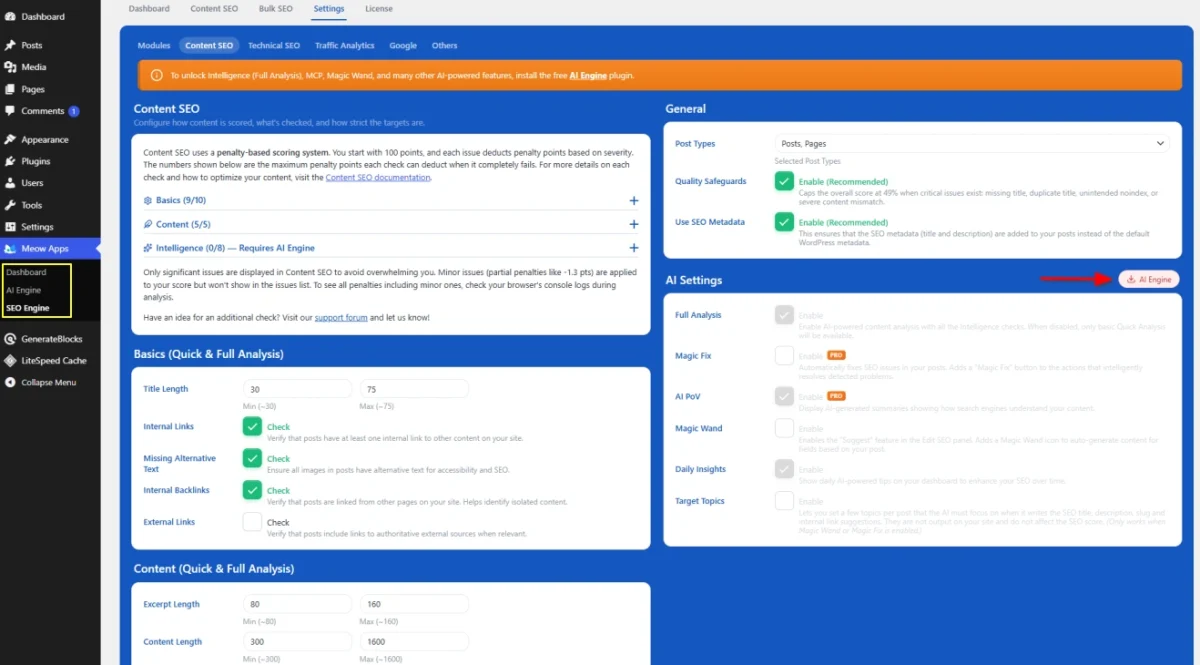
SEO Engine is a newer WordPress SEO plugin developed by Meow Apps, the team behind AI Engine. Unlike traditional SEO plugins that rely heavily on keyword scores, it combines technical SEO management with AI-powered content analysis and automation.
What interests me most is its integration with AI assistants. Through the Model Context Protocol (MCP), you can connect compatible AI tools to your WordPress SEO data, review optimization issues, and generate suggestions directly through an AI assistant.
Key Features
- AI-Powered Content Analysis: Evaluates titles, descriptions, internal links, image alt text, content structure, and topic coverage to identify optimization opportunities.
- Magic Fix (Pro): Generates AI-assisted corrections for weak titles, missing image alt text, grammar issues, and internal links. You review suggested changes before applying them.
- AI Visibility Tracking (Pro): Monitors how ChatGPT, Gemini, and Claude respond to questions about your brand, including competitor mentions and visibility trends.
- MCP Integration: Connects WordPress SEO data with compatible AI assistants for content analysis, reporting, and optimization workflows.
- Redirection Manager: Supports 301, 302, 307, and 308 redirects, automatic redirects after URL changes, and a built-in 404 error monitor.
- AI Bot Tracking: Monitors visits from crawlers associated with ChatGPT, Claude, Perplexity, and other AI services.
- Analytics Integration: Connects Google Analytics, Plausible, and Matomo, or uses built-in private analytics to monitor website traffic.
- Search Console Insights (Pro): Displays search impressions, clicks, keyword positions, and optimization opportunities directly inside WordPress.
Pros and Cons
Pros
- Free version includes essential technical SEO tools and content analysis.
- MCP integration provides a different way to manage SEO through AI assistants.
- Built-in redirection manager and 404 monitoring.
- Supports multiple analytics platforms, including privacy-friendly alternatives.
- AI bot tracking is available without upgrading.
Cons
- Much smaller user base than established SEO plugins.
- Advanced AI corrections and visibility tracking require Pro.
- AI-powered workflows require a compatible AI provider and additional configuration.
- AI provider usage could involve separate API costs.
- Shorter development history and fewer independent learning resources.
SEO Engine Pricing
| Plan | Price |
|---|---|
| SEO Engine Free | $0 |
| SEO Engine Pro Annual | Starts at $19/year (1 site) |
| SEO Engine Pro Lifetime | Starts at $199 (5 sites) |
The free version includes technical SEO management, content analysis, redirects, analytics integrations, and MCP functionality.
Pro unlocks Magic Fix, AI Visibility tracking, advanced content analysis, Search Console insights, and priority support.
Annual licenses include updates and support while the subscription remains active. Lifetime licenses include future updates and support for the first year.
A 14-day refund policy applies to purchases.
8. SureRank
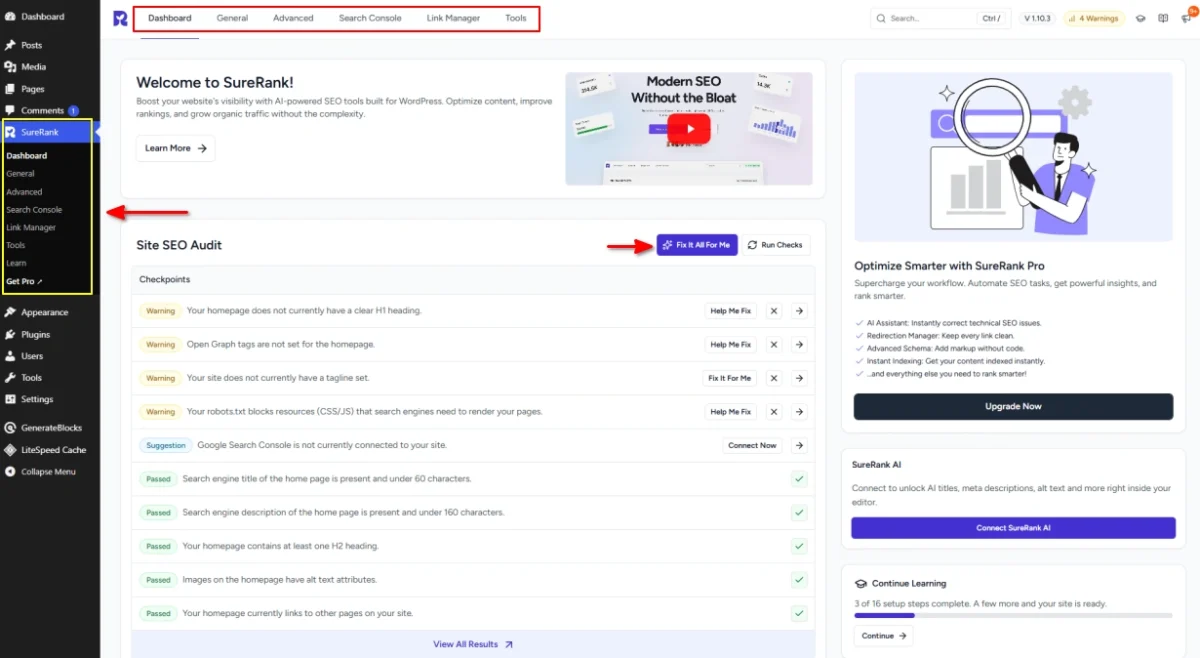
SureRank is a newer WordPress SEO plugin developed by Brainstorm Force, the company behind the Astra theme. Launched in 2025, it has already reached over 300,000 active installations.
What interests me about SureRank is its combination of page-level SEO checks and visual search previews. Instead of relying entirely on numerical SEO scores, it identifies specific problems and provides options to correct them. The plugin also integrates with popular page builders, including Elementor, Divi, Bricks, and Breakdance.
Key Features
- Site-Level SEO Checks: Scans your website for indexing problems, sitemap issues, missing metadata, and incorrect social sharing settings.
- Page-Level SEO Analysis: Checks individual posts and pages for missing titles, weak content structure, link problems, and other optimization issues.
- Search and Social Previews: Edit titles, descriptions, and images while previewing how your pages appear in Google, Facebook, and X.
- Robots.txt Analyzer: Reviews your robots.txt configuration and identifies rules that could prevent search engines from crawling important content.
- WooCommerce Integration: Adds SEO controls for product pages, including metadata, structured data, and social sharing information.
- AI SEO Tools (Pro): Generates titles, descriptions, image alt text, and internal linking recommendations. AI usage is included with the subscription, subject to fair-use limits.
- Content Research (Pro): Includes SERP analysis, competitor content comparisons, an outline builder, and a content gap finder.
- One-Click SEO Fixes (Pro): Identifies common technical problems and provides automated fixes for supported issues.
Pros and Cons
Pros
- Modern interface with clear explanations of SEO issues.
- Integration with several popular WordPress page builders.
- Dedicated robots.txt analysis and editing tools.
- AI features included in premium subscriptions without separate API fees.
- Supports importing SEO settings from Rank Math, Yoast SEO, AIOSEO, and other plugins.
Cons
- Relatively short development history compared with established competitors.
- Advanced content research and automated fixes require Pro.
- AI features are subject to fair-use limits.
- Premium subscriptions limit the number of websites.
- Some features, including white-label SEO reports, are still in development.
SureRank Pricing
| Plan | Price | Website Limit |
|---|---|---|
| Free | $0 | Unlimited |
| Pro Annual | $99/year | 10 |
| Business Annual | $179/year | 500 |
| Pro Lifetime | $399 one-time | 10 |
| Business Lifetime | $799 one-time | 500 |
The annual plans include one year of updates and priority support. Lifetime licenses include ongoing access, updates, and support without annual renewal payments.
The listed paid prices are promotional rates. Regular annual prices are $149 for Pro and $249 for Business.
Both paid plans provide access to the premium features, with the main difference being website limits. SureRank also includes a 14-day money-back guarantee.
9. SmartCrawl
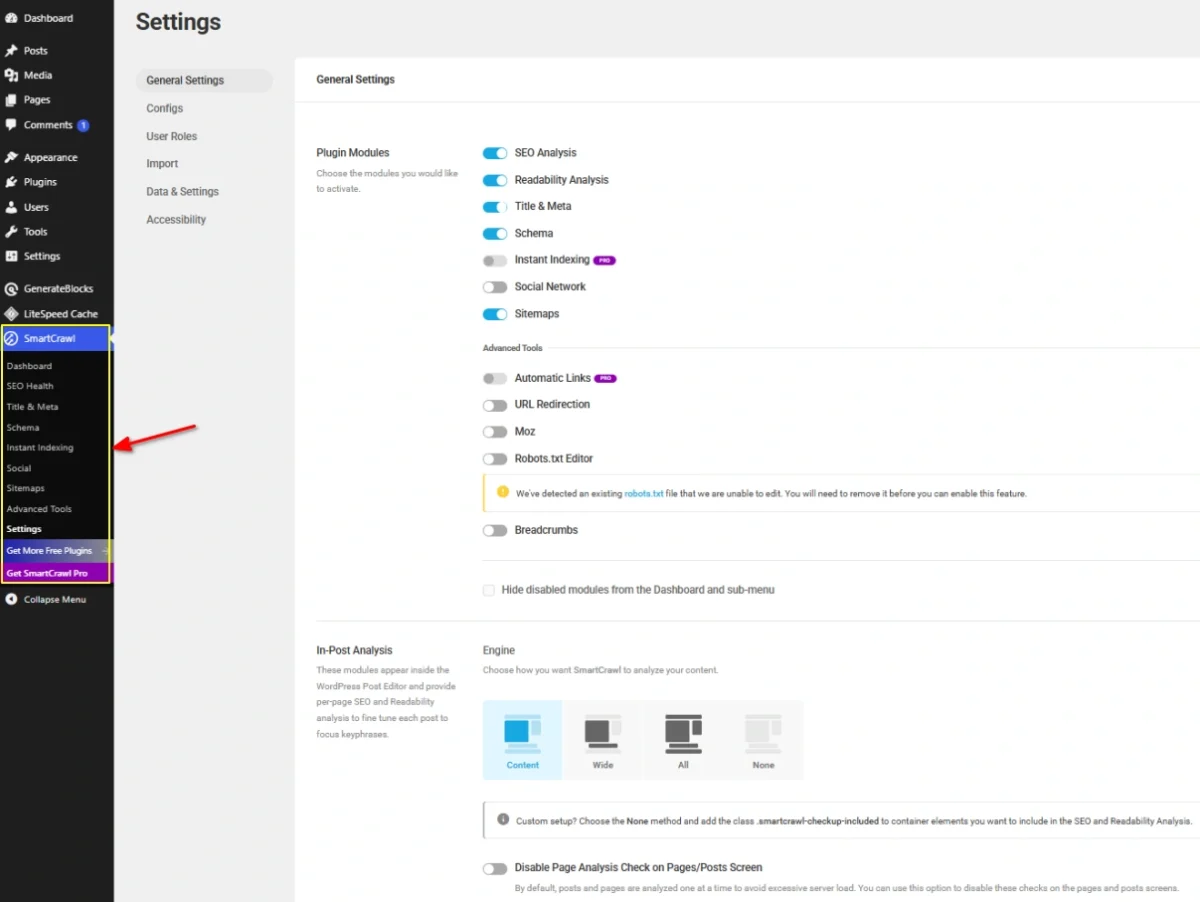
SmartCrawl is a WordPress SEO plugin developed by WPMU DEV, with built-in tools for site audits, content analysis, and technical SEO management.
What makes SmartCrawl interesting is its SEO Health Checkup. Instead of checking every page manually, you get a report highlighting problems across your website, along with recommendations for fixing them. The Pro version adds scheduled audits and automated site crawls, which are particularly useful for maintaining larger websites.
Key Features
- SEO Health Checkup: Scans your website for SEO issues and provides recommendations for improving its technical configuration.
- Content Analysis: Checks keyword usage, readability, titles, and content structure directly in the WordPress editor.
- SEO Site Crawler (Pro): Scans website URLs to identify broken links, redirect chains, and technical problems.
- Scheduled SEO Audits (Pro): Runs automated checks and generates reports without requiring manual scans.
- Automatic Internal Linking (Pro): Links selected keywords to specified URLs across your website.
- Schema Type Builder: Creates structured data for articles, products, local businesses, reviews, and other supported content types.
- Social Media Optimization: Configures Open Graph metadata, social sharing images, and other settings for social networks.
- Advanced Redirects (Pro): Adds location-based redirects and additional URL redirection rules.
Pros and Cons
Pros
- SEO Health Checkup identifies site-wide problems in one report.
- Free version includes content analysis, schema markup, and basic redirects.
- Scheduled audits reduce manual SEO maintenance.
- Supports WordPress Multisite installations.
- Paid membership includes other WPMU DEV plugins for security, backups, and performance.
Cons
- Automated crawls, scheduled audits, and internal linking require Pro.
- Premium subscriptions include a broader plugin package rather than a standalone SmartCrawl license.
- Some advanced features rely on WPMU DEV services.
- The free version has fewer automation tools than Pro.
SmartCrawl Pricing
| Plan | Annual Price | Website Limit |
|---|---|---|
| SmartCrawl Free | $0 | Unlimited |
| Pro Basic | $50/year | 1 |
| Pro Standard | $75/year | 3 |
| Pro Plus | $100/year | 10 |
All paid plans include SmartCrawl Pro, access to the WPMU DEV Pro plugin collection, updates, and 24/7 support.
The main differences between plans are website limits and additional membership resources, including CDN bandwidth and backup storage.
All premium plans comes with 30 days money back guarantee.
10. SiteSEO
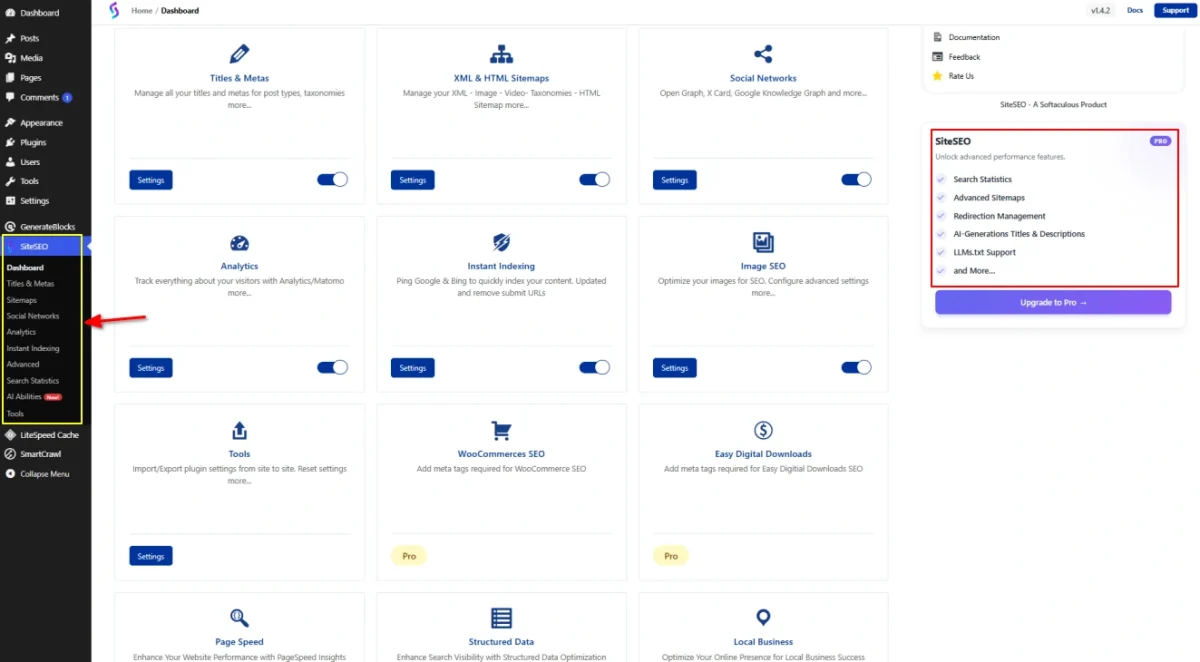
SiteSEO is an all-in-one WordPress SEO plugin developed by Softaculous, with over 400,000 active installations. It includes on-page optimization, technical SEO settings, and dedicated tools for online stores.
What stands out to me is its affordable licensing for multiple websites. The Business plan supports unlimited sites, while the free version covers basic optimization without requiring a subscription. SiteSEO also includes some less common features, such as an external links manager and built-in Google indexing submission tools.
Key Features
- On-Page SEO Analysis: Runs more than 20 SEO checks and evaluates unlimited target keywords, including metadata, headings, and content structure.
- Dynamic Metadata: Uses customizable variables to generate SEO titles and descriptions for posts, pages, archives, and custom post types.
- Google Instant Indexing: Supports URL submission through Google’s Indexing API, which Google officially restricts to eligible job posting and livestream pages.
- WooCommerce SEO (Pro): Adds dedicated metadata and structured data controls for products, categories, and other store content.
- External Links Manager (Pro): Controls how external links behave, including options for opening links in new tabs and managing link attributes.
- SEO Alerts (Pro): Identifies SEO-related problems and sends notifications when supported issues are detected.
- Advanced Schema Management (Pro): Supports automatic structured data, custom schema, and importing schema from URLs, HTML, or JSON.
- Google Search Console Integration (Pro): Displays search performance information inside WordPress and supports sitemap submissions.
Pros and Cons
Pros
- Free version includes essential SEO settings and content analysis.
- Supports unlimited target keywords during content optimization.
- Business license covers unlimited websites.
- Includes dedicated SEO features for WooCommerce and Easy Digital Downloads.
- Built-in tools for managing external links and indexing submissions.
Cons
- Redirect management and advanced schema features require Pro.
- Google Search Console reports aren’t available in the free version.
- AI-generated metadata requires Pro and separately purchased AI tokens.
- The entry-level paid license supports only one website.
- Fewer third-party tutorials and learning resources than more established competitors.
SiteSEO Pricing
| Plan | Price | Website Limit |
|---|---|---|
| SiteSEO Free | $0 | Unlimited |
| Personal | $49/year | 1 |
| Professional | $99/year | 5 |
| Business | $249/year | Unlimited |
All paid plans include the same core Pro features, one year of updates, and customer support. The main differences are website limits and support priority.
SiteSEO also sells AI tokens separately, starting at $3 for 100,000 tokens, valid for one year. An active Pro license is required to use its AI features.
WordPress SEO Plugins Compared – Free vs. Premium Features
The biggest differences between these plugins become clear when you compare what their free versions include and which advanced tools require a paid license.
The table below highlights the features that matter most when comparing WordPress SEO plugins.
| SEO Plugin | Schema Markup | Redirect Manager | WooCommerce SEO | AI Features |
|---|---|---|---|---|
| Rank Math | Free + Pro | Free | Free + Pro | Paid credits |
| Yoast SEO | Free + Premium | Premium | Paid add-on | Premium |
| AIOSEO | Free + Pro | Pro | Free + Pro | Paid credits |
| SEOPress | Free + Pro | Pro | Pro | Pro |
| The SEO Framework | Basic + Extensions | No dedicated manager | Basic support | No built-in AI |
| Slim SEO | Free + Pro | Free | Basic support | API-based |
| SEO Engine | Free | Free | Pro AI tools for WooCommerce | Free + Pro |
| SureRank | Free + Pro | Pro | Free + Pro | Pro |
| SmartCrawl | Free + Pro | Free + Pro | Basic support | Limited |
| SiteSEO | Free + Pro | Pro | Pro | Pro + tokens |
All 10 plugins provide essential tools such as SEO titles, meta descriptions, XML sitemaps, and canonical URL management.
The differences are in their advanced capabilities. Rank Math provides redirect management in its free version, while Yoast SEO reserves that feature for Premium. Slim SEO includes several automated tools without requiring an upgrade, whereas The SEO Framework keeps advanced functionality in optional extensions.
For premium plans, website licensing is just as important as the subscription price. A lower-priced single-site license isn’t necessarily cheaper when you’re managing five or ten WordPress websites.
Before upgrading, check whether the specific feature you need is included in your chosen plan, particularly for AI tools, keyword tracking, and WooCommerce optimization.
Which WordPress SEO Plugin Should You Choose?
After comparing all 10 plugins, I’d narrow down your choice based on the type of website you run and how much control you want over your SEO settings.
| Your Requirements | My Recommendation | Why I’d Choose It |
|---|---|---|
| Best for beginners | Yoast SEO | Clear writing feedback and simple optimization guidance |
| Best for bloggers | Rank Math | Useful SEO tools for managing and optimizing blog content |
| Best for WooCommerce stores | AIOSEO | Dedicated product optimization and eCommerce SEO tools |
| Best for small businesses | AIOSEO | Local business SEO and location-specific settings |
| Best for agencies | SEOPress | White-label tools, bulk editing, and flexible licensing |
| Best free SEO plugin | Rank Math | Extensive SEO functionality without a premium subscription |
| Best lightweight plugin | The SEO Framework | Automatic optimization with minimal dashboard clutter |
| Best for automatic SEO setup | Slim SEO | Handles essential SEO settings with little manual configuration |
| Best for AI-powered SEO automation | SEO Engine | MCP integration, AI-assisted corrections, and AI visibility monitoring |
| Best for SEO audits | SmartCrawl | Site-wide checks for technical and on-page SEO problems |
My advice: If your current SEO plugin already handles your website’s requirements, there’s no reason to switch just because another plugin has more features. Choose a replacement only when it solves a specific limitation you’re dealing with.
Common WordPress SEO Plugin Mistakes to Avoid
Even a well-configured SEO plugin won’t help much if important settings are overlooked. Here are five mistakes worth checking on your WordPress site.
1. Installing Multiple SEO Plugins
Running Rank Math, Yoast SEO, or AIOSEO together often creates duplicate meta tags, conflicting canonical URLs, and overlapping XML sitemaps.
What to do: Use one primary SEO plugin. Add specialized plugins only when they provide functionality your main plugin doesn’t include.
2. Accidentally Setting Important Pages to Noindex
A single incorrect noindex setting could prevent Google from including an important page in search results.
What to do: Review indexing settings for posts, pages, categories, and other important content. Check individual page settings before publishing.
3. Adding Duplicate Schema Markup
Using multiple plugins to generate identical structured data could create duplicate or conflicting schema properties.
What to do: Check which plugin generates your structured data. Disable overlapping schema output and validate important pages using Google’s Rich Results Test. If you need more control over structured data, compare the best WordPress schema markup plugins.
4. Switching Plugins Without Migrating SEO Settings
Changing SEO plugins without transferring existing metadata could result in missing custom titles, descriptions, redirects, or schema configurations.
What to do: Back up your website, use the new plugin’s import tool, and verify important pages before removing the old plugin.
5. Chasing Perfect SEO Scores
A 100/100 score in Rank Math or a green indicator in Yoast SEO doesn’t guarantee better Google rankings. These scores measure compliance with the plugin’s recommendations, not your actual search performance.
What to do: Prioritize accurate content, search intent, internal linking, and technical issues over achieving a perfect plugin score.
Frequently Asked Questions
What is the best SEO plugin for WordPress in 2027?
Rank Math is my top overall choice because its free version includes many tools that competitors reserve for premium plans. However, Yoast SEO is a better fit for users who prefer straightforward content analysis, while SEOPress offers useful tools for managing client websites.
Which is the best free WordPress SEO plugin?
Rank Math offers one of the most complete free SEO packages for WordPress. It includes on-page SEO analysis, schema markup, XML sitemaps, and redirect management. The SEO Framework is another good option if you prefer automatic optimization with fewer settings.
Is Rank Math better than Yoast SEO?
Rank Math offers more advanced functionality in its free version, while Yoast SEO provides stronger readability guidance and a simpler writing experience. For a closer look at how all three compare, see my Rank Math vs Yoast SEO vs AIOSEO comparison.
Do WordPress SEO plugins actually improve Google rankings?
SEO plugins help implement technical and on-page optimizations, but installing one doesn’t automatically improve rankings. Google also evaluates content relevance, quality, usability, and other signals that SEO plugins don’t control. I cover those areas in detail in my complete SEO guide.
Is it worth paying for a premium SEO plugin?
A premium SEO plugin is worth considering when you need specific features unavailable in the free version, such as advanced schema customization, automated internal linking, or detailed keyword tracking. For a basic blog or small website, a free plugin is often sufficient.
Is it safe to switch from one SEO plugin to another?
Yes, switching SEO plugins is safe when done correctly. However, removing your existing plugin before transferring its settings could result in lost SEO titles, meta descriptions, redirects, or structured data. Before switching, back up your website and use the new plugin’s built-in import tool to transfer your existing SEO settings. Then verify your metadata, canonical URLs, XML sitemaps, and indexing settings before removing the old plugin.
Should I use more than one SEO plugin?
Use only one primary SEO plugin to manage titles, descriptions, canonical URLs, and other core settings. Specialized plugins for features such as image optimization or broken link monitoring are fine, provided their functionality doesn’t conflict with your main SEO plugin.
Does WordPress need an SEO plugin?
WordPress works without an SEO plugin, and search engines still index WordPress websites without one. However, a dedicated SEO plugin simplifies metadata management, XML sitemaps, canonical URLs, and other settings that would otherwise require manual configuration. For other tools worth installing, see my must-have WordPress plugins for bloggers.
Final Verdict
After comparing all 10 SEO plugins, Rank Math is my top recommendation for most WordPress websites. Its free version offers an impressive range of tools, and you don’t need to upgrade just to handle essential SEO tasks.
If you prefer straightforward content optimization, Yoast SEO is a solid alternative. For agencies managing multiple websites, I’d choose SEOPress because of its flexible licensing and developer-friendly features.
Whatever plugin you choose, remember that good SEO depends on more than the plugin itself. The right tool simplifies optimization, but your content quality, website structure, and overall SEO strategy still determine your long-term success.
This post is super helpful! I didn’t realize there were so many great SEO plugins available for WordPress. I’m especially interested in trying out the new ones for 2026. Thanks for the detailed comparison between free and paid options!
Great list! I’ve been curious about the best SEO plugins for 2026, and this post gave me some valuable insights. I’m especially interested in trying out the ones you mentioned for free. Thanks for sharing!
“Excellent article! I’ve been using Yoast SEO for a while, and it’s been a game-changer for optimizing my site. However, I’m definitely curious to try Rank Math based on the features you’ve highlighted here. It’s always great to learn about new tools that can improve SEO. Thanks for sharing such a thorough comparison!”
Thanks for sharing this great list of Plugins.
You are welcome Rohit!