
Most people don’t pick hosting. They end up stuck with slow sites, random downtime, and support that vanishes when traffic matters. WPX is often pitched as a premium fix, fast, secure, and support-driven. Claims are easy. Proof is not.
This WPX hostin review exists to cut through that noise.
WPX is regularly grouped with managed WordPress hosting providers, but reputation alone means nothing. What matters is performance under load, real limits, support quality, and whether the pricing actually makes sense for your use case.
This review does not assume WPX is good or bad. It verifies what’s true, exposes trade-offs, and makes it clear who WPX is built for and who should avoid it entirely.
What Is WPX Hosting and Who Is It Built For
WPX is a managed WordPress hosting platform positioned for site owners who care more about speed, stability, and support than squeezing costs.
This is not entry-level hosting. It’s not built for experimentation, side projects, or people who want to learn server management. It removes complexity on purpose and charges for that convenience.
WPX is built for:
- Bloggers and publishers who rely on organic traffic and can’t afford slow pages.
- Affiliate sites where milliseconds affect rankings and conversions.
- Business websites that need predictable performance without technical overhead.
- Users who want hosting handled, not babysat.
It fits site owners evaluating hosting for small businesses that prioritize uptime, speed, and support over low pricing.
WPX is not built for:
- Budget-driven users hunting for the cheapest plan.
- Developers who want full server-level control.
- Projects that require custom stacks, non-WordPress apps, or heavy infrastructure tuning.
In short, WPX targets users who want WordPress to run fast, stay secure, and stay online without thinking about servers. If you want control and flexibility, this is the wrong product. If you want outcomes, this is the audience WPX is chasing.
Core Features Overview
WPX Hosting is not feature heavy by accident. It is intentionally opinionated. Everything included is there to remove friction, not to impress you on a comparison table.
Here is what actually matters.
Managed WordPress Environment
WPX handles the fundamentals so you do not have to:
- WordPress optimized servers
- Automatic core updates
- Managed security at the server level
- Hands off maintenance for daily operations
This aligns with what most users should prioritize when choosing the right web hosting setup today: stability first, control second.
Free Unlimited Site Migrations
WPX still leans hard on migrations as a value lever.
- Unlimited WordPress migrations
- Handled by support, not plugins
- No downtime promise in most cases
This is one of the few areas where WPX clearly overdelivers compared to many competitors.
Built In CDN and Caching Layer
WPX includes its own CDN and server side caching:
- No third party CDN setup required
- Caching handled at platform level
- Designed for WordPress, not generic assets
You give up customization, but you gain consistency.
Daily Backups and Restore Access
- Automatic daily backups
- Multiple restore points
- Restore handled inside the dashboard
This is baseline in managed hosting, but WPX executes it cleanly.
Simplified Resource Based Plans
WPX plans are not based on vague “unlimited” promises.
They focus on:
- Number of websites
- Storage limits
- Bandwidth or traffic thresholds
That clarity reduces surprises later. WPX’s core features are not innovative. They are curated.
If you expect experimental tools or deep configuration, you will be disappointed. If you want a focused stack that removes bad decisions from the equation, this feature set makes sense.
Performance and Speed Benchmarks
WPX positions itself among the fastest managed WordPress hosting providers, and this is not just branding. The platform is built to reduce latency at the server level, not mask it with plugins.
Real Performance Characteristics
What consistently stands out with WPX:
- Fast server response times due to LiteSpeed and aggressive server-side caching.
- High PHP worker allocations on mid and upper plans, which directly improves handling of concurrent visitors.
- Stable performance under sustained traffic, not just empty demo tests.
A key metric here is Time to First Byte (TTFB). WPX generally performs well on TTFB measurements, which means the server responds quickly before the page even starts rendering. That directly impacts Core Web Vitals, crawl efficiency, and perceived speed.
What This Means in Practice
WPX performance favors:
- Content-heavy sites.
- SEO-driven traffic.
- Pages that rely on consistent response times, not burst scaling.
What it does not optimize for:
- Sudden viral spikes without upgrading plans.
- Micro-optimizing every cache rule manually.
- Benchmark chasing for screenshots.
WPX focuses on repeatable speed, not flashy test results.
Server Infrastructure and Technology Stack
WPX runs entirely on LiteSpeed servers, and that choice defines the platform. LiteSpeed is built for WordPress workloads and handles concurrent traffic more efficiently than traditional stacks when managed correctly.
From the current WPX setup, the infrastructure includes:
- SSD storage across all plans, ranging roughly from 10 GB to 300 GB depending on tier.
- Clearly defined resources per plan, including CPU cores, RAM, and PHP workers, instead of vague “unlimited” claims.
- High PHP worker counts on higher tiers, which directly affects how well sites handle simultaneous visitors.
- Built-in object caching and opcode optimization at the server level.
The stack is fixed by design:
- LiteSpeed only.
- No switching to Apache or Nginx.
- No custom server modules or low-level tuning.
This avoids the performance and security problems that arise when users misconfigure servers without fully understanding Apache vs Nginx vs LiteSpeed differences.
WPX prioritizes predictable performance, stability under load, and faster support resolution.
Data Centers, CDN, and Global Reach
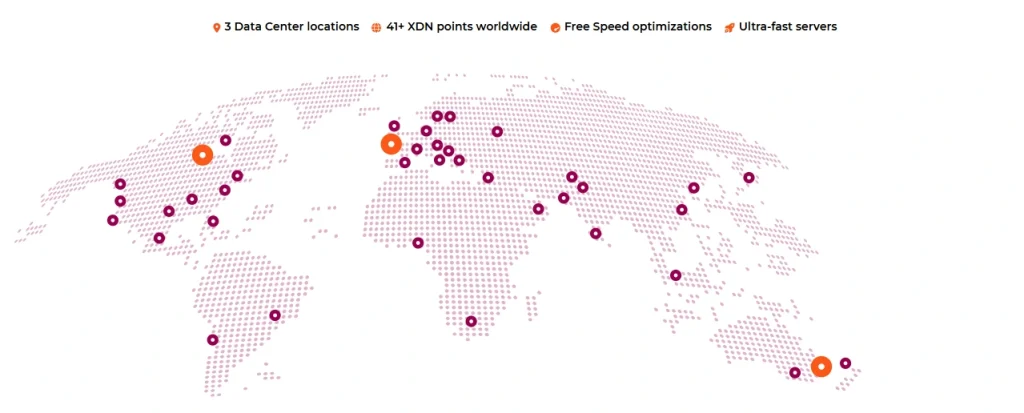
WPX’s global delivery strategy is deliberately simple, but it is not vague. It is built around a limited number of high-impact locations and an included CDN that removes setup friction.
Data Center Locations
WPX currently operates data centers in:
- Chicago, USA
- London, UK
- Sydney, Australia
These three locations are chosen for traffic density, not geographic vanity.
What this covers well:
- North America and Europe with low baseline latency.
- Asia-Pacific traffic via the Sydney location and CDN edge caching.
What it does not try to do:
- No dozens of regional data centers.
- No country-level placement selection beyond the available options.
This is enough for most content, affiliate, and business sites. It is not designed for ultra-low-latency regional apps.
Built-In WPX CDN
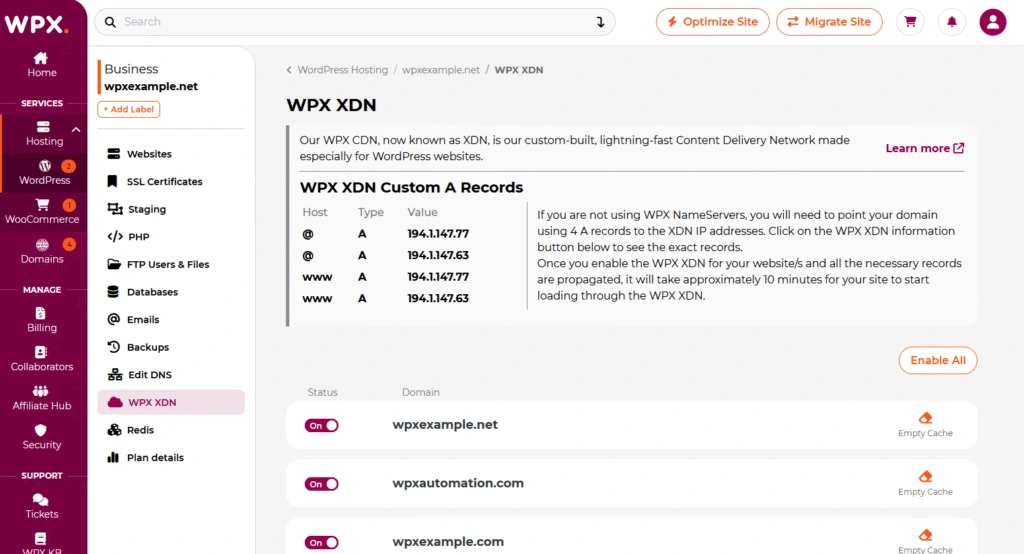
WPX includes its own CDN on all plans.
Key characteristics:
- 41+ global edge locations.
- CDN is enabled by default.
- No bandwidth-based add-ons or traffic penalties.
- Static asset acceleration for images, CSS, JS, and fonts.
This places WPX in the same functional category as entry-to-mid-tier CDN providers, without the complexity of external configuration.
What matters in practice:
- Faster global page delivery without plugins.
- Reduced load on origin servers.
- Better consistency during traffic spikes.
This CDN is not an edge-compute platform. You won’t get custom rules, edge workers, or region-based logic. You get speed without babysitting.
Real-World Global Performance Implications
WPX’s setup optimizes for:
- Predictable international performance.
- Fewer moving parts.
- Lower failure risk.
The trade-offs are clear:
- No fine-grained regional routing.
- No enterprise-level edge control.
- No advanced CDN customization.
For most WordPress sites, this is a strength, not a weakness. WPX focuses on coverage that matters, not infrastructure theater.
If your traffic is global and content-driven, WPX delivers fast enough everywhere that counts. If your business depends on region-specific latency tuning, this is not the platform you’re looking for.
Security Architecture

WPX treats security as a platform responsibility, not something you assemble with plugins after the fact. The environment is locked down first, then actively protected.
WPX aligns closely with secure hosting providers that focus on prevention instead of reactive cleanup.
What WPX enforces at the platform level:
- Server-side firewalls active before WordPress loads.
- Continuous malware scanning with free malware removal handled by WPX staff.
- Account isolation to prevent cross-site infections.
- Free SSL certificates included on all plans.
DDoS and Traffic Abuse Protection
WPX includes built-in protection against common traffic abuse and attack patterns.
If you understand what DDoS protection actually does, the design choice makes sense. WPX filters malicious traffic upstream so WordPress never has to deal with it. This reduces downtime during attack spikes and avoids false positives caused by aggressive plugins.
Web Application Firewall Approach
WPX runs a managed firewall layer tuned specifically for WordPress behavior.
Knowing how a web application firewall works, the benefit is clear:
- Common exploit vectors are blocked globally.
- New vulnerabilities are mitigated centrally.
- Sites stay protected without user configuration.
What You Don’t Control
WPX does not allow:
- Custom firewall rules.
- Low-level security tuning.
- Experimental security setups.
You lose flexibility. You gain consistency and faster incident resolution.
Backup and Disaster Recovery
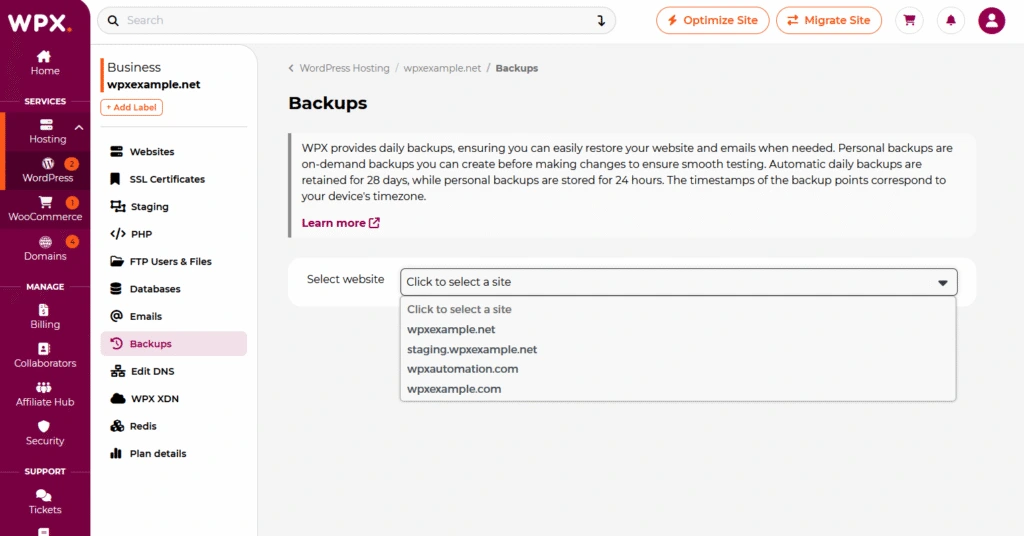
WPX treats backups as a recovery system, not a marketing checkbox. The goal is simple. Get your site back online fast when something breaks.
Backup Frequency and Retention
WPX runs daily automated backups across all plans.
Typical characteristics:
- One backup per day stored automatically.
- 28 days backup retention.
- No manual setup required.
- No reliance on WordPress-level cron jobs.
This is designed for real incidents, not long-term archiving.
Restore Process and Practical Use
Restores are handled from the WPX dashboard and are built for speed, not complexity.
What matters in real scenarios:
- You can roll back a site after a bad update, plugin conflict, or hack.
- Restores are site-level, not file-by-file micromanagement.
- Recovery does not require third-party plugins.
If you’ve ever had to rebuild a site manually, you already understand why backing up a WordPress site properly is non-negotiable. WPX assumes failure will happen and designs around fast recovery.
Disaster Recovery Philosophy
WPX’s backup system optimizes for:
- Operational simplicity.
- Fast rollback.
- Minimal user involvement during incidents.
What it does not try to be:
- A compliance-grade archival solution.
- A granular versioning system.
- A replacement for off-site enterprise backup tools.
If your business requires multi-month retention or regulatory-grade backups, you will need an external solution. WPX is not pretending otherwise.
Ease of Use and Control Panel
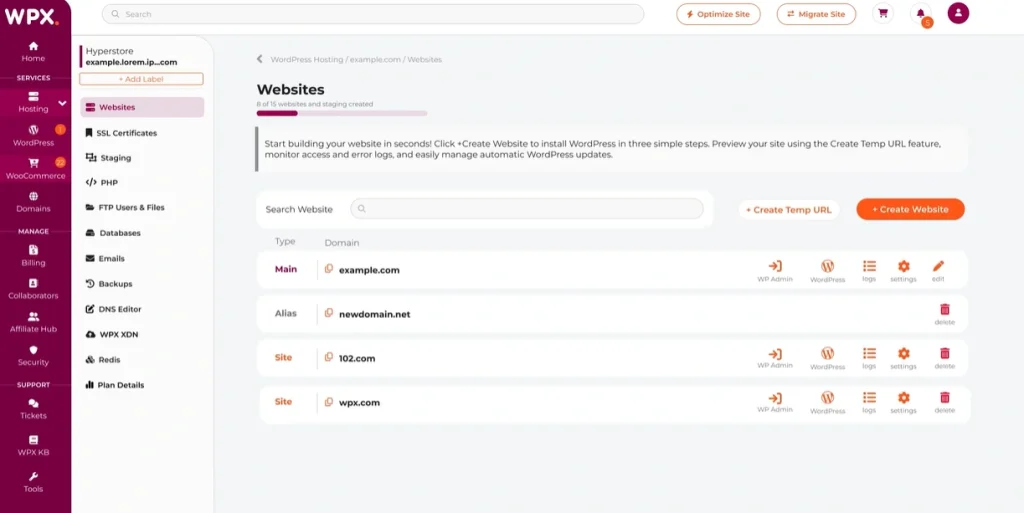
WPX’s redesigned dashboard is built for execution, not exploration. It removes unnecessary choices and surfaces only what site owners actually need to run and maintain WordPress sites.
Dashboard
WPX does not try to mimic cPanel or appeal to developers.
The control panel is designed around:
- Managing WordPress installs.
- Handling domains and SSL.
- Accessing backups and staging.
- Triggering migrations and support requests.
Everything else is intentionally hidden.
This is not a learning environment. It is an operations interface.
Practical Usability
Common tasks are fast and hard to mess up:
- Add or remove sites in minutes.
- Enable CDN and caching without configuration.
- Restore backups without touching files or databases.
- Manage SSL automatically.
If you want a panel to experiment, WPX will frustrate you. If you want a panel that keeps WordPress stable and fast with minimal input, this is one of its strongest advantages.
WordPress Optimization and Caching
WPX does not expect you to optimize WordPress yourself. It removes that responsibility by handling performance at the platform level.
That is the core philosophy here.
Server Level Optimization
WPX applies WordPress specific optimizations before your site even loads:
- Aggressive server side caching enabled by default
- Optimized PHP and database configuration
- Static asset delivery handled through its own CDN
This eliminates the most common mistake users make: stacking plugins to fix problems the server should have handled in the first place.
If your site is slow on WPX, the issue is almost always theme bloat, bad plugins, or poor content structure, not hosting.
Built In Caching Strategy
WPX relies primarily on:
- Server level page caching
- CDN based asset caching
- Minimal dependency on WordPress plugins
This is why many traditional caching plugins become redundant. Installing everything from popular lists without understanding the stack is how people break performance instead of improving it.
Before adding anything, understand how to actually speed up a WordPress website instead of blindly throwing plugins at the problem.
Plugin Compatibility Reality
WPX does not lock WordPress down aggressively, but it also does not encourage plugin heavy caching setups.
In most cases:
- Page cache plugins are unnecessary
- Object caching plugins add little value
- CDN plugins are redundant
If you insist on plugins, choose carefully from WordPress caching plugins that complement server level caching rather than conflict with it.
Customer Support Quality
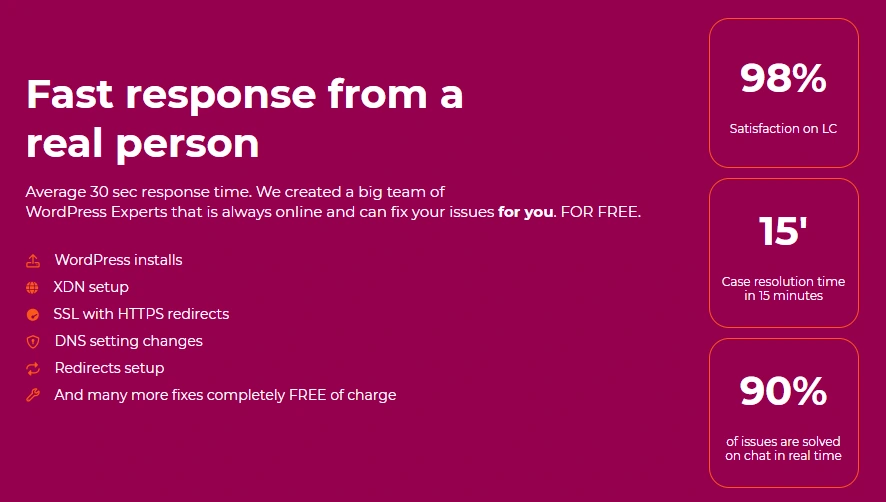
Support is where managed hosting either earns its premium or exposes itself. WPX stakes a lot of its reputation here, and this is one area where it generally delivers.
Support Model and Response Expectations
WPX runs a human-first support model.
- Live chat is the primary channel.
- Tickets are handled by in-house technicians, not outsourced scripts.
- Response times are measured in seconds, not in minutes or hours.
This matters because WordPress problems are rarely theoretical. When a site breaks, speed of response is the difference between a minor issue and real revenue loss.
What Support Actually Helps With
WPX support goes beyond pointing to documentation.
They actively handle:
- Site migrations and cleanup.
- Malware removal and post-incident fixes.
- Performance-related issues tied to the platform.
- Backup restores and recovery guidance.
This is aligned with the reality that uptime directly affects SEO and revenue, not just convenience. Fast support reduces downtime windows, which reduces downstream damage.
Where Support Draws the Line
WPX support is not a development service.
They will not:
- Debug custom code.
- Optimize poorly built themes or plugins.
- Help architect complex custom setups.
That boundary is intentional. It keeps support fast and focused instead of diluted.
Pricing and Plans
WordPress Hosting Plans
- Plans starts from $14.99/mo for annual term and $11.99/mo for 5 year term.
- Websites: 1 to 200
- Storage: 10 GB to 300 GB
- Visitors: Unlimited on all plans
- Bandwidth: 100 GB to unlimited
- RAM: 3 GB to 100 GB
- CPU Core: 0.5 to 6 Cores
- PHP Workers: 9 to 300
WooCommerce Hosting Plans
- Plans starts from $29.16/mo for annual term and $23.33/mo for 5 year term.
- Websites: 1 to 5
- Storage: 20 GB to 100 GB
- Visitors: Unlimited on all plans
- Bandwidth: 400 GB to unlimited
- RAM: 8 GB to 80 GB
- CPU Core: 2 to 4 Cores
- PHP Workers: 10 to 80
Agency Hosting Plans
- Plans starts from $99.99/mo for annual term and $79.99/mo for 5 year term.
- Websites: 35 to 200
- Storage: 80 GB to 300 GB
- Visitors: Unlimited
- Bandwidth: Unlimited
- RAM: 35 GB to 100 GB
- CPU Core: 3 and 4 Cores
- PHP Workers: 105 to 300
Discounts and Entry Cost
WPX does run promotions occasionally. Our, WPX promo offers will reduce the initial commitment to 65%, but do not expect aggressive lifetime discounts. Renewals stay close to standard pricing.
Scalability and Growth Limitations
WPX is designed to scale within a defined box. If you understand that box, it works. If you expect elastic cloud behavior, you will hit a wall.
How WPX Scales in Practice
WPX scales vertically, not dynamically.
- You upgrade plans to add more sites, storage, or traffic capacity
- Performance remains stable within plan limits
- No auto scaling during sudden traffic explosions
This is controlled growth, not infinite elasticity.
For most content sites and business WordPress installs, this is fine. For unpredictable traffic models, it is a constraint.
Where WPX Starts to Feel Restrictive
WPX is not built for:
- Viral traffic spikes without prior planning
- Rapidly growing SaaS style workloads
- Custom server tuning as usage patterns change
- Resource heavy applications beyond WordPress norms
Once you approach upper plan thresholds, your only option is to move up or move out.
WPX scales cleanly, but only in straight lines.
If your growth curve looks chaotic, WPX will feel limiting. If your growth is disciplined, WPX handles it without drama.
Pros and Cons
Pros
- Consistently fast performance without manual tuning.
- Built-in CDN (XDN) included on all plans, no upsells.
- Strong security posture with active malware cleanup.
- Daily automated backups with fast restore workflow.
- Human support with fast response times.
- Clean, focused dashboard that reduces mistakes.
- No feature sprawl or confusing plan matrices.
- 30 Days money back guarantee
Cons
- Pricing is high compared to budget and mid-tier hosts.
- No root access or deep server customization.
- Limited scalability for sudden traffic spikes.
- Not suitable for non-WordPress applications.
- Plan-based limits mean upgrades are inevitable as you grow.
WPX vs Alternatives
WPX sits in a narrow lane. Comparing it to alternatives only makes sense when you understand what each platform optimizes for and what it deliberately ignores.
WPX vs Kinsta
Kinsta is engineered for scale, enterprise workflows, and deep infrastructure control. WPX is engineered for speed with minimal friction.
- Use WPX if you want fewer limits exposed and faster hands-on support.
- Use Kinsta if you need Google Cloud-level architecture and are willing to accept stricter rules and higher cost.
The difference is philosophy, not quality. See how this plays out in WPX Hosting vs Kinsta.
WPX vs WP Engine
WP Engine prioritizes tooling, integrations, and enterprise workflows. WPX prioritizes simplicity and responsiveness.
- WPX feels lighter and faster to operate.
- WP Engine feels heavier but more extensible.
If you value clean execution and fast support, WPX fits better. If you need advanced environments and enterprise features, WP Engine makes more sense.
The contrast is clear in WPX Hosting vs WP Engine.
WPX vs Bluehost
This is not a close comparison.
- Bluehost is entry-level hosting designed for mass-market users.
- WPX is premium managed hosting designed for performance-focused sites.
Bluehost works for starting out. WPX works when the site already matters.
That difference is fully exposed in WPX Hosting vs Bluehost.
Who Should Choose WPX?
WPX is built for site owners who already know that hosting is infrastructure, not an experiment.
You should choose WPX if:
- Your site generates revenue, leads, or authority and downtime has real cost.
- You want fast performance out of the box, not after weeks of tuning.
- You rely on SEO or content traffic and need consistent load times.
- You don’t want to manage servers, stacks, or caching layers.
- You value fast human support over endless documentation.
- You prefer predictable monthly pricing over usage-based surprises.
WPX fits users who compare platforms at the level of top web hosting service providers, not bargain plans or beginner hosts. The assumption here is simple. Your site already matters.
WPX is especially well suited for:
- Established blogs and content sites.
- Affiliate and niche sites where speed affects rankings.
- Business websites where stability matters more than flexibility.
- Agencies that want fewer support fires, not more control.
If you are past the phase of “just getting online” and into the phase of “this site cannot fail,” WPX aligns with that mindset.
Who Should Avoid WPX?
WPX is not forgiving to the wrong audience. If your priorities don’t match its design, you will feel constrained fast.
Avoid WPX if:
- You are price-first and want the lowest monthly cost.
- You are testing ideas, side projects, or disposable sites.
- You expect pay-as-you-go scaling or elastic resources.
- You want root access, custom server rules, or stack control.
- You run non-WordPress apps or mixed workloads.
- You are early-stage and still figuring out traffic, monetization, or direction.
WPX will feel expensive if you are comparing it against cheap hosting services that optimize for entry pricing instead of outcomes. That gap is intentional.
WPX also isn’t a fit if:
- Your traffic spikes are extreme and unpredictable.
- You rely on custom code that needs low-level tuning.
- You enjoy optimizing infrastructure more than publishing or selling.
If you want flexibility, experimentation, or the lowest possible bill, WPX is the wrong tool. It is built for owners who value stability over optionality and results over tinkering.
Final Verdict: Is WPX Hosting Worth It in 2026
WPX is built for sites that already matter.
It delivers fast, consistent performance, strong security, and responsive support without forcing you to manage servers or stacks. You pay more, but you remove operational risk.
- WPX is worth it if your site drives revenue or SEO traffic and downtime costs you money.
- It is not worth it if you want the cheapest plan, full server control, or elastic cloud scaling.
Clear fit. Clear limits. No confusion.
Frequently Asked Questions
Yes. WPX focuses on fast load times, low latency, and high uptime, all of which directly affect crawlability, Core Web Vitals, and rankings. It does not fix bad content, but it removes hosting-related SEO bottlenecks.
It is worth it only if your site already matters. If slow pages or downtime cost you traffic or revenue, the price is justified. If you are experimenting or budget-first, it is not.
No. WPX does not offer traditional shared hosting. It runs a managed WordPress environment with isolated resources to reduce performance and security risks.
“Better” depends on priorities. WPX is simpler and more support-driven. Kinsta and WP Engine offer deeper tooling and scalability. WPX wins on ease and responsiveness, not flexibility.
Yes. WPX includes its own CDN on all plans, with global edge locations enabled by default. There is no separate setup or extra charge.
Yes. WPX offers dedicated WooCommerce plans designed for higher resource usage. It works well for small to mid-size stores, not massive or highly dynamic shops.
WPX is consistently fast for real world WordPress workloads. Server level caching, built in CDN, and optimized infrastructure remove most common speed bottlenecks without manual tuning.
Yes. WPX offers free unlimited WordPress migrations handled by their support team. This is one of their strongest advantages.
WPX handles steady high traffic well. Sudden viral spikes require plan upgrades. It is not designed for unpredictable elastic scaling.
Yes. The dashboard is simple, modern, and focused. Beginners can manage sites easily, while advanced users may feel limited.
Yes. WPX offers agency plans designed for managing multiple WordPress sites under one account with centralized control.
Thank you for reviewing our service.
We are happy to have you with us and we will keep up the good work and provide the best WordPress Hosting solution!
If you need anything, please do not hesitate to contact us. We are 24/7 ready to assist and resolve any issues!
Best,
WPX Team
You are welcome!
Do they have Indian datacentre or not? and what about storage details ?
They have main two data centers: 1. USA and 2. UK. But they offer their own WPX CDN services free of cost that will load your website quickly. By using WPX CDN, your website will load within 1 second. You can check our own website speed which is hosted on WPX Hosting. (See screenshots added in the article)
For storage, they offer 10GB, 20GB, and 40GB to their Business, Professional and Elite Hosting plans respectively.
I am also using it for last few months and the speed of WPX hosting is really best in the industry.