
Choosing between Rocket.net and Kinsta isn’t easy when both offer managed WordPress hosting with fast performance, strong security, and reliable support. But once you look at what’s behind the hosting, the differences become much clearer.
Rocket.net uses its own managed origin servers with Cloudflare Enterprise on every plan, while Kinsta runs each site in an isolated Linux container on Oracle Cloud Infrastructure (OCI). Their pricing, resource limits, performance setup, support, and management tools also differ.
So which one gives you more for your money? Is Rocket.net’s edge-focused setup better for speed, or does Kinsta’s platform make more sense for your site?
In this Rocket.net vs Kinsta comparison, we’ll put both hosts head to head and look at the details that actually matter before you choose one.
Rocket.net vs Kinsta 2026: Complete Comparison
| Feature | Rocket.net | Kinsta |
|---|---|---|
| Infrastructure | Own managed origin servers + Cloudflare Enterprise | Oracle Cloud Infrastructure (OCI) + isolated Linux container per site |
| Server Technology | Nginx, MariaDB, PHP 8.x, NVMe | Nginx, MySQL, PHP 8.x |
| Redis | Included | Paid add-on |
| Uptime Guarantee | 99.99% | Up to 99.99% SLA |
| CDN | Cloudflare Enterprise, 335+ PoPs | Cloudflare Enterprise, 335+ PoPs |
| Edge Caching | Full-page edge cache on all plans | Cloudflare edge caching on all plans |
| Starting Price | $30/mo | $35/mo |
| Annual Price | $25/mo | $30/mo |
| Renewal Price | Same | Same |
| Money-Back Guarantee | 30 days | 30 days |
| Free Domain | No | No |
| Data Center Locations | US, Canada, Europe, Asia, Australia | 30 global locations |
| Managed WordPress | Yes | Yes |
| Control Panel | Custom Rocket.net dashboard | MyKinsta |
| WordPress Only | Yes | Yes |
| One-Click WordPress Install | Yes | Yes |
| Free Migration | Unlimited free expert migrations | Free expert migrations |
| Staging | Included on all plans | 1 free per site |
| Extra Staging | Included | $20/site/month |
| Site Cloning | Yes | Yes |
| Automatic Updates | WordPress core, plugins, and themes | Plugins and themes |
| Free Email | No | No |
| WooCommerce | Yes, Redis included | Yes, Redis add-on |
| Free SSL | Automatic Cloudflare SSL | Automatic Cloudflare wildcard SSL |
| Malware Protection | Imunify360 + hacked-site cleanup | Platform scanning + free malware removal |
| Firewall | Cloudflare Enterprise WAF + Imunify360 | Cloudflare WAF + hardware firewall |
| DDoS Protection | Cloudflare Enterprise | Cloudflare |
| Automatic Backups | Daily + on-demand + one-click restore | Daily + manual/on-demand |
| Backup Frequency | Daily; hourly options available | Daily; 6-hour and hourly options available |
| Backup Retention | 14 days standard; 30 days Enterprise | 14 days most plans; up to 30 days on larger agency plans |
| SSH | Yes, key-only authentication | Yes, password or key |
| Git | Yes, via SSH | Yes, via SSH |
| GitLab CI/CD | Not listed | Yes |
| Composer | Not listed | Yes |
| Deploy-on-Push | Not listed | Yes |
| WP-CLI | Yes, via SSH and /wpcli API | Yes, preinstalled |
| Cron Jobs | SSH crontab / WP-CLI | Real server cron |
| Minimum Cron Interval | Not specified | 5 minutes |
| APM | Not listed | Built in |
| Support | 24/7 live chat and tickets | 24/7 live chat and tickets |
| Phone Support | Business and Enterprise | No standard phone support |
| Slack Support | Enterprise | No |
| Support Team | WordPress-focused | WordPress specialists |
| Chat Response | Generally fast | Often under 2 minutes |
| PHP Workers | Unlimited PHP workers advertised | Varies by plan |
| Object Cache Pro | Enterprise | Not listed |
| Relay | Enterprise | Not listed |
| WP Rocket | Included | Not listed |
| Cloudflare Argo Smart Routing | Yes | Not listed |
| Isolated Container Per Site | No | Yes |
| Security Certifications | Not listed | SOC 2 / ISO 27001 |
| Best For | Performance-focused WordPress users who want more included at the base price | Businesses, developers, and growing WordPress sites that need advanced tools and infrastructure |
| Overall Value | Lower starting price and more included features | Higher price but broader developer and management features |
About Rocket.net and Kinsta
Rocket.net
Rocket.net was founded in 2020 and is based in Jupiter, Florida. The company specializes in managed WordPress hosting and has built its service around fast delivery, managed security, and hands-on support.
Rocket.net is best known for its use of Cloudflare Enterprise across its hosting plans. It serves businesses, agencies, WooCommerce stores, and other WordPress websites that want managed hosting without handling server administration themselves.
Kinsta
Kinsta was founded in 2013 and is headquartered in West Hollywood, California. It started as a WordPress-focused hosting company and now serves businesses, agencies, developers, and growing websites.
Kinsta is known for its managed WordPress hosting platform, developer-friendly tools, and isolated hosting environments. Its current infrastructure uses Oracle Cloud Infrastructure (OCI), with each site running in its own isolated Linux container.
Performance and Speed
Rocket.net and Kinsta both use managed WordPress infrastructure, but Rocket.net puts more emphasis on server resources and built-in caching.
| Performance factor | Rocket.net | Kinsta |
|---|---|---|
| Infrastructure | Private cloud with self-managed VMs | Oracle Cloud Infrastructure (OCI) |
| Page caching | Full-page HTML caching | Server-level full-page cache |
| Edge caching | Full HTML caching | Cloudflare Edge Cache |
| Object caching | Redis + Object Cache Pro | Optional Redis |
| PHP | Unlimited PHP workers | PHP workers allocated per site |
| PHP caching | OPcache | OPcache |
| Extra performance features | Relay, Redis, Object Cache Pro | Server-level caching and optional Redis |
Rocket.net gives you a lot of server power to work with. Its high-spec VMs use NVMe storage, Redis, OPcache, and unlimited PHP workers, which helps when WordPress needs to process several PHP requests at once.
Kinsta takes a more isolated approach. Each site runs inside its own LXC container, with Nginx handling web requests and MariaDB handling the database.
Caching is strong on both platforms:
- Rocket.net: full-page HTML cache, Redis, Object Cache Pro, Relay, and OPcache.
- Kinsta: server-level full-page cache, Cloudflare Edge Cache, OPcache, and optional Redis.
The WordPress setup still matters. A lightweight theme can keep pages smaller, while the right cache can reduce repeated work on the server. Fast WordPress themes and WordPress caching plugins can help keep the site quick.
Time to First Byte (TTFB)
TTFB measures how quickly the first response reaches the visitor after a page request. Lower is better.
The latest independent test, covering October 2025 through May 2026, recorded:
- Rocket.net: 346 ms average TTFB
- Kinsta: 525 ms average TTFB
- Difference: 179 ms in Rocket.net’s favor
Rocket.net also recorded 66 ms global TTFB in the same test, while Kinsta recorded 477 ms.
That means Rocket.net starts responding faster in these tests. For visitors, a response in the 300 ms range gives the browser a quicker start, while 500+ ms adds more waiting before the page can begin rendering.
The exact result can change depending on caching and the type of page being tested. Cached pages can respond much faster than pages that need PHP and database processing.
If your hosting response is already fast but WordPress still feels slow, WordPress speed is another area worth working on.
Uptime
Rocket.net guarantees 99.99% uptime, while Kinsta offers up to 99.99% under its SLA. Both publish service incidents and maintenance updates on their status pages.
Rocket.net
Rocket.net has reported several recent incidents, including intermittent connectivity between its API and some WordPress origin servers on September 2, 2026. Its Phoenix data center also experienced connectivity issues on August 13 due to elevated temperatures.
You can view its incident history on the Rocket.net status page.
Kinsta
Kinsta reported a Toronto data center disruption on August 27, 2026, along with a MyKinsta file-upload issue affecting larger files around the same period. Its status page also lists scheduled maintenance across data centers.
You can view its incident history on the Kinsta status page.
Which Has Better Uptime?
Rocket.net has a stronger standard guarantee at 99.99%, while Kinsta offers up to 99.99% under its SLA. Both have experienced occasional service incidents.
Which is faster, Rocket.net or Kinsta?
Rocket.net is the faster choice based on the latest independent performance data.
It leads Kinsta in the main server-response test:
- Rocket.net: 346 ms TTFB
- Kinsta: 525 ms TTFB
- Rocket.net global TTFB: 66 ms
- Kinsta global TTFB: 477 ms
Rocket.net also gives you unlimited PHP workers, Redis, Object Cache Pro, NVMe storage, and several caching layers without requiring you to build that setup yourself.
Kinsta is still a fast host, and its isolated containers make it a good fit for demanding WordPress sites. Its recent uptime result was also slightly better.
For blogs, business sites, and content-heavy WordPress sites, Rocket.net should generally feel snappier in day-to-day use.
For WooCommerce, membership sites, and other sites with many dynamic requests, the gap can shrink because PHP and database processing become more important.
Overall, I’d choose Rocket.net when speed is the main priority. Kinsta remains a strong choice if you put more weight on its managed WordPress environment and recent uptime record.
Ease of Use
Rocket.net and Kinsta both take care of the technical side of WordPress hosting, but they differ in migrations, staging, updates, and the tools available in their dashboards.
WordPress Management
| Feature | Rocket.net | Kinsta |
|---|---|---|
| Managed WordPress | Fully managed WordPress with a custom dashboard, configurable automatic updates, and no plugin blacklist | Fully managed WordPress through MyKinsta, with isolated containers, built-in APM, and optional plugin and theme updates |
| Free Migration | Unlimited free expert migrations; WooCommerce stores can be re-synced so orders aren’t lost | Free expert migrations handled by the team; Express Migration is also available |
| Staging | One-click staging and site cloning on all plans | 1 free staging environment per site; extra environments cost $20/site/month |
| Automatic Updates | Configurable WordPress core, plugin, and theme updates | Plugin and theme updates through MyKinsta, including bulk actions; WordPress core stays under your control |
Rocket.net is more generous with migrations and staging. You get unlimited expert migrations and staging on every plan, while Kinsta provides one free staging environment per site.
Rocket.net also lets you decide which WordPress updates should run automatically. Kinsta gives you control over WordPress core updates while handling plugin and theme updates through MyKinsta.
Control Panel
| Feature | Rocket.net | Kinsta |
|---|---|---|
| Control Panel | Custom dashboard with site cloning, staging, backups, PHP versions, cache, CDN, and WAF controls | MyKinsta with APM, redirects, CDN/cache controls, user permissions, and bulk actions |
| One-Click Installer | Yes | Yes |
| Website Builder | No, WordPress only | No, WordPress only |
Rocket.net’s dashboard puts common hosting controls such as backups, staging, cloning, PHP versions, and security settings in one place.
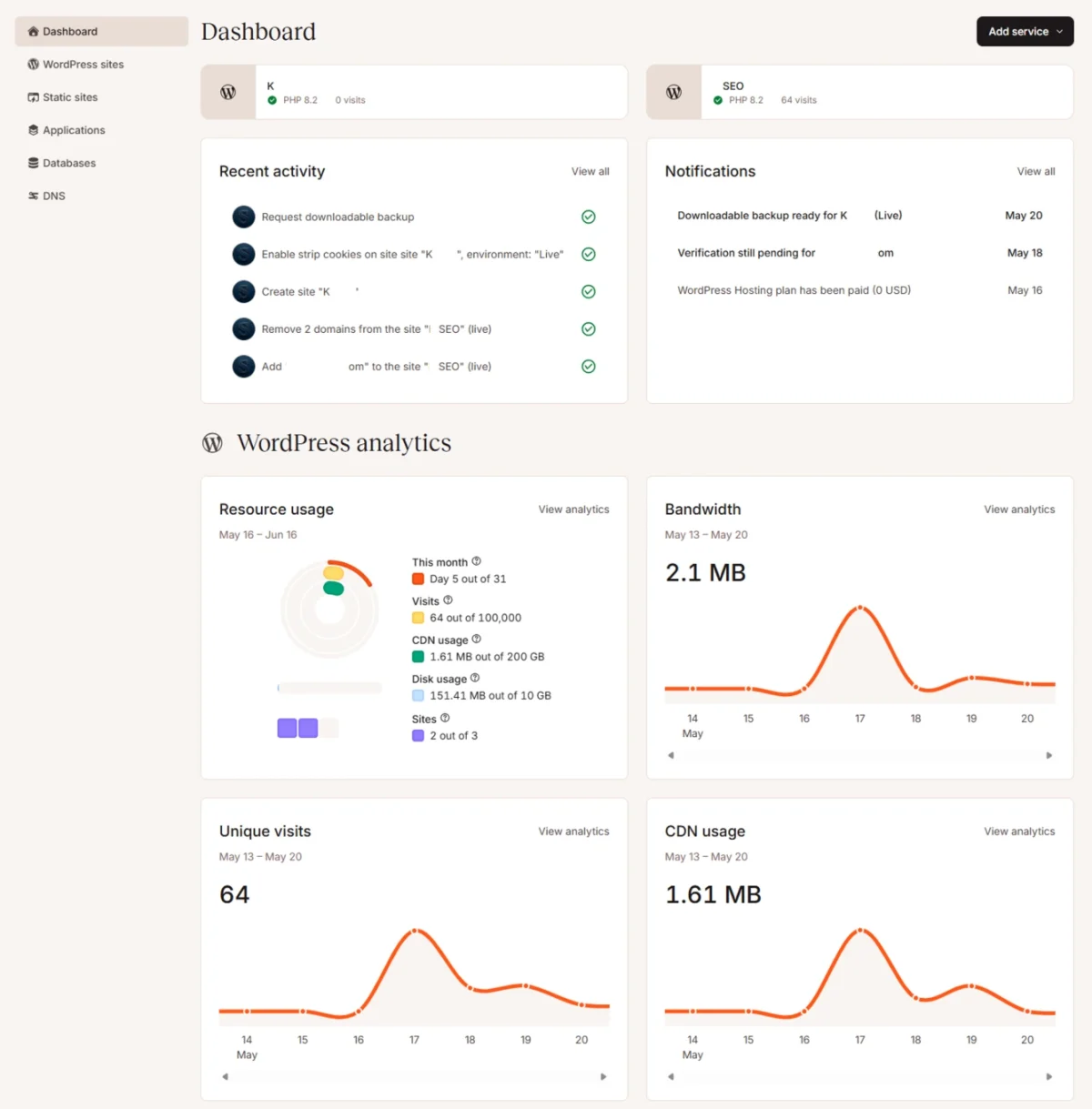
Kinsta’s MyKinsta dashboard adds tools such as APM, redirects, user permissions, and bulk actions. Both let you install WordPress directly from the hosting dashboard.
Email Hosting
| Feature | Rocket.net | Kinsta |
|---|---|---|
| Free Email | No | No |
| Email Storage | N/A | N/A |
| Email Limits | N/A | N/A |
Neither Rocket.net nor Kinsta provides email hosting with its managed WordPress plans. You’ll need a separate email service if you want domain-based email accounts.
WooCommerce
| Feature | Rocket.net | Kinsta |
|---|---|---|
| WooCommerce | Supported; Redis included, edge caching for catalog pages, Object Cache Pro on Enterprise | Supported; isolated environments, edge caching, extra PHP workers on higher plans, Redis available as an add-on |
Rocket.net uses edge caching for catalog pages, while cart and logged-in traffic still reaches the origin. Enterprise plans also add Object Cache Pro.
Kinsta supports WooCommerce with isolated environments, edge caching, and extra PHP workers on higher plans. Redis is available as an add-on.
Data Centers and CDN
Rocket.net and Kinsta both use Cloudflare Enterprise for CDN delivery, with 335+ PoPs available globally. The bigger difference is their origin infrastructure and the number of locations where you can host your website.
Data Center Locations
| Feature | Rocket.net | Kinsta |
|---|---|---|
| Origin locations | US, Canada, Europe, Asia, Australia | 30 global locations |
| Location choice | Choose from available Rocket.net origin locations | Choose from 30 data center locations |
| Global delivery | Cloudflare Enterprise | Cloudflare Enterprise |
Rocket.net has origin locations across five major regions: the US, Canada, Europe, Asia, and Australia. This gives you flexibility when your visitors are spread across different parts of the world.
Kinsta has 30 data center locations. You can select the location where your site runs, which is useful when most of your visitors come from a particular region.
The origin location matters most for requests that can’t be served from the CDN cache, such as logged-in traffic, shopping carts, and other dynamic requests.
CDN
| Feature | Rocket.net | Kinsta |
|---|---|---|
| CDN | Cloudflare Enterprise | Cloudflare Enterprise |
| PoPs | 335 | 335+ |
| Included | All plans | Included |
Rocket.net includes Cloudflare Enterprise on every plan, with 335 PoPs. Kinsta also includes Cloudflare Enterprise and provides access to 335+ PoPs.

Both can serve cached content from Cloudflare locations closer to visitors. This reduces the need for static files and cached pages to travel back to the origin server for every request.
Which Has Better Coverage?
There’s very little difference in CDN coverage since both use Cloudflare Enterprise and have access to more than 335 PoPs.
Rocket.net has origin locations across five regions, while Kinsta gives you 30 specific data center locations. For most websites, the better choice will depend on where the majority of visitors are located and how much of the site’s traffic is cached.
Security and Backups
Security and backups are two areas where both Rocket.net and Kinsta give WordPress sites a strong baseline. Both provide SSL, malware protection, firewall protection, DDoS protection, and automatic backups without requiring you to set everything up yourself.
Security
Rocket.net uses Cloudflare Enterprise WAF together with Imunify360 at the origin server. Imunify360 provides real-time malware scanning and blocking, while Cloudflare handles protection at the edge.
Kinsta uses Cloudflare WAF, a hardware firewall, and WordPress-specific firewall rules. Its platform also scans for malware and provides free malware removal if your site is hacked.
Here’s how their main security features compare:
- SSL: Rocket.net provides automatic Cloudflare SSL. Kinsta provides automatic Cloudflare wildcard SSL on all domains.
- Malware protection: Rocket.net uses Imunify360 for real-time scanning and blocking. Kinsta provides platform-level scanning.
- Malware removal: Rocket.net will clean a hacked site when you migrate it in. Kinsta provides free malware removal for hacked sites.
- Firewall: Rocket.net uses Cloudflare Enterprise WAF and Imunify360. Kinsta uses Cloudflare WAF and a hardware firewall with WordPress-specific rules.
- DDoS protection: Both include Cloudflare DDoS protection on all plans.
For additional WordPress-level protection, WordPress security plugins can be used alongside the security provided by your hosting platform.
Backups
Both hosts provide automatic backups on all plans, but Rocket.net includes more backup frequency options at higher plan levels, while Kinsta offers several paid backup intervals.
| Backup Feature | Rocket.net | Kinsta |
|---|---|---|
| Automatic backups | Daily | Daily |
| On-demand backups | Included | Included |
| Restore | One-click restore | Restore from available backups |
| Standard retention | 14 days | 14 days on most plans |
| Longer retention | 30 days on Enterprise | 20 days on some higher plans; 30 days on larger agency plans |
| Hourly backups | Hourly platform snapshots on Enterprise; Umbrella hourly backups is a paid add-on | $100/site/month add-on |
| More frequent backups | — | 6-hour backups for $20/site/month |
| External backups | Umbrella hourly backups available as a paid add-on | AWS or cloud storage available as an add-on |
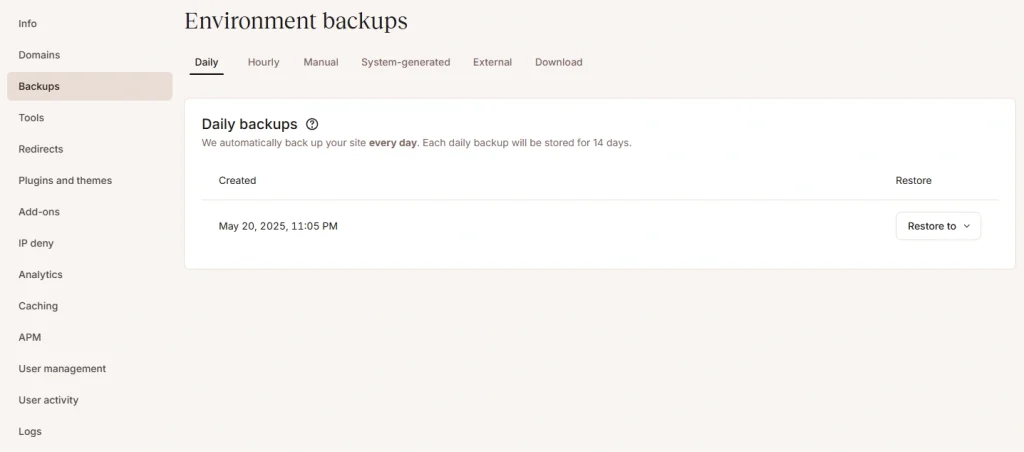
Rocket.net takes daily backups on every plan and lets you create on-demand backups when needed. Enterprise plans add hourly platform snapshots, while Umbrella hourly backups are available separately.
Kinsta also takes daily backups and provides manual backups. It can automatically create a backup before restores, staging pushes, and updates. You can also pay for 6-hour or hourly backup intervals.
If you want to keep another copy outside your hosting account, WordPress backup methods can be used as an extra layer.
Which Is Better for Security?
Rocket.net has the stronger security setup if you want multiple layers built into the hosting service, with Cloudflare Enterprise WAF, Imunify360, and DDoS protection working together.
Kinsta also has a layered setup with Cloudflare WAF, a hardware firewall, WordPress-specific rules, malware scanning, and DDoS protection.
For backups, Rocket.net gives you daily and on-demand backups on all plans, while Kinsta offers more paid options for sites that need backups every 6 hours or every hour. Both can retain backups for up to 30 days on selected plans.
Developer Tools
Rocket.net and Kinsta both include the developer tools you’d expect from managed WordPress hosting, including SSH access, Git support, WP-CLI, and cron jobs. The biggest difference is that Kinsta offers more flexibility for deployment workflows, while Rocket.net keeps the essentials simple.
SSH Access
| Feature | Rocket.net | Kinsta |
|---|---|---|
| SSH | Key-only authentication | Password or SSH key authentication |
Rocket.net uses SSH keys for authentication, which means password-based SSH access isn’t available.
Kinsta supports both password and SSH key authentication, giving developers more flexibility when connecting to a server.
Git
Both hosts support Git over SSH, so you can work with version-controlled projects instead of uploading files manually.
Rocket.net includes Git support through SSH, while Kinsta goes further with documentation for GitLab CI/CD, Composer workflows, and deploy-on-push setups.
WP-CLI
WP-CLI is available on both platforms.
- Rocket.net: Available through SSH and its
/wpcliAPI endpoint. - Kinsta: Preinstalled as the
wpcommand on every site.
This makes it easy to manage plugins, themes, database tasks, and other WordPress commands from the terminal.
Cron Jobs
Both hosts support cron jobs, but Kinsta gives you more control over scheduling.
| Feature | Rocket.net | Kinsta |
|---|---|---|
| Cron Jobs | Supported through SSH crontab and WP-CLI | Real server cron with custom schedules |
| Minimum interval | — | 5 minutes |
| Default WordPress cron | — | Every 15 minutes |
Rocket.net supports custom cron jobs through SSH and WP-CLI.
Kinsta uses real server cron instead of relying only on WordPress cron, allows custom crontab entries, and supports schedules as frequent as every five minutes.
Which Is Better for Developers?
Rocket.net covers the core developer tools most WordPress users need, including SSH, Git, WP-CLI, and cron jobs.
Kinsta has the stronger developer toolkit thanks to flexible SSH authentication, built-in WP-CLI, real server cron, and better support for deployment workflows with GitLab CI/CD and Composer.
Customer Support
Rocket.net and Kinsta both offer 24/7 customer support. The main difference is the number of support channels available and how quickly you can reach the support team.
Support Channels
| Rocket.net | Kinsta | |
|---|---|---|
| Live Chat | 24/7 on all plans | 24/7 |
| Support Tickets | 24/7 on all plans | 24/7 |
| Phone Support | Business and Enterprise plans | No standard phone support |
| Slack Support | Enterprise plan | Not available |
Support Quality
Rocket.net
- WordPress-focused support team
- Live chat is the main support channel
- Chat responses are generally fast
- Phone support is available on Business and Enterprise plans
- Enterprise customers can also get support through Slack
Kinsta
- Support team consists of WordPress specialists
- 24/7 live chat and ticket support
- Kinsta cites chat response times often under 2 minutes
- No standard phone support
Which Has Better Customer Support?
Rocket.net has the advantage if you want more ways to contact support. Business and Enterprise customers get phone support, while Enterprise customers also have Slack support.
Kinsta is a strong choice if you mainly use live chat or tickets. Its reported chat response time of under 2 minutes is also a plus when you need a quick answer.
Pricing
Rocket.net and Kinsta both offer monthly and annual billing, with Rocket.net starting at a lower price. Both hosts keep the same price at renewal and offer a 30-day money-back guarantee.
Starting Price
| Pricing Feature | Rocket.net | Kinsta |
|---|---|---|
| Monthly Price | $30/month | $35/month |
| Annual Price | $25/month | $30/month |
| Renewal Price | Same | Same |
| Money-Back Guarantee | 30 days | 30 days |
| Free Domain | No | No |
Rocket.net starts at $30/month when you pay monthly. With annual billing, the price drops to $25/month.
Kinsta starts at $35/month with monthly billing. Its annual price is $30/month.
So, Rocket.net is $5/month cheaper with either billing option.
Thinking of going with Kinsta? Wait for Black Friday and you could save 50% on your hosting. Check out my Kinsta Black Friday deal for the details.
Renewal Pricing
Neither host increases the price when your plan renews.
- Rocket.net: The renewal price stays the same.
- Kinsta: The renewal price stays the same.
This means you won’t have to deal with a higher renewal rate after the initial term.
Money-Back Guarantee
Both Rocket.net and Kinsta offer a 30-day money-back guarantee.
- Rocket.net: 30 days
- Kinsta: 30 days
Neither host provides a free domain with its hosting plans, so the domain cost is separate.
Which Is Worth the Money?
Rocket.net offers the lower price at both monthly and annual billing rates. You’ll pay $30/month with monthly billing or $25/month when billed annually.
Kinsta costs $35/month monthly or $30/month with annual billing.
Since both hosts have the same renewal pricing and a 30-day money-back guarantee, Rocket.net offers better value if keeping the hosting cost lower is your priority.
Pros and Cons
Rocket.net and Kinsta are both strong managed WordPress hosting options, but they have some clear differences. Here’s a quick look at the main advantages and drawbacks of each.
Rocket.net Pros and Cons
Pros
- Cloudflare Enterprise is included on all plans.
- 24/7 live chat and ticket support.
- Phone support is available on Business and Enterprise plans.
- Free expert migrations are available.
- Staging and cloning are available on all plans.
- Redis is included.
- No plugin blacklist.
- 99.99% uptime guarantee.
- Daily backups with on-demand backup options.
- 30-day money-back guarantee.
- Lower starting price than Kinsta.
Cons
- No free domain.
- No free email hosting.
- Phone support isn’t available on the lower-tier plans.
- Enterprise-level features are limited to higher plans.
- It’s built specifically for WordPress, so it isn’t suitable if you need hosting for other types of websites.
Kinsta Pros and Cons
Pros
- 24/7 live chat and ticket support.
- WordPress specialists handle support requests.
- Cloudflare Enterprise is included.
- 30 global data center locations.
- Isolated container-based hosting for each site.
- Free migrations from other hosts.
- Staging environments are available.
- WP-CLI comes preinstalled.
- Git support with options for GitLab CI/CD and deploy-on-push workflows.
- Automatic daily backups.
- 30-day money-back guarantee.
- APM is available for finding WordPress performance issues.
Cons
- Higher starting price than Rocket.net.
- No standard phone support.
- No free domain.
- No free email hosting.
- Extra staging sites cost $20/site per month.
- Redis is available as a paid add-on.
- Higher backup frequency requires a paid add-on.
Which One Should You Choose?
Rocket.net and Kinsta are both good choices for managed WordPress hosting, but they suit different needs. Your choice comes down to your budget, the features you need, and how much control you want over your hosting setup.
Choose Rocket.net If:
- You want a lower starting price of $30/month.
- You want Cloudflare Enterprise on every plan.
- You want Redis included without paying extra.
- You need free expert migrations.
- You want staging and cloning on all plans.
- You want phone support on Business or Enterprise plans.
- You prefer a WordPress-only hosting platform.
- You want a 99.99% uptime guarantee.
Choose Kinsta If:
- You want access to 30 global data center locations.
- You need advanced developer tools such as GitLab CI/CD, Composer, and deploy-on-push.
- You want WP-CLI preinstalled on your sites.
- You need application performance monitoring through APM.
- You prefer isolated containers for each site.
- You’re comfortable paying $35/month for the starting plan.
- You mainly use live chat and ticket support rather than phone support.
If you want lower pricing and more features included in the base plans, choose Rocket.net. If you want more developer tools and a wider choice of hosting locations, choose Kinsta.
Best Alternatives to Rocket.net and Kinsta
If Rocket.net or Kinsta isn’t the right fit for your website, there are several other Rocket.net and Kinsta alternatives for managed WordPress hosting that worth considering. Here’s a quick comparison of four alternatives.
| Hosting Provider | Starting Price (Annual) | Sites | Storage | Best For |
|---|---|---|---|---|
| WP Engine | $30/mo | 1 | 10 GB | Small WordPress sites and blogs |
| Pressable | $20.83/mo | 1 | 20 GB | Managed WordPress and WooCommerce |
| Cloudways | $11/mo | 1 | 25 GB | Flexible cloud hosting |
| WPX | $14.99/mo | 1 | 10 GB | Fast WordPress hosting |
WP Engine
WP Engine starts at $30/month for its Startup plan. It supports 1 site with 10 GB of local storage and up to 25,000 visits per month.
It’s a good option for small business websites, blogs, and users who want managed WordPress hosting with tools such as staging, backups, security features, and automated migrations.
Check this too: WP Engine vs Kinsta and WP Engine vs Rocket.net
Pressable
Pressable starts at $20.83/month when billed annually. Its entry-level Signature 1 plan supports 1 WordPress install, up to 30,000 visits per month, and 20 GB of storage.
Pressable is a good choice for managed WordPress and WooCommerce sites. Its plans also provide features such as free migrations, daily and hourly backups, staging, and 24/7 WordPress support.
Check this too: Pressable vs Kinsta
Cloudways
Cloudways starts at $11/month on its current pricing page. The entry-level plan supports 1 WordPress application, 15 GB of disk space, 30,000 unique visits, and 100 GB of bandwidth.
Cloudways is a good fit if you want more choice over your cloud infrastructure. You can select from cloud providers such as DigitalOcean and other available infrastructure options instead of using a single hosting network.
Check this too: Cloudways vs Kinsta
WPX
WPX starts at $11.99/month with its current long-term prepaid offer. The Starter plan supports 1 website and provides 10 GB of storage, unlimited visitors, and 100 GB of bandwidth.
WPX is a good option if you want fast managed WordPress hosting with features such as a custom global CDN, daily backups, malware scanning and removal, free migrations, and 24/7 support.
Check this too: WPX vs Kinsta
FAQs
Is Rocket.net better than Kinsta?
Rocket.net is a better choice if you want a lower starting price, Cloudflare Enterprise, free Redis, and strong performance features included with your plan. Kinsta is a better fit if you want developer-focused tools such as APM, Git workflows, and its MyKinsta management platform.
Is Rocket.net cheaper than Kinsta?
Yes. Rocket.net starts at $30/month, while Kinsta starts at $35/month. Rocket.net also drops to $25/month with annual billing, compared with $30/month for Kinsta based on the pricing used in this comparison.
Which is faster, Rocket.net or Kinsta?
Rocket.net has a strong advantage in cached response speed because Cloudflare Enterprise edge caching is built into its platform. Independent comparisons also report faster TTFB results for Rocket.net, although actual speed depends on the site, content, traffic, and caching setup.
Does Rocket.net use Cloudflare Enterprise?
Yes. Cloudflare Enterprise is part of Rocket.net’s hosting platform and is included with its plans. It provides CDN, caching, WAF, and DDoS protection features.
Does Kinsta use Cloudflare?
Yes. Kinsta uses Cloudflare Enterprise features for its CDN, security, caching, and DDoS protection. Its hosting infrastructure also uses isolated containers on Google Cloud.
Does Rocket.net include Redis?
Yes. Redis is included with Rocket.net plans. Kinsta offers Redis as a paid add-on, so this can make a meaningful difference for sites that need object caching.
Which is better for developers, Rocket.net or Kinsta?
Kinsta has an advantage for developers who need tools such as DevKinsta, Git workflows, GitLab CI/CD, Composer, and application performance monitoring. Rocket.net still provides SSH, Git, WP-CLI, cron jobs, and an API for developers.
Does Rocket.net offer free website migration?
Yes. Rocket.net provides free expert migrations. Kinsta also provides free migrations, although the number and type of migrations can vary by plan.
Which has better customer support, Rocket.net or Kinsta?
Both offer 24/7 WordPress-focused support. Rocket.net provides live chat and tickets on all plans, with phone support on higher plans, while Kinsta mainly uses live chat and tickets. The better option depends on whether you want phone support or prefer chat-based support.
Is Rocket.net good for WooCommerce?
Yes. Rocket.net supports WooCommerce and includes Redis with its plans, which can be useful for WooCommerce stores. It also provides managed WordPress features such as caching, security, backups, and staging.
Is Kinsta good for WooCommerce?
Yes. Kinsta offers managed WooCommerce hosting with WordPress-focused support, staging, backups, and performance tools. Redis is available as a paid add-on for sites that need object caching.
Which is better for agencies, Rocket.net or Kinsta?
Both can work well for agencies. Rocket.net has agency-focused features such as white-label options and tools for managing multiple client sites, while Kinsta offers developer tools, APM, and agency-oriented management features.
Is Rocket.net worth the money?
Rocket.net can be worth the money if you want managed WordPress hosting with Cloudflare Enterprise, Redis, staging, free migrations, and a lower starting price than Kinsta. It’s especially appealing if performance and the features included in the base plan are your main priorities.
Final Verdict
Rocket.net and Kinsta are both strong managed WordPress hosting options, but Kinsta comes out ahead overall.
Kinsta costs a little more, starting at $35/month, but it gives you 30 global locations, isolated containers, APM, strong developer tools, and 24/7 support from WordPress specialists.
Rocket.net is the better choice if you want a lower price and features such as Cloudflare Enterprise and Redis included. However, Kinsta offers a more complete package for businesses, developers, and growing WordPress websites.
If you want advanced tools, flexible hosting locations, and reliable WordPress support, Kinsta is the better choice and our overall winner.