
Picking a WordPress host isn’t always easy, especially when two hosts seem to offer many of the same things. Rocket.net and WP Engine are both managed WordPress hosting providers, but there are some real differences in how they handle performance, security, support, and site management.
Rocket.net is known for its fast hosting setup and global content delivery, while WP Engine has been around longer and offers a broader set of tools for WordPress users.
In this Rocket.net vs WP Engine comparison, we’ll look at their speed, features, pricing, security, backups, support, and overall ease of use. This should make it easier to see which one fits your website better.
Rocket.net vs WP Engine Comparison 2026
Rocket.net and WP Engine have a lot in common, but the details are quite different once you look at pricing, performance, security, backups, developer tools, and support. The table below puts their main features side by side so you can quickly see where each host stands.
| Feature | Rocket.net | WP Engine |
|---|---|---|
| Infrastructure Provider | Own managed origin servers + Cloudflare Enterprise on every plan | Google Cloud standard infrastructure; AWS or Azure available on premium options |
| Server Technology | Nginx, MariaDB, PHP 8.x, NVMe, Redis; Object Cache Pro and Relay on Enterprise | Containerized platform, Nginx, proprietary EverCache |
| Uptime Guarantee | 99.99% | 99.95% Essential; 99.99% Core+ |
| Status Page | status.rocket.net | wpenginestatus.com |
| Caching | Cloudflare Enterprise full-page edge cache, Redis, WP Rocket; Relay/Object Cache Pro on Enterprise | EverCache for static and dynamic content + Cloudflare edge |
| Starting Price | $30/mo; $25/mo annually | $35/mo; $30/mo annually |
| Renewal Price | Same | Same |
| Money-Back Guarantee | 30 days | No |
| Free Domain | No | No |
| Data Center Locations | US, Canada, Europe, Asia, Australia | ~12–14 GCP regions across North America, Europe, APAC, and Middle East; additional AWS locations on premium options |
| CDN | Cloudflare Enterprise, 335+ PoPs | Cloudflare Advanced Network, 335+ PoPs; GES is paid |
| Managed WordPress | Fully managed; custom dashboard, configurable updates, no plugin blacklist | Fully managed WordPress |
| WordPress Updates | Configurable core, plugin, and theme updates | WordPress and PHP updates automated; plugin auto-updates and visual regression on eCommerce plans |
| Free Migration | Unlimited free expert migrations; WooCommerce stores can be re-synced | Free migration plugin + expert and bulk migrations |
| Staging | One-click staging + site cloning on all plans | One-click staging with Production, Staging, and Development |
| Site Cloning | Yes | Available through staging/development tools |
| Temporary URL | Yes | Yes |
| Control Panel | Custom dashboard for sites, staging, cloning, backups, PHP, cache, CDN, and WAF | Custom User Portal for sites, environments, billing, and support |
| One-Click WordPress Install | Yes | Yes |
| Website Builder | No; WordPress only | No dedicated website builder |
| Multisite | Yes | Supported on eligible plans |
| Free Email | No | No |
| Email Storage | N/A | N/A |
| Email Limits | N/A | N/A |
| WooCommerce | Yes; Redis, edge cache for catalog pages; Object Cache Pro on Enterprise | Yes; eCommerce Performance Pack adds WooCommerce cache, search, and plugin auto-updates |
| Free SSL | Automatic Cloudflare SSL | Managed SSL |
| Malware Protection | Imunify360 real-time scanning/blocking; hacked-site cleanup when migrating an affected site | Support-assisted scanning and cleanup |
| Firewall | Cloudflare Enterprise WAF + Imunify360 at origin | Origin firewall + ModSecurity; Cloudflare WAF with paid GES |
| DDoS Protection | Cloudflare Enterprise DDoS protection on all plans | Standard protection; stronger protection with Advanced Network and GES |
| Security Updates | Automatic WordPress, plugin, and theme updates | Automated WordPress and PHP updates |
| Automatic Backups | All plans; on-demand backups + one-click restore | Live, staging, and development environments |
| Backup Frequency | Daily; hourly platform snapshots on Enterprise; Umbrella hourly backups as paid add-on | Daily/nightly; manual checkpoints anytime |
| Backup Retention | 14 days standard; 30 days Enterprise; manual backups generally 24 hours | 30 days; stored off-site on S3 |
| Backup Restore | One-click restore | Restore from available backup/checkpoint |
| SSH | Key-only; no password SSH | SSH Gateway with key-based access and 10-minute idle timeout |
| Git | Git through SSH | First-class Git Push to production and staging |
| WP-CLI | SSH + API (/wpcli) | Preinstalled through SSH Gateway |
| Cron Jobs | SSH crontab / WP-CLI supported | Traffic-based WP-Cron; Alternate Cron can run every minute; custom system cron limited |
| Support | 24/7 live chat and tickets | 24/7 chat and tickets |
| Phone Support | Business and Enterprise | Professional and higher |
| Slack Support | Enterprise | No |
| Support Quality | WordPress-focused team; chat is generally fast | Good WordPress knowledge; AI-first handoff can affect response flow |
| Analytics | In-depth analytics reporting dashboard | Platform and site performance reporting |
| PHP Workers | Unlimited advertised | Resource allocation varies by plan |
| Bandwidth | 50 GB on Starter; higher limits on larger plans | 75 GB Essential; 550 GB Core; 550 GB Enterprise |
| Visitor Limits | Unmetered on Rocket.net plans | Plan-based visitor ranges |
| Storage | 10 GB Starter; higher storage on larger plans | 10 GB Essential capacity option; higher capacities available |
| Performance Monitoring | Built-in analytics and performance tools | Advanced uptime monitoring on Core; performance tools across platform |
| Image Optimization | Cloudflare-based edge performance features | Automatic front-end code optimization available on Core/Enterprise options |
| Agency Features | Agency plans, Agency Toolkit, dedicated Enterprise origins | Agency and enterprise hosting options |
| Enterprise Hosting | Dedicated Enterprise origins available | Enterprise plans with isolated resources and managed performance |
| AI Tools | Native ChatGPT, Gemini, Claude integrations + MCP server | AI Toolkit with Smart Search AI and content recommendations |
| Headless WordPress | Not a major platform feature | Headless WordPress options |
| Developer Environments | Staging + cloning | Development + Staging + Production |
| Local Development | No dedicated Rocket.net local development product listed | Local development environment available through Local |
| Genesis / StudioPress | Not included | Genesis Framework + 30+ StudioPress themes |
| Advanced Security | Enterprise WAF, Imunify360, DDoS protection included | Advanced DDoS and Managed WAF on Enterprise; GES available |
| Edge Network | Cloudflare Enterprise | Cloudflare |
| Edge Locations | 335+ PoPs in supplied comparison | 335+ PoPs in supplied comparison |
| Edge Caching | Full-page Cloudflare Enterprise edge cache | Cloudflare edge + EverCache |
| Argo Smart Routing | Included as a standout feature | Not listed as a standard platform feature |
| WP Rocket | Included | Not included as standard |
| Object Cache Pro | Enterprise | Available through supported platform/eCommerce options |
| Redis | Included on managed plans | Platform caching handled through EverCache |
| MCP Server | Yes | Not listed |
| AI Agent Support | ChatGPT, Gemini, Claude + MCP | AI Toolkit and Smart Search AI |
| WordPress Activity Logging | Yes | Security and platform monitoring |
| WAF | Cloudflare Enterprise WAF | Origin WAF; managed Cloudflare WAF with GES |
| SSO to WordPress Admin | Yes | Available through supported enterprise features |
| Pre-installed WooCommerce | Yes | Available |
| Free WP Umbrella | Yes | Not listed |
| Standout Advantage | Cloudflare Enterprise on every plan, full-page edge caching, Redis, WP Rocket, unlimited PHP workers, unmetered visitors, flat renewal pricing, Agency and Enterprise options | EverCache, Advanced Network, Global Edge Security, AI Toolkit, headless WordPress, Dev/Stage/Prod environments, Genesis/StudioPress |
About Rocket.net and WP Engine
Rocket.net
Rocket.net started in 2020, founded by Ben Gabler, and is based in West Palm Beach, Florida. It offers managed WordPress and WooCommerce hosting, mainly for businesses, agencies, developers, and site owners who don’t want to manage the server themselves.
Its biggest difference is the Cloudflare Enterprise setup. Rocket.net puts Cloudflare’s CDN, caching, and security in front of WordPress sites, while the hosting platform takes care of the server side.
WP Engine
WP Engine was founded by Jason Cohen in 2010 and is based in Austin, Texas. It provides managed WordPress and WooCommerce hosting for everyone from smaller site owners and agencies to larger businesses.
WP Engine has built its platform specifically around WordPress, with features such as EverCache, CDN, automated backups, security, and development tools. The idea is to let users run WordPress sites without having to handle most of the technical server work.
Performance and Speed
Rocket.net and WP Engine are both built for managed WordPress, but they handle server resources and caching differently.
| Performance factor | Rocket.net | WP Engine |
|---|---|---|
| Infrastructure | Private cloud with self-managed VMs | Google Cloud; AWS or Azure on premium plans |
| Server technology | High-spec servers with many CPU cores/RAM and NVMe | Containerized platform with Nginx |
| PHP | Unlimited PHP workers | PHP resources managed by WP Engine |
| Page caching | Full-page HTML caching | Proprietary EverCache |
| Object caching | Redis + Object Cache Pro | EverCache handles static and dynamic content |
| PHP caching | OPcache | Server-managed caching |
| Extra performance features | Relay, Redis, Object Cache Pro | EverCache + edge caching |
Rocket.net gives WordPress plenty of server resources. Its high-spec servers use NVMe storage, unlimited PHP workers, Redis, Object Cache Pro, Relay, and OPcache.
WP Engine uses a containerized setup with Nginx and its own EverCache system. EverCache handles static and dynamic content before repeated requests reach WordPress, which helps the server stay responsive when traffic increases.
For heavier WordPress sites, there’s an important difference:
- Rocket.net gives you unlimited PHP workers.
- WP Engine relies heavily on EverCache to reduce requests reaching PHP.
- Rocket.net includes Redis and Object Cache Pro.
- Both can serve full-page cached content without making WordPress rebuild the page each time.
The host isn’t the only thing that controls loading time. Choosing a lightweight WordPress theme and using one of the best caching plugins for WordPress can also keep pages fast.
Time to First Byte (TTFB)
TTFB tells you how long the server takes to start sending the page after a visitor makes a request. Lower numbers mean less waiting before the browser can start loading the page.
- Rocket.net: 346 ms average TTFB
- WP Engine: 355 ms average TTFB
- Difference: just 9 ms
Rocket.net is technically faster here, but 9 ms is far too small to make one site feel faster than the other by itself. Both start responding in roughly one-third of a second.
WP Engine’s response times stayed between 259 and 526 ms during the same testing window. Its 355 ms average was also a big improvement over the 463 ms recorded in 2024.
Cached global TTFB was even closer:
- Rocket.net: 66 ms
- WP Engine: 65 ms
That’s effectively a tie. Both can serve cached pages very quickly, while uncached pages will depend more on PHP, database queries, plugins, and the WordPress setup.
If those parts are slowing things down, these WordPress speed tips can help beyond what the host handles.
Uptime
WP Engine has the stronger recent uptime result.
Independent monitoring from October 2025 through May 2026 recorded:
- Rocket.net: 99.97% uptime
- WP Engine: 100% uptime
- Rocket.net: 7 outages and 1 hour 44 minutes of downtime
- WP Engine: 0 outages during the same period
Rocket.net has performed better in previous years. It recorded 100% uptime in both 2022 and 2023, followed by just one minute of downtime in 2024. Its latest testing window wasn’t as strong.
WP Engine has been very consistent. Its full-year uptime reached 99.99% in 2022, 2024, and 2025, with just 25 minutes of downtime recorded in 2025.
For plan guarantees, Rocket.net offers 99.99% uptime on higher plans, while WP Engine offers a 99.99% SLA on Core and higher tiers.
Which is faster, Rocket.net or WP Engine?
There’s no big speed gap between Rocket.net and WP Engine.
Rocket.net has the slight TTFB win at 346 ms versus 355 ms, while WP Engine is one millisecond ahead for cached global TTFB at 65 ms versus 66 ms. In day-to-day use, those differences are too small to matter.
Rocket.net has some advantages for PHP-heavy sites:
- Unlimited PHP workers
- Redis included
- Object Cache Pro
- NVMe storage
- Relay and OPcache
WP Engine has its own strengths:
- EverCache for static and dynamic requests
- 27 ms response time with 100 concurrent users in independent load testing
- 0% errors during that load test
- 100% uptime in the latest eight-month monitoring window
For blogs and content sites, both should feel equally quick when pages are cached. Rocket.net gets a small edge for sites that rely more heavily on PHP and object caching.
WP Engine is the stronger pick when traffic spikes and recent reliability matter more. Its 27 ms load-test result and 100% recent uptime make a strong case for busy business sites and WooCommerce stores.
For raw TTFB, Rocket.net wins by a hair. For performance as a whole, I’d call it very close rather than declaring one clearly faster.
Ease of Use
WordPress Management
Rocket.net and WP Engine both take care of the technical WordPress work, but there are a few differences in how much control you get.
- Rocket.net gives you fully managed WordPress, unlimited free expert migrations, one-click staging and cloning, and automatic updates that you can configure for WordPress, plugins, and themes.
- WP Engine offers managed WordPress, a free migration plugin, expert and bulk migrations, and one-click staging with Production, Staging, and Development environments.
Control Panel
Rocket.net has a simple custom dashboard where you can handle backups, PHP versions, staging, cloning, caching, CDN, and WAF settings. WordPress can also be installed straight from the dashboard.
WP Engine uses its User Portal to manage sites, environments, billing, and support. Adding a new site also gives you the option to install WordPress with a few clicks.
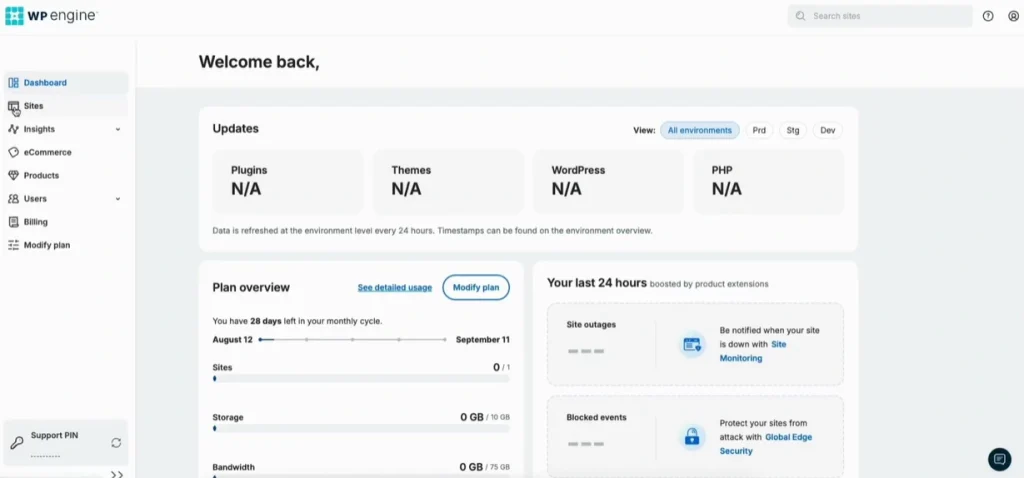
Neither host comes with its own website builder. They’re both built around WordPress, so you can add page builder plugins if you want more freedom when designing pages.
Email Hosting
Neither Rocket.net nor WP Engine provides email hosting with its WordPress plans.
| Email Feature | Rocket.net | WP Engine |
|---|---|---|
| Free Email | No | No |
| Email Storage | N/A | N/A |
| Email Limits | N/A | N/A |
So, if you need email addresses for your domain, you’ll have to use a separate email service.
WooCommerce
Both hosts work with WooCommerce, but Rocket.net and WP Engine handle WooCommerce a little differently.
- Rocket.net supports WooCommerce on all plans and includes Redis. Its edge cache can speed up catalog pages, while cart and logged-in traffic still goes to the origin. Enterprise plans also get Object Cache Pro.
- WP Engine supports WooCommerce on all plans. Its eCommerce Performance Pack adds WooCommerce caching, search, and plugin auto-updates.
Data Centers and CDN
Data Center Locations
Rocket.net has origin server locations in the US, Canada, Europe, Asia, and Australia. This gives you a good range of choices when you want your WordPress site hosted closer to its main audience.
WP Engine uses roughly 12–14 Google Cloud regions across North America, Europe, Asia-Pacific, and the Middle East. Premium options also provide additional AWS locations.
The important difference is that the physical data center isn’t the only factor in either setup. Both hosts use a global CDN to serve cached content closer to visitors.
CDN
Rocket.net includes Cloudflare Enterprise with every hosting plan. Its CDN has 335+ points of presence, so cached files can be delivered from locations much closer to your visitors.
WP Engine also uses Cloudflare, with its Advanced Network included. Its network has 330+ points of presence, while Global Edge Security is available as a paid upgrade.
| CDN Feature | Rocket.net | WP Engine |
|---|---|---|
| CDN | Cloudflare Enterprise | Cloudflare |
| PoPs | 335+ | 335+ |
| Included CDN | Yes | Yes |
| Edge caching | Yes | Yes |
| Premium option | Cloudflare Enterprise included | Global Edge Security |
| HTTP/3 | Yes | Yes |
Rocket.net has the simpler setup here because Cloudflare Enterprise is already part of the hosting package. WP Engine gives you Cloudflare CDN through its Advanced Network, with extra edge security available through GES.
For sites that need a separate CDN outside their hosting provider, you can also look at other CDN services.
Security and Backups
Security
Both Rocket.net and WP Engine provide SSL, firewalls, malware protection, and DDoS protection, but Rocket.net puts more of these features directly into every hosting plan.
- Rocket.net provides automatic Cloudflare SSL, Cloudflare Enterprise WAF, Imunify360 malware scanning, and Cloudflare Enterprise DDoS protection on all plans.
- Imunify360 scans and blocks threats in real time. Rocket.net also offers hacked-site cleanup when you migrate an affected site to its platform.
- WP Engine provides managed SSL and an origin firewall with ModSecurity. Its Cloudflare WAF comes with the paid Global Edge Security (GES) option.
- WP Engine also provides DDoS protection on all plans, with stronger protection through Advanced Network and the highest level through GES.
- WP Engine support can scan and clean a compromised site when you open a support ticket.
If you’re handling security yourself, simple steps like keeping WordPress updated and limiting unnecessary plugins can go a long way. These WordPress security tips cover some useful ways to protect a site.
You can also add extra protection with WordPress security plugins, although both hosts already provide several security layers at the hosting level.
Backups
Rocket.net and WP Engine both provide automatic backups, so you don’t have to rely on a separate backup system for basic site recovery.
- Rocket.net takes daily backups on all plans, with 14-day retention on standard plans and 30-day retention on Enterprise. You can also create on-demand backups and restore a site with one click.
- Enterprise customers get hourly platform snapshots, while Umbrella hourly backups are available as a paid add-on.
- WP Engine takes nightly backups and keeps them for 30 days. Backups are stored off-site on Amazon S3.
- WP Engine also provides manual checkpoints whenever you want to create a backup before making a major change.
- Backups are available for live, staging, and development environments.
If you prefer handling backups yourself, there are several ways to back up a WordPress site. Staging and migration plugins can also make it easier to move or restore WordPress sites.
Which Is Better for Security?
Rocket.net gets the edge if you want more security features included from the start. Cloudflare Enterprise WAF and DDoS protection, along with Imunify360, are included across its plans.
WP Engine is still a strong choice, especially for businesses already using its managed WordPress platform. However, some of its stronger Cloudflare security features require Advanced Network or paid GES.
| Security & Backup Feature | Rocket.net | WP Engine |
|---|---|---|
| Free SSL | Yes | Yes |
| Malware Protection | Imunify360 | Support-assisted scanning and cleanup |
| Firewall | Cloudflare Enterprise WAF + Imunify360 | Origin firewall + ModSecurity |
| DDoS Protection | Cloudflare Enterprise included | Included, with stronger tiers |
| Automatic Backups | Daily | Daily |
| Backup Retention | 14–30 days | 30 days |
| On-Demand Backup | Yes | Manual checkpoints |
| One-Click Restore | Yes | Yes |
For everyday protection and backup features without paying extra for higher security tiers, Rocket.net is the stronger option. WP Engine gives you solid protection too, but some of its more advanced Cloudflare security features sit behind additional options.
Developer Tools
Both Rocket.net and WP Engine give developers the basics they need for managing WordPress from the command line. The main difference is that WP Engine has a more structured setup for Git and scheduled tasks.
SSH
Rocket.net provides key-only SSH access, so you connect using an SSH key rather than a password.
WP Engine uses an SSH Gateway with key-based access. Sessions have a 10-minute idle timeout, which adds a small security layer for developer access.
Git
Rocket.net supports Git through SSH, with Git and version control listed as included features.
WP Engine has a more direct Git workflow. You can push code to production or staging through its Git repository at git.wpengine.com.
WP-CLI
Both hosts support WP-CLI, which is useful for managing WordPress without going through the dashboard.
- Rocket.net: WP-CLI is available through SSH and its API at
/wpcli. - WP Engine: WP-CLI comes preinstalled through the SSH Gateway.
Cron Jobs
Rocket.net supports cron jobs and lets you set up custom tasks through SSH crontab or WP-CLI.
WP Engine uses traffic-based WP-Cron by default. You can enable Alternate Cron to run wp-cron.php every minute, but custom system cron jobs are more limited.
Customer Support
Support Channels
Both Rocket.net and WP Engine offer 24/7 support through chat and tickets, but the higher-tier options aren’t the same.
| Support Feature | Rocket.net | WP Engine |
|---|---|---|
| Live Chat | 24/7 | 24/7 |
| Support Tickets | 24/7 | 24/7 |
| Phone Support | Business and Enterprise | Professional and higher |
| Slack Support | Enterprise | No |
| AI Support | No AI-first handoff | AI-first chat |
Rocket.net keeps live chat as its main support channel, with phone support added on Business and Enterprise plans. Enterprise customers also get Slack support.
WP Engine starts chat with an AI assistant before handing the conversation to a support agent. Phone support becomes available from the Professional plan.
Support Quality
Rocket.net’s support team is focused on WordPress, and live chat is generally quick when you need help with a site or hosting issue.
WP Engine’s support team also has good WordPress knowledge. The main difference is the AI-first support flow, which can add an extra step before you reach a person.
Which Has Better Support?
Rocket.net gets the edge if quick access to a human through chat matters most. WP Engine has good WordPress support too, but its AI-first chat and higher-tier phone support make the experience a little less direct.
Pricing
Rocket.net starts at $30 per month when you pay monthly, or $25 per month with annual billing. WP Engine starts at $35 per month, dropping to $30 per month when billed annually.
| Pricing Feature | Rocket.net | WP Engine |
|---|---|---|
| Starting Price | $30/mo | $35/mo |
| Annual Price | $25/mo | $30/mo |
| Renewal Price | Same | Same |
| Money-Back Guarantee | 30 days | No |
| Free Domain | No | No |
Rocket.net has the lower starting price, but WP Engine can be more affordable when a current discount is available. You can also find a WP Engine coupon that will reduce the initial hosting cost.
Neither host gives you a free domain, so you’ll need to register your domain separately.
Pros and Cons
Rocket.net Pros and Cons
Pros
- Cloudflare Enterprise CDN is included with all plans.
- 335+ global PoPs for faster content delivery.
- Unlimited free expert migrations.
- Daily backups with one-click restore.
- Strong security with Cloudflare WAF, DDoS protection, and Imunify360.
- Staging and site cloning are available on all plans.
- Configurable automatic WordPress, plugin, and theme updates.
- 24/7 live chat and ticket support.
Cons
- No free email hosting.
- WordPress is the only supported CMS.
- Phone support is limited to Business and Enterprise plans.
- Custom system cron jobs require SSH or WP-CLI.
- Advanced features such as Object Cache Pro are limited to Enterprise.
WP Engine Pros and Cons
Pros
- Fully managed WordPress and WooCommerce hosting.
- Production, Staging, and Development environments.
- Free migration plugin plus expert migration services.
- 30-day backup retention.
- Cloudflare CDN and Advanced Network features.
- Strong WordPress tools for developers and agencies.
- 24/7 chat and ticket support.
- Phone support is available on Professional plans and higher.
Cons
- No free email hosting.
- No built-in website builder.
- Some advanced Cloudflare security features require paid GES.
- No money-back guarantee.
- Support starts with an AI assistant in chat.
- Custom system cron jobs are limited.
- Higher starting price than Rocket.net.
Which One Should You Choose?
There’s no need to overthink this. Rocket.net and WP Engine are both capable managed WordPress hosts, but they suit different types of users.
Choose Rocket.net If
Rocket.net is a better fit if you want a fast setup with fewer things to manage yourself.
- You want Cloudflare Enterprise CDN, WAF, and DDoS protection included.
- You want unlimited free expert migrations.
- You need staging and site cloning on every plan.
- You want control over automatic WordPress, plugin, and theme updates.
- You prefer talking to a support agent through 24/7 live chat.
- You want a lower starting price and a 30-day money-back guarantee.
Choose WP Engine If
WP Engine makes more sense if you need more developer-focused tools or a setup built for managing several environments.
- You want separate Production, Staging, and Development environments.
- You use Git Push and WP-CLI for development work.
- You run WooCommerce and need its extra ecommerce features.
- You’re managing client websites through an agency or larger business setup.
- You want WP Engine’s wider range of WordPress development tools.
My Pick
For most WordPress users, I’d go with Rocket.net. It costs less to start, gives you Cloudflare Enterprise, includes free expert migrations, and doesn’t make you jump through extra steps when you need support.
I’d pick WP Engine when its development tools and multi-environment setup are more useful for your workflow. For a developer, agency, or larger WordPress project, those extras can make the higher price easier to justify.
Best Alternatives
Rocket.net and WP Engine aren’t the only options for managed WordPress hosting. Kinsta, Pressable, Cloudways, and WPX are also worth considering, especially if you’re looking for different pricing, site limits, or server options. You can also explore these WP Engine alternatives to compare more hosting providers before making a decision.
| Hosting | Starting Price (Annual) | Sites | Storage | Best For |
|---|---|---|---|---|
| Kinsta | $30/mo | 1 | 10 GB | High-traffic WordPress sites |
| Pressable | $20.83/mo | 1 | 20 GB | Small businesses and agencies |
| Cloudways | $11/mo | 1 | 25 GB | More server choice and control |
| WPX | $14.99/mo | 1 | 10 GB | For newbie and bloggers |
Kinsta
Kinsta now runs its managed WordPress hosting on Oracle Cloud Infrastructure (OCI). It offers 30 data center locations, isolated containers for each site, daily backups, staging, CDN, and managed security.
It’s a good fit for WordPress sites that need reliable performance without having to handle server administration. The entry plan supports one site with 10 GB of storage, so it’s best suited to a single site rather than someone managing several small websites.
Check this too: Kinsta vs WP Engine, Kinsta vs Rocket.net
Pressable
Pressable is owned by Automattic, the company behind WordPress.com and WooCommerce. It provides managed WordPress hosting with automatic updates, backups, staging, migrations, security, and CDN features.
Pressable also supports WooCommerce, so it can work well for online stores as well as regular WordPress sites. Its hosting is aimed at businesses, agencies, and site owners who want WordPress management handled for them.
Check this too: Pressable vs WP Engine
Cloudways
Cloudways takes a different approach from hosts such as Kinsta and WPX. You can choose the cloud provider you want to use, including DigitalOcean, Vultr, and AWS, while Cloudways handles the server management.
That gives you more control over server resources, locations, and pricing. It’s a good choice if you want cloud hosting without having to manage a server completely on your own.
Check this too: Cloudways vs WP Engine
WPX
WPX’s cheapest WordPress plan is the Starter plan, which supports 1 website and provides 10 GB of storage. It also comes with daily backups, free site migration, malware scanning and removal, a custom CDN, staging, and 24/7 support.
It’s a good fit if you’re running a single WordPress site and want managed hosting without paying for space or site slots you won’t use.
Check this too: WPX vs WP Engine
FAQs
Is Rocket.net better than WP Engine?
For most WordPress site owners, Rocket.net is the better pick if speed, security, support, and lower starting cost matter most. WP Engine is a better fit when you need stronger developer and agency tools.
Is Rocket.net faster than WP Engine?
Rocket.net has a strong advantage in global content delivery because Cloudflare Enterprise is included with its hosting. WP Engine also uses Cloudflare, but some of its higher-level edge features require an additional service.
Is Rocket.net good for WordPress?
Yes. Rocket.net is built specifically for managed WordPress and includes staging, automatic updates, free migrations, backups, CDN, WAF, malware protection, and 24/7 support.
Does Rocket.net use Cloudflare?
Yes. Rocket.net uses Cloudflare Enterprise as part of its hosting setup. Its CDN and WAF are included with the hosting rather than being separate services.
Does WP Engine have a free trial or money-back guarantee?
WP Engine doesn’t offer a money-back guarantee under the pricing used in this comparison. Rocket.net, on the other hand, offers a 30-day money-back guarantee.
Does Rocket.net offer free migration?
Yes. Rocket.net offers unlimited free expert migrations. WP Engine also provides a free migration plugin, along with expert and bulk migration services.
Which is better for WooCommerce, Rocket.net or WP Engine?
Rocket.net is a strong choice if you want Redis, edge caching, and Cloudflare Enterprise included with your hosting. WP Engine is worth considering if you need its WooCommerce-specific features, such as extra caching, search, and plugin auto-updates.
Which is better for developers, Rocket.net or WP Engine?
WP Engine has the edge for developers who rely on Git Push, separate Production, Staging, and Development environments, and agency-focused tools. Rocket.net still provides SSH, Git, WP-CLI, staging, and cloning for regular WordPress development work.
Final Verdict
After comparing both hosts, I’d give the overall recommendation to WP Engine.
Rocket.net has some strong points, especially its Cloudflare Enterprise setup, security features, free expert migrations, and lower starting price. But WP Engine offers a more complete package for people who want to build, manage, and grow WordPress sites for the long term.
Its developer tools, Git integration, staging environments, managed WordPress features, and WooCommerce options make it a stronger all-round choice. WP Engine also has a dedicated platform for agencies managing multiple client sites.
For a simple personal site, Rocket.net can still be the better-value option. But if you’re running a business website, agency projects, or WooCommerce store, I’d choose WP Engine. Its wider set of WordPress tools gives you more room as the site grows.