


If you’re looking at WPX and Cloudways, you probably want to know one thing: which one is worth your money?
With WPX, you get managed WordPress hosting without having to set up a cloud server. Cloudways gives you more server choices, but setting things up can take more effort.
I’ll compare their prices, speed, and support to help you decide which one makes more sense for your site.
WPX vs Cloudways 2026: Side-by-Side Comparison
Here’s how WPX and Cloudways compare on price, speed, storage, backups, support, and other key features.
| Feature | WPX | Cloudways |
|---|---|---|
| Founded | 2013 (Traffic Planet Hosting; rebranded WPX in 2016) | 2012 |
| Founders | Terry Kyle and Georgi Petrov | Aaqib Gadit and Pere Hospital |
| Headquarters | Sofia, Bulgaria | Started in Malta. Parent company DigitalOcean is in New York |
| Owner / operator | Independent. Still owned by the founders (K Media Tech Ltd) | DigitalOcean (bought Cloudways in Sept 2022 for $350 million) |
| Company type | Private, bootstrapped | Subsidiary of a public company (NYSE: DOCN) |
| What they sell | Managed WordPress and WooCommerce only | Managed cloud for WordPress and other PHP apps |
| Known for | Fast chat, LiteSpeed, XDN, Fixed For You | Pick-your-cloud, scaling, agencies and growing stores |
| Best for | Bloggers, small businesses, smaller shops | Developers, agencies, stores that will grow |
| Standout Features | LiteSpeed, XDN, ~30-sec chat, free malware removal, Fixed For You, custom dashboard | Choice of cloud, Autonomous autoscaling on GCP, no-downtime vertical scale, Breeze + Object Cache Pro |
| Infrastructure provider | Own custom infrastructure | DigitalOcean, Vultr, Linode (Akamai), AWS, or Google Cloud |
| Server software | LiteSpeed Enterprise + MariaDB + OPcache (shared) | Nginx + Apache, Varnish, Redis, Memcached, PHP-FPM |
| Uptime | 99.95% | 99.9–99.99% (varies by cloud) |
| Current Status | No public status page available | status.cloudways.com |
| Caching | LiteSpeed Cache + OPcache. Redis on Woo plans | Varnish + Redis + Memcached + Nginx + Breeze. Object Cache Pro on 4GB+ and Autonomous |
| Managed WordPress | Yes | Partial. Server managed. WordPress more on you unless you add Site Manager |
| Site migration | Unlimited free migrations within 24 hours | Unlimited DIY via Cloudways Migrator. First transfer free from team |
| Staging | One-click. Deploy/merge to live. | One-click. Push/pull with file or table select. |
| Automatic updates | Manual / normal WordPress updates | Manual by default. SafeUpdates / Site Manager Pro can test on staging first |
| Control panel | WPX Panel. Redesigned 2025 | Cloudways Platform. Server view + app view |
| Website builder | No | No |
| One-click installer | Yes | Yes |
| Apps besides WordPress | WordPress and Woo only | WordPress plus Magento, Laravel, Drupal, Joomla, other PHP |
| Free email | Yes (except starter plan) | No. Rackspace add-on ($1.50/mailbox/mo) |
| Email storage | Shares plan disk | Rackspace: 25 GB/mailbox |
| WooCommerce | Separate Woo plans with Redis. Better for smaller stores | Official Woo hosting |
| Data centers | 3: Chicago, London, Sydney | 150+ locations in 50+ countries (depends on provider) |
| CDN | XDN, 43+ endpoints | Cloudflare Enterprise from $4.99/domain/mo on Flexible (~335+ PoPs). Free on Autonomous |
| Free SSL | Yes | Yes |
| Malware protection | Daily scans + free removal | Imunify360 / scanner included. Cleanup more self-serve. Malcare from $4/app/mo |
| Firewall | Managed WAF included | Server firewall + Imunify360. Cloudflare WAF paid on Flexible, Free on Autonomous |
| DDoS protection | Yes (origin + XDN anycast) | Basic at server. Stronger with Cloudflare Enterprise |
| Automatic backups | Yes, all plans | Yes, all servers |
| Backup frequency | Daily. On-demand personal snapshots | Hourly to weekly. Default daily |
| Backup retention | 28 days | 1–4 weeks (you choose), Default 7 days |
| SFTP | Yes, all plans | Yes |
| SSH | Available, more limited | Yes. Master + app users |
| Git | SSH/SFTP only. No Git-push button | Dashboard Git deploy + Git over SSH |
| WP-CLI | If SSH is on | Preinstalled |
| Cron jobs | Mostly WP-Cron. No real crontab UI | Cron Manager + Cron Optimizer (server cron via WP-CLI) |
| Support channels | 24/7 chat + tickets. No phone | 24/7 chat + tickets. Advanced add-on for priority. Premium ($500/mo): phone + Slack + AM |
| Support quality | ~30-sec chat. They fix a lot for you | Standard is mixed. Advanced is stronger. Premium is the senior / phone tier |
| Starting price | $17.99/mo (monthly), $14.99/mo (annual), $11.99/mo (5-year term) | $11/mo |
| Renewal price | Same as the rate you picked | Same |
| Money-back / trial | 30-day money-back | 3-day free trial. No 30-day refund |
| Free domain | No | No |
About WPX and Cloudways
WPX

WPX launched in 2013 and provides managed WordPress hosting. You can get your WordPress site up and running without setting up a server or dealing with much technical work.
WPX offers free website migrations, daily backups, malware removal, and its own XDN CDN. It also provides email hosting on all plans except Starter, which is worth keeping in mind if you want to use an email address with your domain.
Cloudways

Cloudways launched in 2011 and became part of DigitalOcean in 2022. It lets you host WordPress websites on cloud servers from providers such as DigitalOcean, Vultr, and AWS.
The main difference is that you get more choice over your server and its resources. Cloudways also offers features such as staging, automated backups, and server monitoring. However, you’ll need to spend more time choosing your setup and learning the dashboard than you would with a simpler managed WordPress host.
Performance and Speed
WPX and Cloudways use different tools to improve WordPress performance. WPX comes with its own hosting setup, while Cloudways gives you more freedom to adjust server resources and caching.
WPX Performance
WPX provides server-side caching and its own XDN CDN. These features help deliver pages and other website content faster without requiring you to configure a separate cloud server.
Key performance features:
- WPX XDN CDN for content delivery across different locations.
- Server-side caching to reduce repeated page processing.
- A managed hosting environment with less server configuration for you to handle.
WPX is convenient for content-heavy websites where you want to spend more time publishing articles than managing hosting settings.
WPX Speed Test Results

WPX scored 100/100 for desktop performance in my Google PageSpeed Insights test.
- First Contentful Paint: 0.2 seconds
- Largest Contentful Paint: 0.3 seconds
- Total Blocking Time: 0 ms
- Cumulative Layout Shift: 0
These results show excellent loading speed in this test. Actual performance will vary depending on your website and testing conditions.
Cloudways Performance
Cloudways lets you choose your cloud provider and server size. You can also adjust the caching setup to suit your WordPress installation.
Its performance tools include:
- Varnish for caching pages.
- Breeze for WordPress caching and file optimisation.
- Redis for object caching when configured.
- Cloudflare Enterprise as a paid add-on for CDN delivery and other performance features.
You get more room to adjust the setup, which can be useful for WooCommerce stores, membership sites, and websites with heavier workloads.
Ease of Use
WPX
With WPX, you can get your WordPress site running without choosing a cloud provider or setting up a server. The dashboard gives you access to your websites and the main hosting settings in one place.
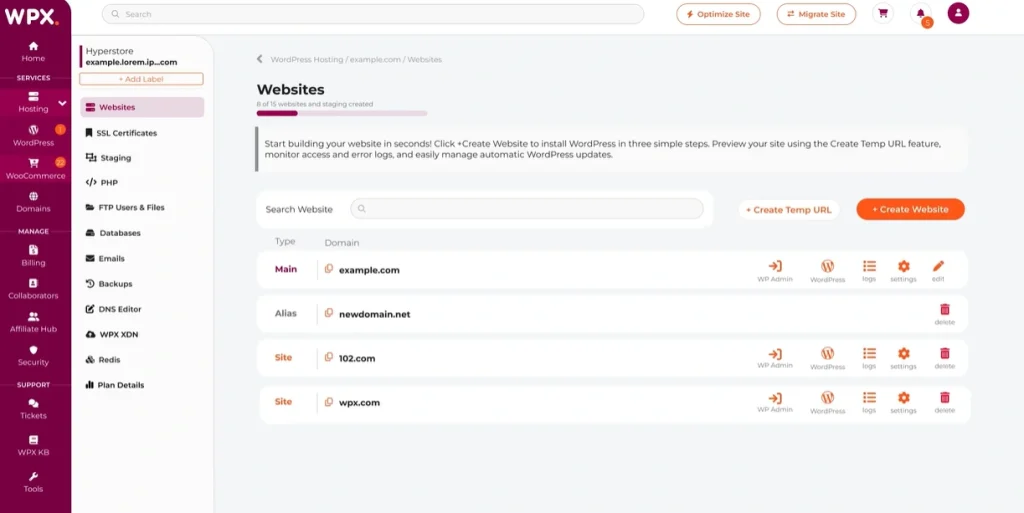
A few things you can do through WPX:
- Manage your WordPress websites from one account.
- Request a free website migration.
- Access backups and other hosting tools.
- Contact support if you run into a hosting problem.
You don’t need much server knowledge to get started. If you run a blog or affiliate website and prefer to keep hosting tasks simple, WPX is easier to manage.
Cloudways
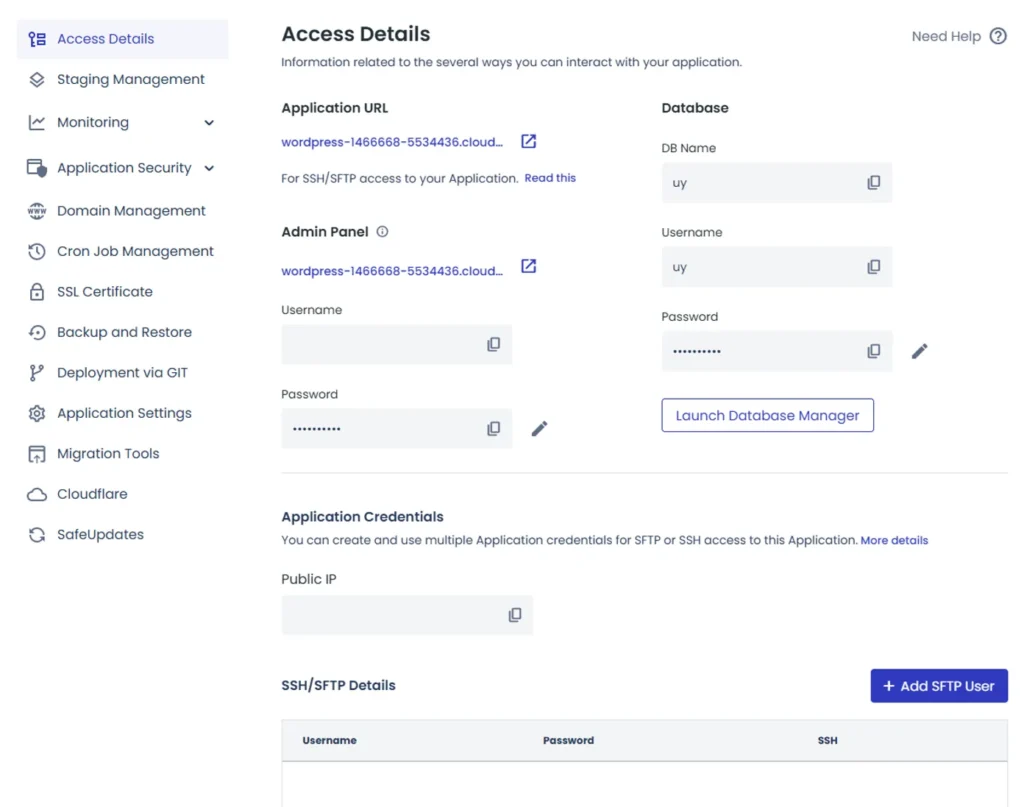
Cloudways requires a few more decisions before you start. You need to choose a cloud provider, server location, server size, and application settings before launching your WordPress site.
Once your site is running, you can manage backups, staging, monitoring, and server settings from the dashboard.
The extra settings give you more control, but they can take time to learn if you’ve never managed cloud hosting before.
Which Is Easier?
WPX is the easier option for beginners who want to get on with running their websites. Cloudways suits users who don’t mind learning a few more hosting settings to get greater control over their server.
Data Centers and CDN
WPX Data Centers and CDN
WPX has three main data center locations:
- Chicago, USA
- London, UK
- Sydney, Australia
WPX also provides its own XDN CDN, with 43+ global endpoints, at no extra cost on its hosting plans.
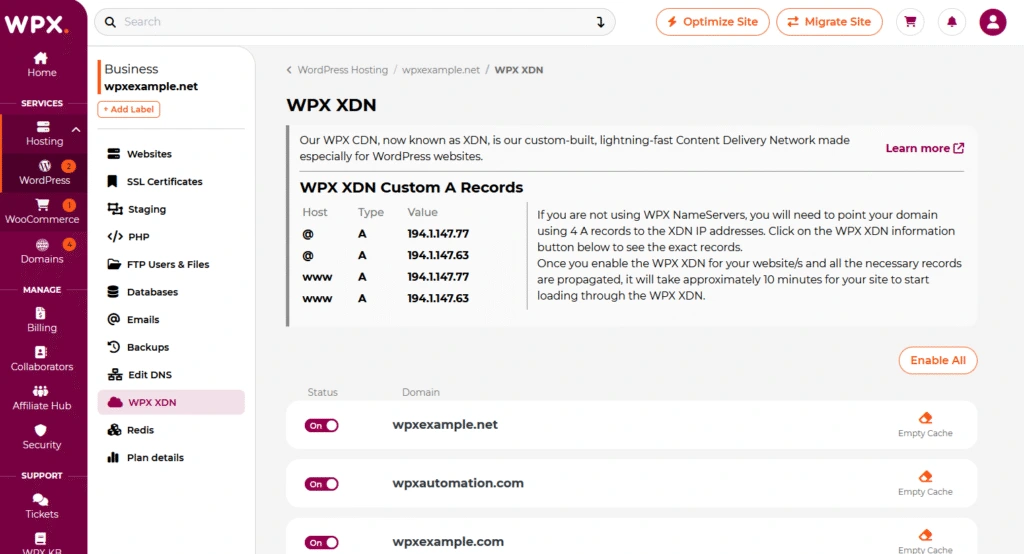
- XDN helps deliver cached website content from locations closer to visitors.
- You don’t need to buy a separate CDN service to use WPX’s network.
- Your main website server stays in the data center you select; CDN endpoints help deliver cached content in other regions.
The main limitation is server choice: WPX offers just three primary hosting locations.
Cloudways Data Centers and CDN

Cloudways gives you a much wider choice of server locations through cloud providers such as DigitalOcean, Vultr, Linode, AWS, and Google Cloud. Availability depends on the provider and plan you select.
- Server locations across 50+ countries, depending on the cloud provider.
- Choice of server region to bring your website closer to its main audience.
- Cloudflare Enterprise available as a paid add-on ($4.99/domain/mo) for CDN delivery, image optimisation, and additional security features.
- Server location and CDN are separate choices: picking a nearby server doesn’t automatically give you a global CDN.
Unlike WPX, Cloudways doesn’t rely on one fixed set of hosting locations. You can choose a provider and region that suit your website.
WPX vs Cloudways: Which Is Better?
- WPX: Better if you want a built-in CDN and don’t want to configure a separate service.
- Cloudways: Better if you need more choice over your main server location and cloud provider.
WPX keeps the setup simple with three primary hosting locations and its own XDN network. Cloudways wins on server-location flexibility, but your available options depend on the cloud provider you choose.
Security and Backups
WPX Security
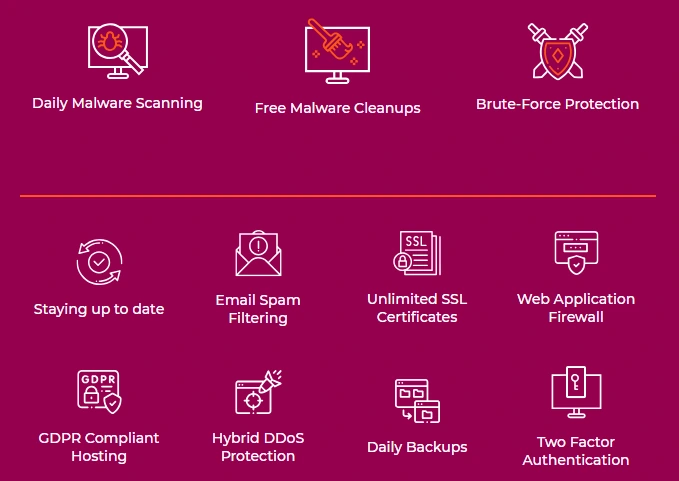
WPX provides several security features with its managed WordPress hosting, without requiring you to set up a separate security service.
- Malware scanning: Daily scans to identify malicious files.
- Free malware removal: WPX removes malware from affected websites at no extra cost.
- Web application firewall (WAF): Helps filter malicious requests before they reach your website.
- DDoS protection: Protection against distributed denial-of-service attacks.
- Free SSL certificates: Encrypt connections between your website and visitors.
Cloudways Security

Cloudways provides server-level security features, with additional protection available through paid services.
- Dedicated firewalls: Help block unwanted traffic from reaching your server.
- Free SSL certificates: Let’s Encrypt SSL certificates are available.
- Server security updates: Cloudways manages security maintenance at the server level.
- Vulnerability scanning: Security tools help identify potential weaknesses.
- Cloudflare Enterprise: A paid add-on that provides additional web protection and CDN features.
You still need to update WordPress, themes, and plugins and protect your administrator account.
Backup Comparison
| Backup feature | WPX | Cloudways |
|---|---|---|
| Automatic backups | Daily | Daily by default |
| Backup retention | 28 days | 7 days by default |
| Backup frequency | Daily | Adjustable from hourly to weekly |
| On-demand backups | Yes | Yes |
| Off-site backup storage | Yes | Yes |
| Personal backup retention | 24 hours | Depends on the selected backup configuration |
WPX’s daily backups remain available for 28 days. Personal backups you create on WPX are retained for 24 hours.
Cloudways creates automatic backups daily by default. You can change the schedule to hourly, every 2 hours, every 4 hours, every 6 hours, every 12 hours, or weekly. Its default retention is 7 days, with longer retention options available through backup settings.
Which One Is Better?
WPX is the better choice if you want daily backups with 28-day retention and free malware removal.
Cloudways is better if you want to choose how frequently your website is backed up, particularly for sites that receive orders or frequent content updates.
Developer Tools
WPX has the tools needed for everyday WordPress work, but Cloudways offers more options for developers who work with custom code, staging sites, and Git repositories.
WPX Developer Tools
WPX provides these tools for managing and testing WordPress websites:
- Staging area: Create a copy of your live site to test plugin updates, theme changes, or design edits before publishing them.
- SFTP and file manager: Access website files and upload or edit files.
- Database access: Manage your WordPress database through phpMyAdmin.
- SSH access: Connect to your site through a terminal for supported command-line tasks.
WPX covers common development tasks. However, developers who need a built-in Git deployment workflow or extensive server configuration have fewer options.
Cloudways Developer Tools
Cloudways offers more tools for developers who want to work directly with their application and server.
- SSH and SFTP: Access files and run command-line tasks.
- Git deployment: Pull code from a Git repository to your application.
- WP-CLI: Manage WordPress from the command line.
- Staging: Clone your live site, test changes, and push selected changes back to production.
- Cron jobs: Schedule recurring scripts and tasks.
- Cloudways API: Automate supported hosting and application management tasks.
- PHP configuration: Adjust supported PHP settings for your application.
Which One Is Better for Developers?
Cloudways is the stronger option for custom development because it offers built-in Git deployment, API access, and more control over server settings. WPX is sufficient for routine WordPress maintenance and testing, but it offers fewer options for advanced deployment workflows.
Customer Support
WPX gives you more hands-on help with everyday WordPress problems, while Cloudways offers deeper technical assistance if you’re willing to pay for a higher support tier.
The biggest differences are phone support, response-time commitments, and how much troubleshooting the support team will handle for you.
Support Channels
| Support option | WPX | Cloudways |
|---|---|---|
| 24/7 live chat | Yes; real response time – around 15 seconds | Yes; available on all plans |
| Support tickets | Yes | Yes; initial response SLA varies by support tier |
| Phone support | Not available | Premium Support add-on ($500/mo) |
| Private Slack channel | No | Premium Support add-on ($500/mo) |
| Priority support | Standard technical support | Advanced and Premium add-ons |
What Will the Support Team Actually Do?
WPX
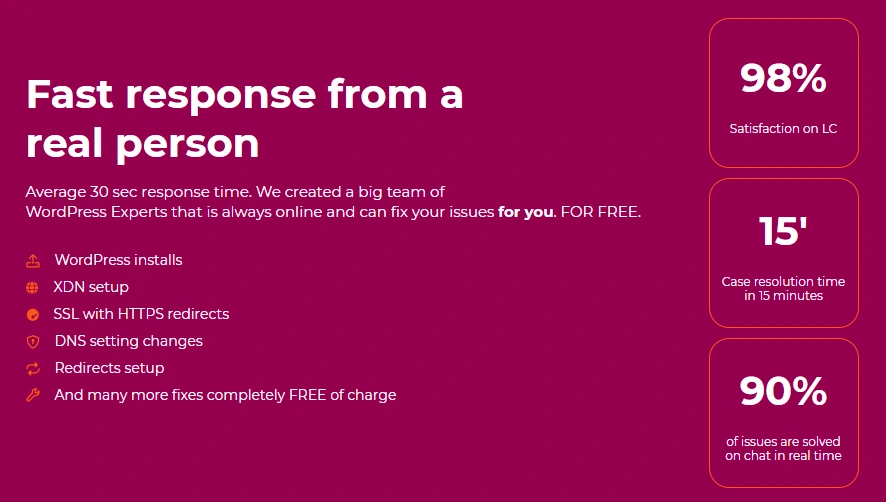
- Website downtime: Its Fixed For You Guarantee covers many technical problems that take a site offline or seriously affect its normal operation.
- Free migrations: The support team handles website migrations to WPX.
- Malware removal: WPX provides free malware scanning and removal.
- Hosting problems: The team helps with supported server, SSL, DNS, and hosting configuration issues.
- Limits: WPX won’t rewrite faulty third-party plugins or themes, fix custom PHP/CSS code, or handle design changes under its standard technical support policy.
Cloudways

- Server and platform problems: Standard support helps with server launches, scaling, backups, domain mapping, SSL certificates, and other Cloudways platform issues.
- Free migration: Managed website migration support is available.
- Plugin and theme troubleshooting: Advanced and Premium Support cover deeper troubleshooting for plugin and theme conflicts.
- Performance and server errors: Advanced and Premium tiers offer performance assistance, server-error investigation, and server configuration help.
- Extra contact options: Premium Support adds phone support and a private Slack channel.
- Limits: Cloudways doesn’t handle custom-code debugging, website design changes, or rewriting plugin functionality, even with its higher support tiers.
Which Host Has Better Customer Support?
I recommend WPX for most WordPress bloggers and site owners who want quick access to a support agent, free migrations, and hands-on help getting a broken website back online. You don’t have to pay for a separate support package to get its standard technical assistance.
Cloudways makes more sense if you need server-level help or want access to senior engineers for deeper troubleshooting.
Cloudways charges extra for advanced support. The Advanced plan costs $100/month or 10% of your monthly hosting bill, whichever is higher. Premium Support costs $500/month or 10% of your bill, whichever is higher. These fees are on top of your regular hosting costs.
Pricing and Plans
WPX uses fixed-price plans, while Cloudways charges based on the cloud server you choose.
| Pricing detail | WPX | Cloudways |
|---|---|---|
| Starting price | $17.99/month | $11/month |
| Annual pricing | $14.99/month ($179.90/year) | Pay-as-you-go |
| Entry plan | 1 Website, 10 GB storage, 100 GB bandwidth | 1 server with 2 GB RAM, 1 vCPU, 50 GB storage |
| Money-back guarantee | 30 days | No |
| Free trial | No | 3 days |
- WPX is easier to budget for because you pay a fixed price for managed WordPress hosting.
- Cloudways starts cheaper, but the final cost depends on your cloud provider and server configuration.
Pros and Cons
WPX
Pros
- Free website migrations and malware removal.
- Custom CDN, daily backups, and free SSL certificates on all plans.
- 24/7 live chat and technical support.
- Fixed-price plans with unlimited visitor allowances.
- Business plan provides email hosting and unlimited mailboxes.
Cons
- Starter plan supports only one website and 10 GB of storage.
- No phone support.
- Less flexibility over server resources than Cloudways.
- Email hosting is not available on the Starter plan.
Cloudways
Pros
- Pay-as-you-go cloud hosting with a choice of infrastructure providers.
- Flexible server resources that you can scale as needed.
- Free managed WordPress and WooCommerce migrations.
- 24/7 standard support through live chat and tickets.
- Advanced and Premium Support options for deeper technical help.
Cons
- Phone support requires the Premium Support add-on.
- Advanced and Premium Support add extra monthly costs.
- Email hosting requires a separate service.
- Server selection and resource management require more decisions than WPX’s fixed plans.
Which One Should You Choose?
Choose WPX if:
- You run WordPress blogs, affiliate websites, or business websites.
- You want free website migrations and malware removal.
- You prefer managed WordPress hosting without handling server configuration.
- You need email hosting with your hosting plan.
Choose Cloudways if:
- You want to choose your cloud infrastructure provider.
- Your website needs flexible server resources.
- You want more control over server configuration.
- You’re comfortable managing hosting settings or paying extra for advanced support.
Best Alternatives to WPX and Cloudways
If WPX or Cloudways doesn’t meet your needs, following hosting providers are worth considering.
Explore these WPX alternatives if you want managed WordPress hosting with less server maintenance, or check out these Cloudways alternatives if you prefer more flexibility with cloud or VPS hosting.
| Host | Starting price (Annual) | Sites | Storage | Best for |
|---|---|---|---|---|
| ScalaHosting (Entry Cloud) | $14.95/mo | Unlimited | 50 GB NVMe | Managed cloud VPS without picking AWS yourself |
| Pressable | $20.83/mo | 1 | 20 GB | Simple managed WordPress, Automattic stack |
| Kinsta | $30/mo | 1 | 15 GB | Speed and a clean managed setup |
| WP Engine | $30/mo | 1 | 10 GB | Brands that want a big managed WP platform |
ScalaHosting
ScalaHosting’s Entry Cloud plan gives you a managed cloud VPS with 2 CPU cores, 2 GB RAM, 50 GB NVMe storage, and its SPanel control panel.
Choose ScalaHosting if you want dedicated server resources without managing a cloud server entirely on your own. It’s a useful alternative to Cloudways if you prefer a managed VPS with a simpler control panel.
Check these too: ScalaHosting vs Clodways and ScalaHosting vs WPX
Pressable
Pressable is managed WordPress hosting backed by Automattic, the company behind WordPress.com and WooCommerce. Its Signature 1 plan costs $20.83/month with annual billing and provides one WordPress installation, 20 GB storage, and support for up to 30,000 monthly visits.
Choose Pressable if you want managed WordPress hosting with staging, hourly and daily backups, free migrations, and 24/7 WordPress support.
Check this too: Pressable vs WPX
Kinsta
Kinsta’s entry-level plan costs $30/month with annual billing and provides one WordPress installation, 15 GB storage, and an estimated 75,000 monthly visits.
Choose Kinsta if you want managed WordPress hosting with a clean dashboard, staging, built-in CDN, and expert support without managing server settings yourself.
Check these too: Kinsta vs Clodways and Kinsta vs WPX
WP Engine
WP Engine’s Startup plan costs $30/month and supports one website, 10 GB storage, and an estimated 25,000 monthly visits. It provides managed WordPress updates, daily and on-demand backups, staging, a global CDN, and developer tools.
Choose WP Engine if you manage a business website or client projects and want managed WordPress hosting with development and deployment features.
Check these too: WP Engine vs Clodways and WP Engine vs WPX
FAQs
Is WPX better than Cloudways?
WPX is better for WordPress users who want free malware removal, expert website migrations, daily backups, and 24/7 live chat support without managing server settings.
Which is cheaper, WPX or Cloudways?
Cloudways is cheaper at the entry level, starting at $11/month. WPX starts at $17.99/month when billed monthly or $14.99/month with annual billing.
Which is faster, WPX or Cloudways?
Neither is always faster. WPX uses its XDN CDN and LiteSpeed caching, while Cloudways offers different cloud servers and caching options. Your results depend on server location, website configuration, and traffic.
Does WPX offer phone support?
No. WPX provides 24/7 live chat and ticket support. Cloudways offers phone support through its Premium Support add-on.
Does Cloudways provide email hosting?
No, traditional email mailboxes aren’t part of standard Cloudways hosting. You need a separate email service to create addresses using your domain.
Can you host WooCommerce on WPX and Cloudways?
Yes. Both support WooCommerce stores. WPX offers managed WordPress hosting with built-in caching and support, while Cloudways lets you select and scale server resources to match your store’s needs.
Is Cloudways good for beginners?
No, Cloudways isn’t the best choice for beginners with little hosting experience. You need to choose a cloud provider, configure server resources, and manage more technical settings.
Conclusion
I recommend WPX for most bloggers and affiliate marketers. You can focus on publishing content and growing your site while WPX handles the hosting side, from daily backups and malware removal to website migrations and technical support.
Cloudways is worth choosing if you have experience managing websites and want more freedom to choose your server and adjust its resources. Just be prepared to handle more technical work yourself.