


If two hosts cost around the same, would you choose fully managed WordPress hosting or your own private cloud Server?
WPX handles all the technical maintenance and speed tuning for you. ScalaHosting gives you dedicated Server resources and full control with a cloud VPS.
Does the hands-off convenience of WPX actually perform better than having your own cloud Server?
Let’s compare both to see which one delivers better speed and value for your website.
WPX vs ScalaHosting 2026: Full Comparison
Here’s the full WPX vs ScalaHosting comparison in one place. I’ve included the core hosting features, infrastructure, WordPress tools, security, backups, developer features, support, pricing, and company details.
| Feature | WPX | ScalaHosting |
|---|---|---|
| Founded | 2013 | 2007 |
| Based in | Sofia, Bulgaria | Dallas, Texas |
| Run by | Terry Kyle and Georgi Petrov | Vladislav Georgiev, Chris Rusev, and Lyubomir L. |
| Hosting type | Managed WordPress and WooCommerce only | Shared, Cloud VPS, managed cloud, reseller |
| Best for | Blogs, small sites, small shops | High traffic sites, stores, and anyone who wants a server login |
| Infrastructure | Own servers | Own data centers plus partner cloud and AWS |
| Server | LiteSpeed Enterprise, MariaDB, OPcache. Shared | Rocky Linux. Apache, Nginx, OpenLiteSpeed, or LiteSpeed |
| CPU and RAM | Shared machine. Starter cap is 3 GB RAM, 0.5 CPU core, 9 PHP workers | Entry Cloud: 2 dedicated CPU cores, 2 GB RAM |
| Storage | SSD | NVMe SSD |
| Hardware | Not published per plan | AMD EPYC or Intel Xeon Gold on current VPS |
| Uptime | 99.95% | 99.9% on shared. 99.99% SLA on managed cloud. |
| Caching | LiteSpeed Cache + OPcache. Redis on Woo plans | LiteSpeed Cache. Memcached included, Redis on request |
| Managed WordPress | Yes | Yes, via SWordPress Manager. Other apps allowed |
| Free migration | Unlimited, within 24 hours | Free on all plans, including email |
| Staging | One click, merge to live. | Copy to a temporary URL |
| Updates | Normal WordPress updates, you apply them | Core, plugin, and theme updates in SWordPress Manager |
| Control panel | Custom WPX dashboard, redesigned in 2025 | SPanel. cPanel optional and paid |
| Website builder | No | Softaculous, Joomla, Node.js, optional AI builder |
| One-click installer | WordPress wizard | Softaculous + SWordPress Manager |
| Free email | No on Starter. Unlimited mailboxes on Business and up | Unlimited on Cloud and VPS |
| Email storage | Shares the plan disk | Shares the plan disk. No separate quota |
| Email limits | 50 emails / 30 min, 49 recipients | No mailbox cap. SpamAssassin on outbound mail |
| WooCommerce | Separate Woo plans with Redis. Weaker for large stores | Supported, with dedicated CPU, RAM, and object cache |
| Data centers | 3 Data centers | 13+ Data centers |
| CDN | XDN, 43+ endpoints, included | Free Cloudflare in SPanel. Not Enterprise |
| Free SSL | Yes, one click | Yes, Let’s Encrypt after DNS is pointed |
| Malware | Daily scans and free removal | SShield monitoring and IP blocks. No guaranteed cleanup |
| Firewall | Managed WAF | ModSecurity, SShield, and CSF |
| DDoS | Origin protection plus XDN | Cloudflare plus SShield and CSF. Not an enterprise package |
| Backups | Daily on all plans, separate server | Daily offsite, plus manual backups and VPS snapshots |
| Backup retention | 28 days. Personal copies last 24 hours | Daily offsite backups. You can restore from several points in SPanel. Snapshots on VPS. |
| SSH | SFTP on all plans. Shell is limited | Yes on Cloud and VPS |
| Git | Over SSH or SFTP only | In SPanel, and over SSH |
| WP-CLI | Only if SSH is on | Built into SPanel |
| Cron | Mostly WP-Cron | Panel scheduler and real server cron |
| Support | 24/7 chat and tickets. No phone | 24/7 chat, tickets, and email. No phone |
| Support style | Live chat about 30 seconds. They fix WordPress issues for you. | Live chat about 15 seconds. Tickets about 15 minutes. |
| Starting price | 17.99/mo monthly. $14.99/mo on a 1-year term. $11.99/mo on a 5-year term. Renewal stays at the term you bought. | Entry Cloud $14.95/mo intro. Renews at $39.95/mo. |
| Money back | 30 days | 30 days full, then prorated on hosting and VPS |
| Free domain | No | Yes on Entry Cloud and managed VPS, first year |
About WPX and ScalaHosting
Let’s look at the background of both companies and what makes their hosting approach unique.
WPX
Terry Kyle launched WPX in 2013 to fix the slow support and bloated dashboards commonly found in the hosting industry.
Today, WPX focuses entirely on managed WordPress and WooCommerce hosting. They own their Server hardware instead of renting space from massive cloud providers.
Because they lock down the environment, you never have to worry about optimization or technical maintenance.
- Best For: Bloggers who want a hands-off, highly optimized WordPress setup.
- Server Setup: Custom infrastructure with LiteSpeed Enterprise and their own XDN.
- Main Advantage: Very fast 30-second support and a strict focus on speed.
ScalaHosting
ScalaHosting launched back in 2007 and takes a completely different approach to hosting. While they offer shared plans, their real strength is managed cloud VPS.
Instead of sharing resources with other sites, you get an isolated cloud environment. This means your site has a dedicated Server slice with guaranteed CPU and RAM.
To keep prices low, they created SPanel. It is an internal control panel that completely replaces the need for expensive cPanel licenses.
- Best For: Growing sites or agencies that need dedicated Server space.
- Server Setup: Isolated cloud VPS with NVMe SSD storage.
- Main Advantage: The freedom of a private Server at an affordable price.
Performance and Speed
When you pay a premium for hosting, you expect your pages to load instantly.
WPX and ScalaHosting both deliver blazing fast load times, but they use completely different Server technology to get there.
WPX Speed test:


WPX relies on a highly optimized, hands-off environment. ScalaHosting gives you the raw power of your own cloud VPS.
| Speed Feature | WPX | ScalaHosting |
| Server Setup | Shared (Underloaded) | Dedicated Cloud VPS |
| Storage | SSD | NVMe SSD |
| Web Server | LiteSpeed Enterprise | Choice of Apache, Nginx, or LiteSpeed |
| CDN Setup | Custom XDN | Cloudflare Integration |
Server Power and Storage
WPX owns its physical Server hardware. They intentionally keep their machines underloaded so your site does not slow down during unexpected traffic spikes.
However, WPX is still a shared environment. You share the underlying CPU and RAM with other websites on the exact same machine.
ScalaHosting takes the cloud route. Your website gets its own isolated Server space with dedicated CPU and RAM that belongs only to you.
If another site on their network goes viral, it will not drain your resources. You also get NVMe SSD storage, which processes database requests much faster than standard SSD drives.
Caching and Content Delivery
WPX built its own custom content delivery network called the XDN. It automatically caches your images and files, serving them from edge locations all over the world.
You never have to install any caching plugin or mess with technical settings. WPX handles the entire speed setup for you at the Server level.
ScalaHosting gives you more freedom to configure things yourself. You can choose to run OpenLiteSpeed on your Server to unlock the LiteSpeed Cache Plugin.
They also include Memcached by default. This speeds up dynamic requests and database queries so your site stays fast even when users are actively clicking around.
Which Host is Actually Faster?
Both hosts can deliver good WordPress performance, but results depend on the website, caching configuration, traffic, and server resources.
- For standard WordPress blogs: WPX is suitable if you want integrated caching and CDN features without managing server settings.
- For resource-intensive WooCommerce stores: ScalaHosting Cloud VPS is worth considering if the selected plan provides sufficient CPU and RAM. Actual performance depends on the store’s workload and configuration.
Ease of Use
WPX is easier to navigate if you only need to manage WordPress websites. ScalaHosting requires a little more familiarity with hosting controls, but SPanel gives you access to more settings and tools.
WordPress Management
WPX puts common website tasks in its custom control panel. You can install WordPress, manage updates, create staging sites, access backups, configure SSL, and enable or disable XDN without working directly with server settings.
ScalaHosting provides similar WordPress management features through SWordPress Manager. You can install WordPress, manage plugins and themes, create staging sites, clone websites, and run WP-CLI commands.
| Feature | WPX | ScalaHosting Cloud |
|---|---|---|
| WordPress installation | Guided installation | WordPress Manager |
| Plugin and theme updates | Automatic updates available | Manual and automatic update options |
| Staging | Create and merge staging sites | Staging and cloning tools |
| Backups | Manage backups through the control panel | Manage and restore backups through SPanel |
| SSL management | Install free SSL certificates | Free SSL certificates |
| Website migration | Free migration handled by the support team | Free migration service |
Control Panel
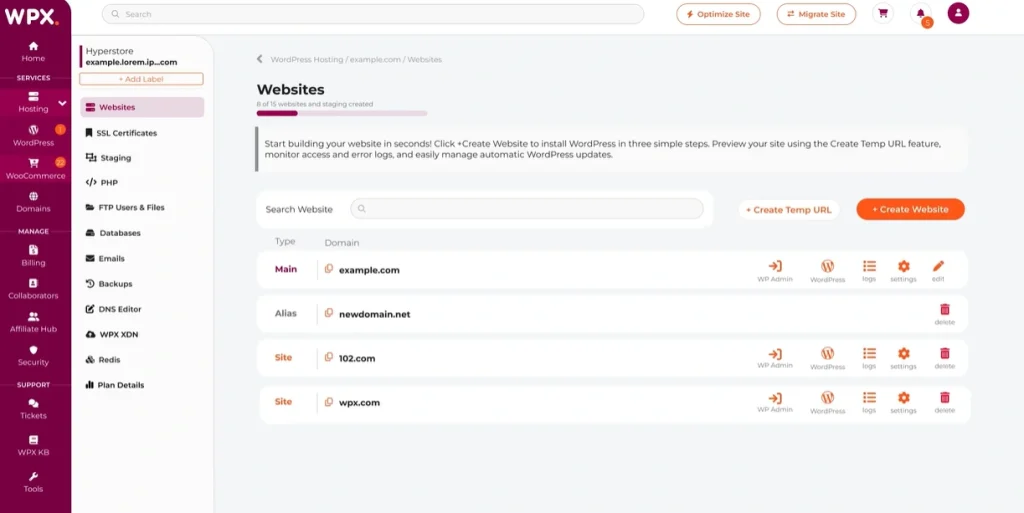
WPX uses a custom dashboard designed around its WordPress hosting service. The interface keeps website management, SSL, backups, email, staging, and CDN controls in one place.
ScalaHosting uses SPanel, which covers WordPress management as well as databases, domains, email accounts, PHP settings, security tools, and server configuration. It also includes Softaculous for installing supported applications.

| Control panel feature | WPX | ScalaHosting Cloud |
|---|---|---|
| Control panel | Custom WPX Control Panel | SPanel |
| Application installer | WordPress installer | Softaculous and WordPress Manager |
| Server configuration | Managed by WPX | More configuration options |
| Email management | Available on eligible plans | Integrated into SPanel |
| Additional applications | Primarily WordPress | Supports WordPress and other applications |
For a WordPress blog or affiliate website, WPX’s narrower dashboard is easier to work with. ScalaHosting is more useful if you manage multiple applications, need server-level settings, or want to control more aspects of your hosting environment.
Email Hosting
WPX does not include email hosting on its Starter plan, while eligible higher plans include domain-based email accounts.
ScalaHosting includes email hosting with its Cloud plans, allowing you to manage website email accounts through SPanel.
| Email feature | WPX | ScalaHosting Cloud |
|---|---|---|
| Email hosting | Not included on Starter | Included |
| Mailbox management | Available on eligible plans | Through SPanel |
| Email storage | Uses hosting storage | Uses hosting storage |
| Sending limits | Plan-specific limits apply | Provider limits and anti-spam policies apply |
WooCommerce Management
WPX offers a WordPress-focused environment for WooCommerce stores, including Redis on eligible WooCommerce plans. Its simplified dashboard suits store owners who prefer the hosting provider to handle server administration.
ScalaHosting offers WooCommerce management tools through its WordPress Manager and SPanel. These include staging, cloning, backups, PHP configuration, and additional server controls on supported plans.
WPX is the simpler choice for store owners who want a managed WordPress environment. ScalaHosting is more suitable if you need dedicated server resources and want best control over the hosting configuration.
Which Host Is Easier to Use?
WPX wins for simplicity. Its dashboard concentrates on the tasks most WordPress site owners perform regularly, without requiring them to manage server settings.
ScalaHosting has a broader interface, but its additional controls are useful for developers, agencies, and website owners managing several applications. You may need more time to learn SPanel, but you also get more flexibility.
- Choose WPX if you want a straightforward WordPress hosting experience.
- Choose ScalaHosting if you want WordPress management tools alongside broader control over your hosting environment.
Data Centers and CDN
WPX and ScalaHosting differ in how they deliver website content to visitors. WPX includes its proprietary XDN CDN with its managed WordPress hosting, while ScalaHosting lets you choose from a wider range of hosting regions and use Cloudflare for content delivery.
Data Center Locations
WPX operates three main hosting locations: Chicago in the United States, London in the United Kingdom, and Sydney in Australia. You select the location where your website is hosted, and that remains its origin server unless you migrate it to another location.
ScalaHosting offers its own infrastructure in Dallas, New York, Seattle, and Sofia, Bulgaria. Its Cloud VPS options also include locations provided through AWS and other infrastructure partners, giving customers a broader choice of server regions.
| Location | WPX | ScalaHosting Cloud |
|---|---|---|
| United States | Chicago | Dallas, New York, Seattle, plus partner regions |
| Europe | London | Sofia, plus partner regions |
| Asia | No Asian origin data center | Mumbai, Singapore, Tokyo, Seoul, and other partner regions |
| Australia | Sydney | Sydney through partner infrastructure |
| Choice of origin location | 3 main locations | 13+ locations |
ScalaHosting is the better option if you need to place your origin server in India or another specific region outside WPX’s three locations. WPX’s smaller selection is less restrictive when most of your content can be delivered through its CDN.
CDN
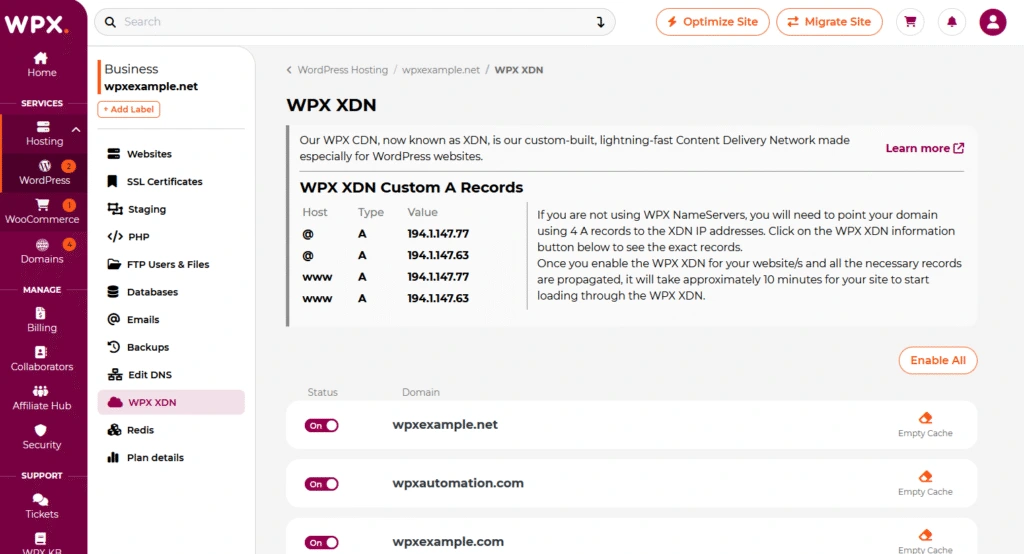
WPX includes XDN, its proprietary CDN, on its hosting plans. The network has more than 43 endpoints across multiple regions, including North America, Europe, Asia, and Australia. It can serve cached content closer to visitors without requiring you to purchase a separate CDN service.
ScalaHosting offers Cloudflare integration through SPanel. Cloudflare can distribute cached content through its global network, but the available features depend on the Cloudflare plan and configuration you use. It is important to distinguish CDN integration from a fully configured CDN: you may need to configure DNS, caching, and other settings to get the desired results.
| CDN feature | WPX | ScalaHosting Cloud |
|---|---|---|
| CDN | Proprietary XDN | Cloudflare integration |
| Network coverage | 43+ XDN endpoints | Cloudflare’s global network |
| Included with hosting | Yes | Cloudflare integration available |
| Separate CDN subscription required | No for XDN | Not necessarily; depends on the Cloudflare plan |
| Origin server location | Chicago, London, or Sydney | Multiple regions, depending on the selected infrastructure |
| Configuration | Integrated into WPX hosting | Managed through Cloudflare and hosting settings |
A CDN can reduce the distance cached images, stylesheets, scripts, and other supported content must travel. It does not automatically move your WordPress database or PHP processing closer to every visitor, so the origin server location still matters for uncached and dynamic requests.
Which Host Has the Better Data Centers and CDN?
ScalaHosting wins on origin-server location choice, particularly if your audience is concentrated in India or another region where WPX does not offer a hosting data center. Its partner infrastructure gives you more flexibility when choosing where the website itself runs.
WPX offers the simpler CDN setup. XDN is included and integrated into the hosting service, whereas ScalaHosting gives you the flexibility to use Cloudflare and configure your delivery setup.
- For a WordPress blog or affiliate website with visitors spread across several countries, WPX’s included XDN may be sufficient without additional configuration.
- For a website that depends heavily on dynamic requests or needs its origin server close to a particular audience, ScalaHosting’s wider selection of server regions is the stronger advantage.
Security and Backups
WPX and ScalaHosting both include security protection and automatic backups, but the main difference is what happens when something goes wrong.
WPX includes malware cleanup by its support team, while ScalaHosting provides server-level security tools and backup controls through SPanel.
Security
WPX includes daily malware scans, a Web Application Firewall (WAF), brute-force protection, free SSL certificates, and hybrid DDoS protection through its infrastructure and XDN network. If a site is infected, WPX cleans most malware files, although cleanup may not always be immediate.
ScalaHosting uses SShield to monitor suspicious activity, block malicious IP addresses, and alert customers to potential threats. Its hosting environment also supports ModSecurity and CSF firewall tools. Cloudflare can add another layer of protection when configured.
| Security feature | WPX | ScalaHosting Cloud |
|---|---|---|
| Malware scanning | Daily scans | SShield monitoring |
| Malware cleanup | Included; most malware files can be cleaned | No guaranteed free cleanup for an already compromised site |
| Firewall | ModSecurity-based WAF | ModSecurity and CSF, where configured |
| DDoS protection | Hybrid protection through WPX infrastructure and XDN | Server-level protection; Cloudflare options available |
| Brute-force protection | Included | Protection through available security tools |
| Free SSL | Yes | Yes |
| Security monitoring | Server and website protection | SShield monitoring and alerts |
Backups
Both providers create daily backups, but WPX keeps a longer standard recovery history. That matters when you discover a broken update, deleted content, or malware several days after the problem started.
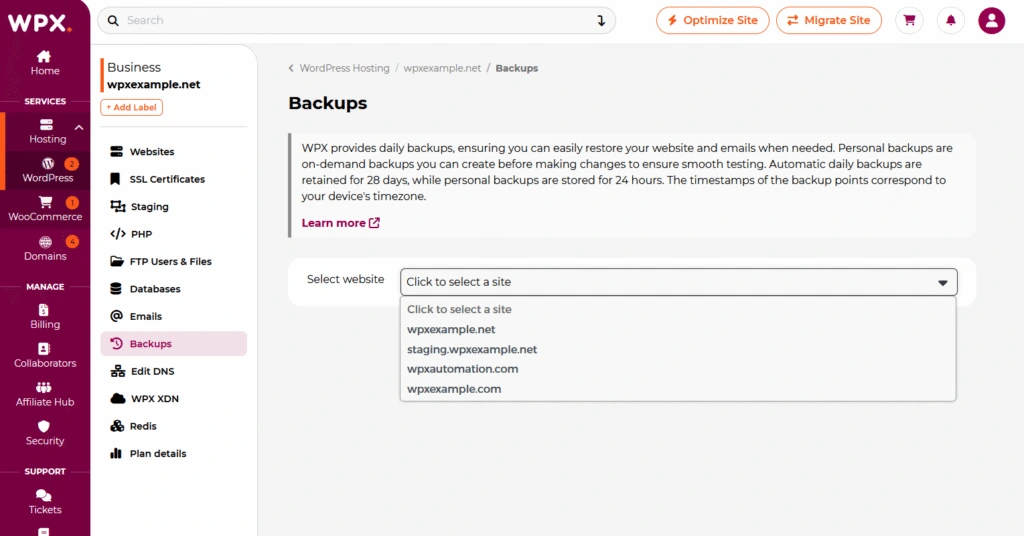
WPX stores automatic backups on a separate server for 28 days. You can restore them through the control panel. You can also create a Personal Backup before making changes, but these copies are kept for only 24 hours and use your hosting storage.
ScalaHosting Cloud provides off-site backups with seven restore points under the standard setup described in this comparison. You manage restoration through SPanel, and VPS snapshots can provide an additional recovery option where available.
| Backup feature | WPX | ScalaHosting Cloud |
|---|---|---|
| Automatic backups | Daily | Daily |
| Backup location | Separate backup server | Off-site storage |
| Standard retention | 28 days | 7 restore points |
| Manual backups | Personal Backups | On-demand backups |
| Backup restoration | Through WPX Control Panel | Through SPanel |
| Downloadable copies | Personal Backups can be downloaded | Depends on the backup method and configuration |
| VPS snapshots | Not applicable as a customer-managed VPS feature | Available on supported VPS configurations |
Which Host Is Better for Security and Backups?
For a WordPress blog or affiliate website where simple recovery and help with malware matter most, I would choose WPX.
For a site owner who values server control and is comfortable managing additional security and recovery tasks, ScalaHosting is a reasonable alternative.
Developer Tools
WPX provides the essential tools for WordPress development while keeping server management largely in the hands of its support team. ScalaHosting Cloud offers more control over server settings, command-line access, and scheduled tasks.
| Developer tool | WPX | ScalaHosting Cloud |
|---|---|---|
| SSH | Available with restrictions | Available |
| SFTP | Yes | Yes |
| Git | Limited deployment options | Git workflows through SSH |
| WP-CLI | Available when SSH is enabled | Supported |
| Cron jobs | Limited; contact support for server cron | SPanel scheduler and server cron |
| PHP versions | Managed environment | Multiple versions, depending on configuration |
| Web server | Managed LiteSpeed | More configurable options |
SSH, Git and WP-CLI
WPX suits developers who mainly work with WordPress files, staging sites, and occasional command-line tasks. Its managed environment reduces server administration but limits some development workflows.
ScalaHosting provides SSH access on Cloud and VPS plans, making it easier to run WP-CLI commands, work with Git, and manage files from the command line.
Cron Jobs and Server Configuration
WPX offers less direct control over server cron jobs and web server configuration. ScalaHosting provides cron scheduling through SPanel and greater flexibility over PHP settings and supported web servers.
Which Host Is Better for Developers?
ScalaHosting is the better choice if you need SSH, Git workflows, scheduled scripts, or server-level configuration. WPX is more suitable if you develop WordPress websites and prefer the hosting provider to manage the underlying server.
Customer Support
Both WPX and ScalaHosting offer 24/7 support, but the experience differs in how they handle problems.
WPX is good if you want help fixing WordPress issues, while ScalaHosting is useful if you also need assistance with server settings and other applications.
Support Channels
WPX offers live chat and ticket support. ScalaHosting provides live chat, tickets, and email support.
| Support channel | WPX | ScalaHosting |
|---|---|---|
| 24/7 live chat | Yes | Yes |
| Ticket support | Yes | Yes |
| Email support | Through tickets | Yes |
| Phone support | No | No |
Response Time and Technical Help
WPX advertises an average live chat response time of around 30 seconds. Its team will help you with website errors, speed problems, and malware cleanup. The “Fixed For You” service is also useful when you don’t want to spend time troubleshooting an issue yourself.
ScalaHosting ticket response time is of around 15 minutes. Its support team will help you with WordPress, hosting settings, and server-related problems. Keep in mind that a quick first response doesn’t necessarily mean the problem will be fixed just as quickly.
| Support quality | WPX | ScalaHosting |
|---|---|---|
| Response time | Around 30 seconds on live chat | ScalaHosting live chat answers in about 15 seconds. Tickets and email take about 15 minutes. |
| Help with WordPress issues | Yes | Yes |
| Malware cleanup | Included, subject to support policy | Free cleanup isn’t guaranteed |
| Availability | 24/7 | 24/7 |
Which Host Has Better Support?
WPX is the better choice if you want someone to help when your WordPress site breaks, slows down, or gets infected. Its quick live chat and malware cleanup can save you from handling these problems alone.
ScalaHosting makes more sense if you need help with server settings, hosting configuration, or applications beyond WordPress.
For a blog or affiliate website, I’d choose WPX for its hands-on help with website problems. If you prefer having more control over your server and need support for a wider range of applications, ScalaHosting is worth considering.
Pricing
WPX costs more on day one. ScalaHosting Cloud looks cheaper until the renewal bill arrives.
| Price | WPX | ScalaHosting Cloud |
|---|---|---|
| Starting price | $11.99/mo (5 year term) $14.99/mo (1 year term) | $14.95/mo (1 year term) |
| Renewal | No change | Renew at $39.95/mo |
| Free domain | No | Yes on Entry Cloud and managed VPS for first year |
| Money back | 30 days | 30 days full. Prorated anytime after that on hosting and VPS |
New ScalaHosting clients can get a full refund within 30 days. After that, unused hosting, reseller, and VPS time is refunded on a prorated basis.
On a long term, WPX is the steadier bill. ScalaHosting Cloud wins the first invoice, then jumps.
Pros and Cons
WPX Pros
- Free malware cleanup and daily malware scanning.
- XDN CDN included with hosting.
- Daily backups with 28-day retention.
- Free, unlimited website migrations.
- Simple dashboard designed around WordPress management.
- Hosting renewal rates remain consistent under the same pricing terms.
- 24/7 live chat support with quick responses.
WPX Cons
- CPU and RAM are shared rather than dedicated.
- Only three main hosting locations: Chicago, London, and Sydney.
- Starter does not include email hosting.
- Limited server-level control, Git workflows, and cron configuration.
- No free domain registration.
- Five-year pricing requires a substantial upfront payment.
ScalaHosting Pros
- Dedicated CPU and RAM on Cloud plans.
- NVMe storage and configurable server software.
- SPanel includes website, database, email, and backup management.
- More server locations through its own infrastructure and cloud partners.
- SSH, WP-CLI, Git workflows, and server cron on supported plans.
- Email hosting included with Cloud plans.
- Off-site backups and additional VPS snapshot options where supported.
ScalaHosting Cons
- Introductory prices increase significantly at renewal.
- Standard backup retention is shorter than WPX’s 28-day period.
- Cloudflare integration require additional configuration.
- Free malware cleanup for an already compromised website is not guaranteed.
- More server settings can make management less straightforward for beginners.
Which One Should You Choose?
Choose WPX if:
- You run a WordPress blog, affiliate website, or small business site.
- You want the hosting team to help with malware cleanup and website problems.
- You prefer an integrated CDN instead of configuring one yourself.
- You want daily backups with 28-day retention.
- You don’t need extensive server access or custom configurations.
- You prefer predictable renewal pricing and are comfortable with the available billing terms.
Choose ScalaHosting if:
- Your website or WooCommerce store needs dedicated CPU and RAM.
- You want more control over PHP settings, server software, and scheduled tasks.
- You need SSH, WP-CLI, and Git workflows for development.
- You want domain-based email hosting included with your Cloud plan.
- You need more choices for your server’s geographic location.
- You are comfortable managing additional hosting settings and checking renewal costs before committing.
Best Alternatives to WPX and ScalaHosting
If WPX or ScalaHosting doesn’t quite match what you need, there are several other managed WordPress hosts worth considering.
Here are top four alternatives to WPX and ScalaHosting.
| Hosting | Starting Price (Annual billing) | Sites | Storage | Best For |
|---|---|---|---|---|
| Pressable | $20.83/mo | 1 | 20 GB | Managed WordPress |
| Kinsta | $30/mo | 1 | 10 GB | High-performance WordPress |
| Cloudways | $11/mo | 1 | 25 GB | Flexible cloud hosting |
| WP Engine | $26/mo | 1 | 10 GB | Managed WordPress and agencies |
Pressable
Pressable is a managed WordPress hosting provider built around WordPress sites. Its Signature 1 plan costs $20.83/month when billed annually, with one WordPress install and 20GB of storage.
It includes features such as edge caching, daily and hourly backups, free migrations, staging, and 24/7 WordPress support.
Pressable is worth considering if you want a managed WordPress setup similar to WPX but want another hosting platform to compare.
Check this too: Pressable vs WPX
Kinsta
Kinsta runs its WordPress hosting on a premium cloud infrastructure. Its entry single-site plan is $30/month when billed annually, with one WordPress install and 10 GB of storage.
Kinsta includes free migrations, CDN bandwidth, staging and 14-day backup retention. It also provides a custom hosting dashboard rather than cPanel.
It’s a good alternative for businesses, blogs and WooCommerce sites that want managed WordPress hosting with cloud infrastructure.
Check this too: Kinsta vs WPX
Cloudways
Instead of operating like a traditional WordPress host, Cloudways provides managed cloud hosting and lets you choose the underlying cloud infrastructure.
Its current Small plan supports 25GB of disk space and 1 TB bandwidth. The price is $11/month.
Cloudways is a useful alternative if you want more control over the underlying cloud server while still having managed hosting tools.
It also offers features such as free migration, staging and cloning, Redis caching, object caching and vertical scaling.
Check these too: Cloudways vs WPX and Cloudways vs ScalaHosting
WP Engine
WP Engine is another managed WordPress hosting option. Its Startup plan is currently $26/month when billed annually, with one site, 25,000 monthly visits and 10GB of storage.
The plan includes staging and development environments, EverCache, a global CDN, automated SSL and 24/7 chat support.
WP Engine is a good alternative if you want a WordPress-focused platform with development and staging tools, particularly for business websites, agencies and professional WordPress projects.
Check this too: WP Engine vs WPX
For better option or more details, you can check these best WPX alternatives.
FAQs
Which is better, WPX or ScalaHosting?
WPX is a good choice for WordPress site owners who want managed hosting and hands-on support. ScalaHosting Cloud is better suited to websites that need dedicated CPU and RAM or greater server control.
Is WPX faster than ScalaHosting?
Neither host is guaranteed to be faster for every website. WPX benefits from its integrated XDN CDN, while ScalaHosting Cloud offers dedicated resources. Actual results depend on caching, configuration, and traffic.
Is ScalaHosting’s cheap plan a fair match for WPX?
Not really. ScalaHosting Mini is shared hosting, whereas its Cloud plans provide dedicated CPU and RAM. Compare WPX with a ScalaHosting Cloud plan for a more meaningful evaluation.
Does WPX include a free domain?
No, WPX does not include a free domain.
Which host has better support?
WPX is worth considering if you want hands-on help with WordPress problems and malware cleanup. ScalaHosting also offers 24/7 support for hosting and server-related issues.
Do both hosts include email?
ScalaHosting Cloud includes email hosting. WPX Starter does not include email, while higher plans do.
Which is better for WooCommerce?
ScalaHosting Cloud is worth considering for stores that need dedicated resources and more server control. WPX can suit stores that prefer managed WordPress hosting and its WooCommerce-specific features. The better choice depends on your store’s workload and plan limits.
Can I move my site for free?
Yes. Both providers offer free website migration.
What if I want my money back?
WPX offers a 30-day money-back guarantee. ScalaHosting offers a 30-day full refund for eligible services and prorated refunds on certain unused hosting services afterward. Domain registrations, licenses, and other exclusions may apply.
Final Verdict
WPX is the better choice if you want simple WordPress hosting, hands-on support, and an included CDN.
ScalaHosting Cloud is a better fit if you need dedicated CPU and RAM, more server control, and greater flexibility.
For blogs and affiliate websites, I’d lean toward WPX. For growing websites and resource-intensive WooCommerce stores, ScalaHosting Cloud is worth considering.