
Bluehost has been around for years, but that doesn’t automatically make it the best web hosting provider in 2026. With newer cloud hosts, managed platforms, and AI-powered website builders entering the market, it’s worth asking whether Bluehost still delivers the performance, features, and value that modern websites need.
In this Bluehost review, you’ll see exactly what the platform offers today, where it performs well, and where it falls short. I’ll cover its hosting plans, speed, uptime, ease of use, security, support, pricing, and everything else that matters, so you can decide if Bluehost is the right choice before spending your money.
Bluehost Review – Quick Summary
| Feature | Bluehost |
|---|---|
| Founded | 2003 |
| Parent Company | Newfold Digital |
| Headquarters | Jacksonville, Florida, USA |
| WordPress Recommendation | Officially recommended by WordPress.org since 2005 |
| Customers | 5+ million WordPress users |
| Hosting Types | Shared, WordPress, WooCommerce, Cloud, VPS, Managed VPS, VDS, Dedicated & Agency Hosting |
| Starting Price | From $3.99/mo |
| Shared Hosting Plans | Basic, Choice Plus, Online Store, Pro |
| Cloud Hosting Plans | Cloud 10, Cloud 25, Cloud 50 |
| Free Domain | Yes (1st year on eligible plans) |
| Domain Registration | Yes |
| Domain Transfer | Yes |
| Free SSL Certificate | Yes |
| Storage | NVMe SSD Storage |
| CDN | Cloudflare CDN |
| Cloud CDN | Cloudflare Enterprise CDN (Cloud Hosting) |
| Website Builder | WonderSuite AI |
| AI Features | AI Site Creation, AI onboarding, AI website customization |
| Control Panel | Bluehost Dashboard + cPanel |
| WordPress Installation | One-click |
| WordPress Optimization | Yes |
| WooCommerce Support | Yes |
| Free Website Migration | Free WordPress Migration Tool |
| Staging Environment | Yes (supported plans) |
| Git Support | Yes |
| WP-CLI | Yes |
| SSH Access | Yes |
| FTP/SFTP | Yes |
| File Manager | Yes |
| MySQL Databases | Yes |
| phpMyAdmin | Yes |
| Multiple PHP Versions | Yes |
| Cron Jobs | Yes |
| DNS Management | Yes |
| Email Hosting | Yes |
| Professional Email | Available |
| Server-Level Caching | Yes |
| Redis Object Cache | Supported plans |
| Browser Caching | Yes |
| Page Caching | Yes |
| Object Caching | Yes |
| DDoS Protection | Yes |
| Web Application Firewall | Yes |
| Malware Scanning | Yes |
| Automatic WordPress Updates | Yes (supported plans) |
| Backup | Weekly backups (eligible plans) |
| Premium Backup | CodeGuard (optional) |
| Site Monitoring | Available |
| SiteLock Security | Optional |
| Two-Factor Authentication | Yes |
| Uptime Guarantee | 99.99% (eligible Shared Hosting plans) |
| Cloud Uptime SLA | 100% Network Uptime SLA |
| Auto Failover | Cloud Hosting |
| Auto Scaling | Cloud Hosting |
| Multi-Region Infrastructure | Cloud Hosting |
| Daily Malware Scans | Cloud Hosting |
| Global Data Center Regions | 10 |
| Money-Back Guarantee | 30 Days |
| Customer Support | 24/7 Live Chat & Phone |
| Knowledge Base | Yes |
| AI Support Assistant | Yes |
| Best For | Beginners, WordPress, WooCommerce, Agencies & Growing Businesses |
| Scalability | Shared → Cloud → VPS → Managed VPS → VDS → Dedicated |
| Renewal Pricing | Higher than introductory pricing |
| Overall Ease of Use | Excellent |
| Visit | Bluehost Website |
About Bluehost

Bluehost has been in the web hosting industry since 2003 and has earned a strong reputation among beginners, bloggers, businesses, and WordPress users. Over the years, it has expanded far beyond shared hosting and now offers everything from WordPress and WooCommerce hosting to Cloud, VPS, Managed VPS, VDS, Dedicated, and Agency Hosting.
One of Bluehost’s biggest strengths is its close connection with WordPress. It has been officially recommended by WordPress.org since 2005 and currently powers more than 5 million WordPress websites. Whether you’re starting your first website or planning to scale to a larger project, Bluehost provides a complete ecosystem with hosting, domains, email, AI-powered website creation, and website management tools under one platform.
| Parent Company | Newfold Digital |
| WordPress Recommendation | Since 2005 |
| WordPress Users | 5+ Million |
| Hosting Solutions | Shared, WordPress, WooCommerce, Cloud, VPS, Managed VPS, VDS, Dedicated & Agency Hosting |
Key Features
- AI-powered WonderSuite website builder
- Free domain for the first year (eligible plans)
- Free SSL certificate
- One-click WordPress installation
- WordPress-optimized hosting
- Built-in CDN
- SSD storage
- Free WordPress migration (eligible websites)
- Shared, WordPress, WooCommerce, Cloud, VPS, Managed VPS, VDS, Dedicated, and Agency hosting
- eCommerce-ready WooCommerce hosting
- Professional email hosting options
- DDoS protection
- Malware scanning options
- Domain privacy available
- Beginner-friendly hosting dashboard
- 24/7 live chat and phone support
- Easy hosting upgrades as your website grows
What Makes Bluehost Stand Out?
Unlike many hosting providers that focus on just one or two services, Bluehost has built a complete ecosystem for different types of users.
- Officially recommended by WordPress.org since 2005.
- Supports over 5 million WordPress users worldwide.
- Covers every major hosting category, from Shared Hosting to Dedicated Servers.
- Offers both traditional VPS and Managed VPS, giving users more flexibility.
- Includes WonderSuite, an AI-powered WordPress website creation experience.
- Has a dedicated Agency Hosting platform for freelancers and agencies.
- Lets you manage hosting, domains, email, and websites from a single dashboard.
- Makes it easier to upgrade to more powerful hosting plans as your website grows without changing providers.
Performance & Speed Tests
Bluehost has significantly upgraded its hosting infrastructure over the past few years. Instead of relying on basic shared hosting technology, newer plans include faster storage, server-level optimizations, and platform-specific enhancements that help improve website loading times.
NVMe SSD Storage
Bluehost now uses NVMe SSD storage across its modern hosting offerings, providing much faster read and write speeds than traditional SATA SSDs.
Benefits include:
- Faster page loading
- Improved database performance
- Quicker file transfers
- Better backend responsiveness
- Reduced latency during high disk activity
Server-Level WordPress Caching
Rather than depending entirely on caching plugins, Bluehost includes server-level WordPress caching on supported hosting plans.
This helps by:
- Reducing server response time
- Serving cached pages more efficiently
- Lowering server load during traffic spikes
- Improving overall page delivery
Optimized WordPress Stack
Bluehost’s WordPress hosting is specifically tuned for WordPress websites instead of being a generic Linux hosting environment.
Performance-focused optimizations include:
- Automatic WordPress updates
- Optimized PHP environment
- Built-in WordPress caching
- Faster WordPress deployment
- AI-assisted site setup without unnecessary manual configuration
High-Speed Network (Managed VPS)
If you choose Managed VPS Hosting, Bluehost offers a much stronger infrastructure than standard shared hosting.
Performance highlights include:
- Up to 100 Gbps port speed
- Unmetered data transfer
- NVMe SSD storage
- Server-level caching
- Dedicated virtual resources
These resources make Managed VPS much better suited for busy business websites, online stores, and applications that need consistent performance.
Performance Across Hosting Plans
Your website’s speed depends heavily on the hosting plan you choose.
- Shared Hosting is suitable for personal websites and small businesses with moderate traffic.
- WordPress Hosting delivers additional performance optimizations specifically for WordPress sites.
- Cloud Hosting is designed for high-traffic WordPress websites with automatic resource scaling.
- VPS and Managed VPS Hosting provide dedicated virtual resources for demanding workloads.
- VDS and Dedicated Hosting offer the highest level of computing resources for resource-intensive applications.
Real-World Speed Expectations
Bluehost provides a solid technical foundation, but hosting alone doesn’t guarantee a fast website.
If you want to make your WordPress site load faster, you should also:
- Use a fast loading WordPress theme.
- Compress images using a image compression plugin for WordPress.
- Remove unnecessary plugins.
- Keep WordPress, themes, and plugins updated.
- Optimize your database regularly.
With a properly optimized website on the right Bluehost hosting plan, you can expect fast page loading and consistent performance for most business and WordPress websites.
Uptime & Reliability
Keeping your website online is just as important as making it fast. Whether you run a blog, business website, or online store, frequent downtime can lead to lost visitors, missed sales, and lower search engine rankings.
Uptime Guarantee
Bluehost now provides a 99.99% uptime guarantee for eligible Shared Hosting plans purchased on or after March 5, 2025.
If uptime falls below this commitment due to covered downtime, you may be eligible for a service credit, subject to Bluehost’s uptime policy and exclusions.
Cloud Hosting Reliability
Bluehost’s Cloud Hosting is built differently from its traditional hosting plans.
Key reliability features include:
- 100% network uptime SLA
- Automatic failover
- Real-time site replication
- Multi-region cloud infrastructure
- Automatic resource scaling during traffic spikes
- Continuous uptime monitoring
These features help minimize downtime even if an individual server encounters issues.
Reliable Infrastructure
Bluehost focuses on maintaining consistent website availability through:
- Enterprise-grade hosting infrastructure
- Proactive server monitoring
- Redundant network architecture
- Scheduled maintenance to improve long-term stability
- Automatic handling of many infrastructure-level issues before they affect websites
Data Center Locations
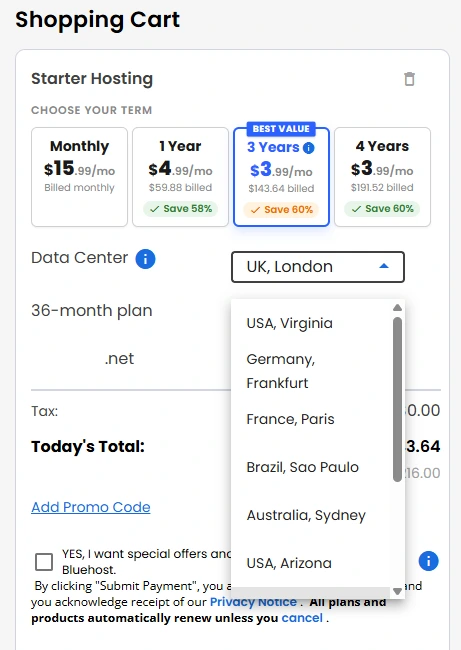
Unlike some hosting providers, Bluehost does not publicly publish a complete list of all standard hosting data center locations. However, the company has expanded its infrastructure significantly and now allows customers to choose a server region for several hosting products, helping reduce latency by hosting websites closer to their visitors.
Available Regions
Bluehost currently offers 10 server locations in multiple global regions, including:
- UK, London
- India, Mumbai
- Canada, Toronto
- Spain, Madrid
- USA, Virginia
- Germany, Frankfurt
- France, Paris
- Brazil, Sao Paulo
- Australia, Sydney
- USA, Arizona
Can You Choose a Data Center?
Yes, Bluehost allows you to select a data center region for supported hosting plans during the signup process. This helps reduce latency for your target audience and can improve overall website responsiveness.
CDN & Caching Technology
Bluehost includes multiple built-in performance technologies, so you don’t have to configure a separate CDN service or install a WordPress caching plugin in most cases. The platform combines Cloudflare CDN with several caching layers to improve loading speed and reduce server load.
Cloudflare CDN
Bluehost integrates Cloudflare CDN directly into its hosting platform.
Key benefits include:
- Global content delivery through Cloudflare’s edge network
- Faster loading for international visitors
- Lower latency by serving static files from the nearest edge location
- Reduced bandwidth usage on the origin server
- Built-in DDoS protection and additional security benefits
The CDN can be managed directly from the Bluehost dashboard.
Built-in Caching
Instead of relying solely on plugins, Bluehost automatically manages multiple caching layers.
These include:
- Page caching
- Object caching (Redis on supported WordPress hosting plans)
- Browser caching
- CDN caching through Cloudflare
All of these work together automatically to improve performance and reduce server workload.
Caching Levels
Bluehost lets you choose how aggressively your website is cached.
Available options include:
- Assets Only – Best for WooCommerce stores and frequently updated websites.
- Assets & Web Pages – Recommended for blogs and websites that publish content regularly.
- Assets & Web Pages – Extended – Best for portfolios and websites where content rarely changes.
You can also clear the entire cache or purge the cache for a specific URL directly from the hosting dashboard whenever you publish updates.
Do You Need a Caching Plugin?
In most cases, no.
Since Bluehost already provides managed page caching, object caching, browser caching, and Cloudflare CDN, installing third-party caching plugins is generally not recommended. Bluehost warns that plugins such as WP Super Cache, W3 Total Cache, LiteSpeed Cache, and WP Fastest Cache may conflict with its built-in caching system.
Ease of Use and Dashboard
One of Bluehost’s biggest strengths is its beginner-friendly experience. Instead of expecting you to manage everything through a traditional hosting control panel, Bluehost provides its own dashboard that brings website, hosting, domain, and email management into one place.
Clean Account Dashboard
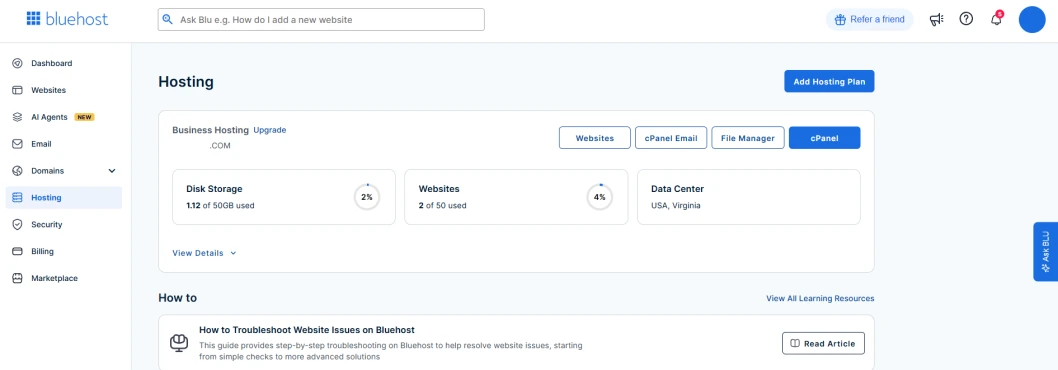
After logging in, you’ll find dedicated sections for:
- Websites
- Hosting
- Domains
- Emails
- Marketplace
- Account & Billing
This layout makes it easy to find common settings without navigating through multiple menus.
Guided Website Setup
Bluehost simplifies the setup process with WonderSuite, its AI-powered onboarding experience, which helps even beginners get a WordPress site up and running.
It helps you:
- Create a new WordPress website
- Choose a design based on your needs
- Customize pages with guided suggestions
- Launch your website with minimal manual configuration
This is especially useful if you’re building your first website.
cPanel Access
Although Bluehost has its own modern dashboard, it still provides access to cPanel for users who prefer traditional hosting management.
Through cPanel, you can manage:
- Files
- Databases
- Email accounts
- PHP settings
- DNS records
- Cron jobs
- Backups (where available)
WordPress Management
Managing WordPress is straightforward from the Bluehost dashboard.
You can quickly:
- Install WordPress
- Log in to the WordPress admin panel
- Manage plugins and themes
- Access website settings
- Monitor your hosted websites from a single account
My Experience
Bluehost does a good job of balancing simplicity with flexibility. Beginners can manage most tasks without touching cPanel, while advanced users still have access to the tools they expect. The dashboard feels organized, and common website management tasks are easy to find.
Security and Backup
Bluehost includes essential security features with every hosting plan, while advanced protection and backup tools are available as optional upgrades. This lets you start with basic protection and add stronger security as your website grows.
Built-in Security Features
Every Bluehost hosting plan includes:
- Free SSL certificate
- Secure HTTPS encryption
- DDoS protection through Cloudflare
- WordPress core update support (on supported plans)
- Security management from the Bluehost dashboard
Security Dashboard
Bluehost provides a dedicated Security section where you can:
- View and manage SSL certificates
- Access the SSL Manager
- Enable or manage SiteLock (if purchased)
- Check WordPress core files for integrity
- Configure IP Blocker
- Enable Hotlink Protection
SiteLock Protection
For websites that need additional security, Bluehost offers SiteLock as an optional add-on, similar to the WordPress security plugin options many site owners install separately.
Depending on your plan, SiteLock can provide:
- Malware scanning
- Vulnerability detection
- Real-time threat monitoring
- Virtual patching
- Malware removal (selected plans)
Backup Options
Bluehost offers multiple backup solutions based on your hosting plan.
Available options include:
- Basic weekly backups on eligible Shared Hosting plans
- Manual backups through your hosting tools (where supported)
- CodeGuard cloud backups as an optional upgrade
CodeGuard Backup
If you need stronger backup protection, CodeGuard adds several useful features:
- Automatic daily backups
- One-click website restoration
- Daily website change monitoring
- Encrypted cloud backup storage
- On-demand backups (selected plans)
- Backup notifications
My Take
Bluehost provides a solid security foundation with free SSL and built-in security management. However, if your website is business-critical or generates revenue, I’d recommend enabling CodeGuard for automated daily backups and considering SiteLock for enhanced malware protection, and taking extra steps to increase your WordPress website security, since the default security features are more suited to basic website protection.
Developer Tools
Although Bluehost is known for its beginner-friendly hosting, it also includes several tools that make development, testing, and website management easier for developers and advanced users.
Command Line & Version Control
- SSH access
- Git integration
- WP-CLI support for WordPress management
These tools allow you to manage files, automate tasks, and deploy changes without relying on the browser-based interface.
Database & Programming Support
Bluehost supports popular web development technologies, including:
- PHP
- MySQL databases
- phpMyAdmin
- Multiple PHP versions (supported plans)
Advanced Configuration
Developers can manage various server settings, such as:
- Cron Jobs
- DNS records
- File Manager
- FTP/SFTP accounts
- Redirects
- Error pages
Staging Environment
Supported WordPress hosting plans include a staging environment, allowing you to:
- Test new plugins and themes
- Make design changes safely
- Push changes to the live website after testing
Developer-Friendly Hosting Options
As projects grow, Bluehost offers multiple upgrade paths:
- VPS Hosting for dedicated virtual resources
- Managed VPS for reduced server administration
- VDS for higher performance and isolation
- Dedicated Hosting for maximum control and resources
Customer Support & Quality

When you run into an issue, Bluehost offers multiple ways to get help. Whether it’s a billing question, a WordPress problem, or a server-related issue, support is available around the clock.
Support Channels
Bluehost provides:
- 24/7 Live Chat
- 24/7 Phone Support
- Knowledge Base
- AI-powered Support Assistant
The AI assistant can answer common questions instantly, while more complex issues can be escalated to a human support representative.
Knowledge Base
If you prefer solving problems yourself, Bluehost has an extensive knowledge base covering topics such as:
- Getting started
- WordPress tutorials
- Domain management
- Email setup
- SSL certificates
- DNS configuration
- Security
- Billing and account management
Most articles include step-by-step instructions with screenshots.
Support Experience
From my evaluation, Bluehost’s support is well-suited for beginners because representatives can help with account-related issues, hosting setup, and basic WordPress guidance.
For more advanced server administration or custom development problems, the support team may provide general guidance, but you’ll usually be responsible for troubleshooting your own code or application.
What I Like
- Support is available 24/7.
- Multiple support options are available.
- Beginner-friendly assistance.
- Large self-help documentation library.
- AI assistant helps resolve simple issues quickly.
Room for Improvement
- Wait times may increase during peak hours.
- Advanced development issues typically fall outside standard support.
- Some premium services may require additional paid support or add-ons.
Pricing & Plans
Bluehost offers nine hosting solutions, allowing you to choose a plan based on your website’s requirements and expected growth.
Hosting Plans & Starting Prices
| Hosting Type | Starting Price |
|---|---|
| Shared Hosting | $3.99/month |
| WordPress Hosting | $3.99/month |
| WooCommerce Hosting | $14.99/month |
| Cloud Hosting | $65.00/month |
| VPS Hosting | $2.09/month |
| Managed VPS Hosting | $49.99/month |
| VDS Hosting | $13.59/month |
| Dedicated Hosting | $144.19/month |
| Agency Hosting | $65.00/month |
Included with Most Hosting Plans
- Free domain for the first year
- Free SSL certificate
- NVMe SSD storage
- Cloudflare CDN
- AI-powered WonderSuite
- One-click WordPress installation
- Free WordPress migration tool
- Malware scanning
- DDoS protection
- Web Application Firewall (WAF)
- 24/7 customer support
Important Things to Know
- Introductory pricing applies to the first billing term only.
- Renewal prices are higher than promotional prices.
- Pricing varies depending on the subscription length you choose.
- VPS, Managed VPS, VDS, Dedicated, and Agency Hosting pricing is available on request or during plan configuration.
Real User Reviews & Ratings
Instead of relying on a single review platform, here’s a snapshot of Bluehost’s reputation across multiple trusted websites.
Overall Ratings
| Review Platform | Rating | Reviews |
|---|---|---|
| Trustpilot | ⭐ 4.5/5 | 30,700+ Reviews |
| G2 | ⭐ 3.4/5 | 280+ Reviews |
What Users Like
Across all review platforms, customers frequently mention:
- Easy setup for beginners
- User-friendly dashboard
- Good value with introductory pricing
- Helpful live chat and phone support
- Smooth WordPress installation
- All-in-one hosting ecosystem
Common Complaints
The most frequently reported issues include:
- Higher renewal prices after the initial term
- Occasional billing or subscription concerns
- Shared hosting performance can vary during peak usage
- Advanced technical issues may require more troubleshooting
- Upselling of premium add-ons during checkout
Alternatives to Bluehost
If Bluehost doesn’t meet your requirements, there are several reliable hosting providers worth considering. Each one focuses on different strengths, whether it’s affordability, performance, managed support, or scalability.
Quick Comparison
| Hosting Provider | Best For | Starting Price |
|---|---|---|
| Bluehost | Beginners & WordPress users | $3.99/month |
| Hostinger | Budget-friendly hosting | $2.99/month |
| HostArmada | Performance & support | $1.99/month |
| InMotion Hosting | Business websites | $4.79/month |
| WPX | Premium managed WordPress hosting | $11.99/mo |
Hostinger
Hostinger is a great choice if you want to keep costs low without sacrificing essential features. It includes LiteSpeed web servers, NVMe storage, a custom hPanel, AI tools, and generous resources, making it ideal for beginners and small businesses.
Not sure which one gives you better value? Our Bluehost vs Hostinger comparison breaks down the differences in performance, features, pricing, and overall experience.
HostArmada
HostArmada focuses on performance and customer support. It offers cloud-based infrastructure, LiteSpeed web servers on selected plans, free daily backups, strong security features, and a growing global network of data centers.
InMotion Hosting
InMotion Hosting is well suited for businesses, developers, and growing websites. It provides NVMe storage, advanced developer tools, generous server resources, free website migration, and a wide range of VPS and dedicated hosting solutions.
Before making your decision, our Bluehost vs InMotion Hosting comparison shows where each provider performs better and which one offers the best value for different types of websites.
WPX Hosting
If your priority is premium WordPress performance and hands-on support, WPX Hosting is worth considering. It focuses entirely on managed WordPress hosting, offering fast servers, free unlimited website migrations, built-in CDN, and a support team that’s known for quick response times.
If you’re deciding between the two, our Bluehost vs WPX Hosting comparison highlights which provider offers better speed, support, and overall value for your website.
Who Should Choose Bluehost?
Choose Bluehost If
- You’re launching your first website or blog.
- You want a beginner-friendly hosting dashboard.
- You need an officially WordPress-recommended hosting provider.
- You want an all-in-one solution for hosting, domains, email, and website management.
- You plan to build a WooCommerce store.
- You want AI-powered website creation with WonderSuite.
- You expect to upgrade from Shared Hosting to Cloud, VPS, or Dedicated Hosting in the future.
- You prefer 24/7 live chat and phone support.
Avoid Bluehost If
- You want the lowest long-term renewal pricing.
- You need unmanaged hosting with complete server-level control from the start.
- You require a provider that publicly lists all of its data center locations.
- You need advanced backup and security features included without purchasing add-ons.
- You want highly customizable hosting with extensive developer-focused configurations on entry-level plans.
- You’re looking for ultra-budget hosting with the fewest possible upsells.
Is Bluehost Worth It?
For most beginners, bloggers, those seeking hosting for small businesses, and WordPress users, yes. Bluehost combines a beginner-friendly dashboard, AI-powered website creation, WordPress optimization, NVMe storage, Cloudflare integration, and a wide range of hosting solutions under one platform.
It’s particularly worth considering if you want a hosting provider that can grow with your website. You can start with Shared Hosting and later upgrade to Cloud, VPS, Managed VPS, VDS, or Dedicated Hosting without switching providers.
That said, Bluehost isn’t the perfect fit for everyone. Renewal pricing is noticeably higher than introductory rates, and advanced security or backup features may require paid add-ons. If your priority is the lowest long-term cost or extensive developer customization on entry-level plans, you may find better alternatives.
Final Verdict
Bluehost continues to be a solid choice for anyone looking for a reliable, beginner-friendly hosting provider with room to grow. Its wide range of hosting solutions, AI-powered website tools, WordPress optimization, and straightforward dashboard make it easy to build and manage websites without a steep learning curve.
While it’s important to consider renewal pricing and the cost of optional add-ons, Bluehost delivers a strong overall package for most users. If you’re looking for a hosting provider that balances ease of use, performance, scalability, and long-term growth, Bluehost is well worth considering in 2026.
FAQs
Is Bluehost good for beginners?
Yes. Bluehost is one of the easiest hosting providers for beginners thanks to its intuitive dashboard, AI-powered WonderSuite, one-click WordPress installation, and 24/7 customer support.
Is Bluehost officially recommended by WordPress?
Yes. Bluehost has been officially recommended by WordPress.org since 2005 and offers hosting environments specifically optimized for WordPress websites.
Does Bluehost include a free domain?
Yes. Most Bluehost hosting plans include a free domain name for the first year. After that, standard domain renewal charges apply, so many users look at other affordable domain name providers when renewal time comes.
Does Bluehost provide free website migration?
Yes. Bluehost offers a free WordPress migration tool for eligible websites, making it easier if you’re planning to move your WordPress site to a new host. Professional migration services are also available for more complex website transfers.
Is Bluehost good for eCommerce websites?
Yes. Bluehost offers dedicated WooCommerce Hosting with features designed for online stores, including payment plugin options for WordPress, store management tools, and WordPress optimization.
Does Bluehost offer a money-back guarantee?
Yes. Bluehost provides a 30-day money-back guarantee on eligible hosting plans. However, domain registration fees and certain add-ons may not be refundable.
Can I upgrade my hosting plan later?
Yes. You can upgrade from Shared Hosting to Cloud Hosting, VPS, Managed VPS, VDS, or Dedicated Hosting as your website grows, without moving to another hosting provider.
Does Bluehost use cPanel?
Yes. Bluehost provides its own modern account dashboard while still offering access to cPanel for users who prefer traditional hosting management.
Is Bluehost worth it in 2026?
For beginners, bloggers, small businesses, and WordPress users, Bluehost remains a strong choice in 2026 due to its ease of use, wide range of hosting plans, WordPress integration, and scalable infrastructure.
Nice article!
Thanks!
Best hosting for wordpress starter blog i highly recommended for every one go for bluehost bro…
Dude, this is a great review. I have pretty much the same thinking about BlueHost. They are good.