

Looking for a working WP Engine coupon code to save on WordPress hosting? I’ve got a discount that can help you get WP Engine hosting at a lower price.
WP Engine is known for its fast performance, strong security, and reliable WordPress support, but its plans aren’t exactly cheap.
In this guide, I’ll share the latest WP Engine discount, show you how to claim it, and explain how much you can save.
WP Engine Coupon Code 2026
You can currently get 25% OFF WP Engine hosting using the coupon code WPE3FORFREE. The best part is that this discount works on both monthly and annual billing plans.
With this offer, WP Engine’s monthly hosting price drops from $35 to just $26.25/month, saving you $8.75 per month.
Here are the coupon details:
| Coupon Details | Offer |
|---|---|
| WP Engine Coupon Code | WPE3FORFREE |
| Discount | 25% OFF |
| Regular Monthly Price | $35/month |
| Discounted Monthly Price | $26.25/month |
| Billing Options | Monthly and Annual |
| Coupon Status | Available |
To claim the discount, choose your preferred WP Engine hosting plan and apply the coupon at checkout. Make sure the 25% discount appears in your order summary before completing your purchase.
How to Use WP Engine Coupon Code (Step-by-Step)
Getting 25% off WP Engine hosting is easy. The WPE3FORFREE coupon is usually applied automatically when you visit WP Engine through our discount link.
Here’s how to claim your discount:
Step 1: Visit the WP Engine Website
Click the Get WP Engine Deal Now button on this page.
You’ll be redirected to the official WP Engine website with the discount already activated.
Step 2: Choose Your Hosting Plan
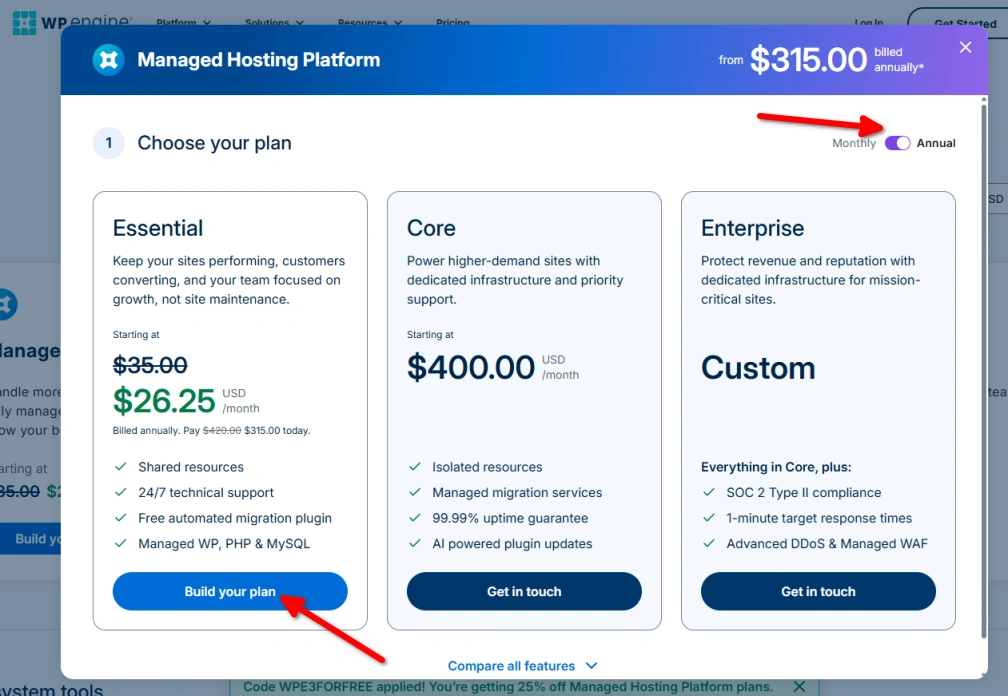
You’ll see a popup displaying WP Engine’s hosting plans, including Essential, Core, and Enterprise.
The Essential plan starts at $26.25/month instead of $35/month with the discount applied.
Click Build your plan to continue.
Step 3: Select Monthly or Annual Billing
Use the billing toggle at the top to choose between Monthly and Annual payments.
The 25% coupon works with both billing options, so select the one you prefer.
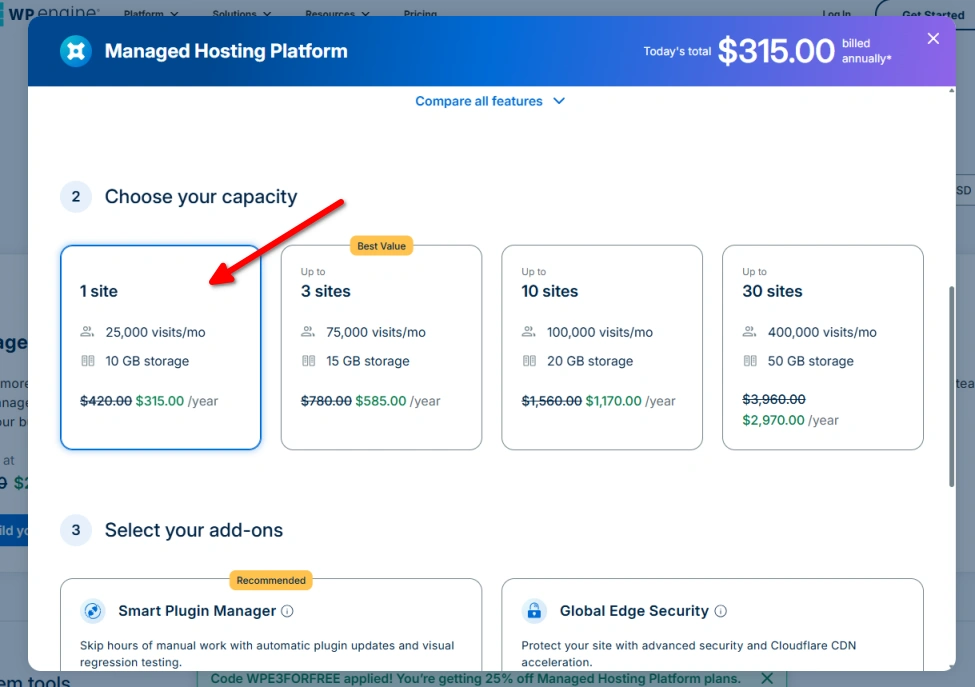
Step 4: Customize Your Hosting Plan
Follow the on-screen instructions to configure your hosting plan and select any additional features you need.
Once you’re happy with your selections, proceed to Add to Cart.
Step 5: Verify Your Coupon and Complete Checkout
Before making your payment, check that the 25% discount appears in your order summary.
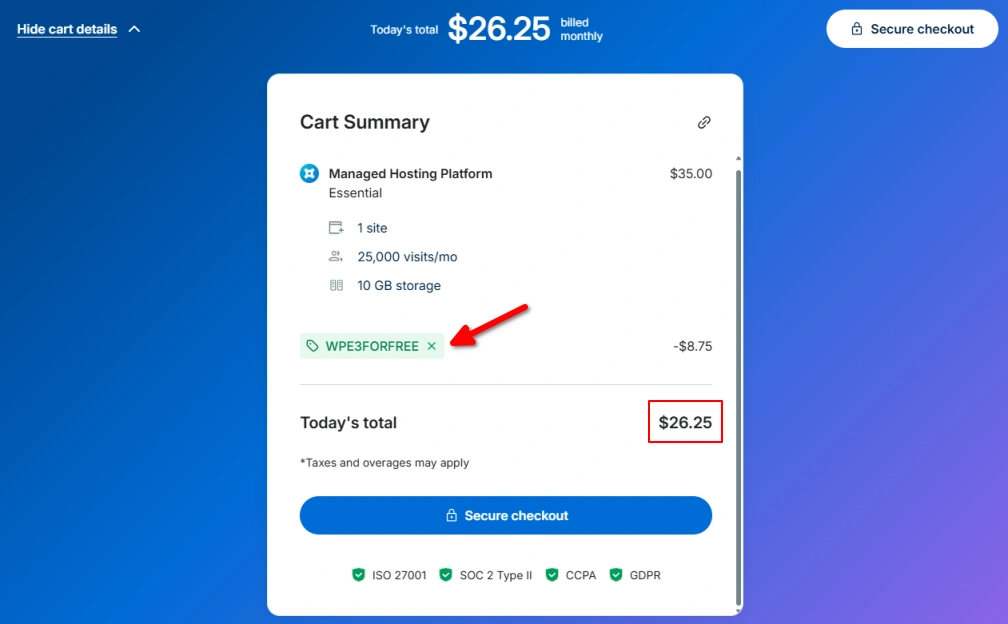
If the discount hasn’t been applied automatically, enter the coupon code WPE3FORFREE in the promo code field and apply it manually.
Once the discounted price is confirmed, complete your payment to activate your hosting plan.
How Much Can You Save With WP Engine Coupon?
The WPE3FORFREE coupon gives you 25% off WP Engine hosting on both monthly and annual plans.
For example, the Essential plan normally costs $35/month, but with the coupon, you pay just $26.25/month.
Here’s a quick breakdown of your savings:
| Billing Period | Regular Price | Discounted Price | You Save |
|---|---|---|---|
| Monthly | $35/month | $26.25/month | $8.75/month |
| Annual | $420/year | $315/year | $105/year |
If you choose monthly billing, you’ll save $8.75 each month. With annual billing, your total savings reach $105 per year.
And if you choose a higher-priced WP Engine plan, the 25% discount can help you save even more.
Planning to buy an annual plan? Check our WP Engine Black Friday Deals article for the 6 months free hosting offer and compare the savings with the current 25% coupon.
What You Get With WP Engine Hosting
WP Engine isn’t just about hosting your WordPress website. It also takes care of many technical tasks, including security, backups, updates, and performance optimization.
Here are the main features you get with WP Engine managed WordPress hosting:
- EverCache Technology: WP Engine uses its own caching technology to improve WordPress loading times and reduce server load.
- Global CDN: A Cloudflare-powered content delivery network helps load your website faster for visitors from different countries.
- Daily and On-Demand Backups: Your website is backed up automatically every day. You can also create manual backups and restore your site when needed.
- Free SSL Certificates: SSL certificates are included to secure your website and enable HTTPS.
- Staging and Development Environments: Test new plugins, themes, and website changes in a separate environment before making them live.
- Managed WordPress Updates: WP Engine manages WordPress, PHP, and MySQL updates to help keep your hosting environment up to date.
- Built-in Security: Includes malware scanning, DDoS protection, security patching, and a web application firewall.
- Free Website Migration: WP Engine provides an automated migration plugin to help you move your existing WordPress website.
- Developer Tools: Access useful tools such as SSH, SFTP, Git, and WP-CLI for managing and developing WordPress websites.
- 24/7 WordPress Support: Get help from WordPress specialists whenever you run into hosting or technical issues.
These features make WP Engine a good choice for anyone who wants reliable managed WordPress hosting without having to handle every technical task manually.
Is the WP Engine Coupon Code Worth Using?
Yes, the WP Engine coupon is definitely worth using, especially if you’re planning to host your website with WP Engine.
The biggest advantage is that you can get 25% off without choosing a longer billing period. Even the monthly plan is eligible, which is great if you prefer paying month by month.
WP Engine is particularly worth considering for:
- Business websites that need reliable hosting and strong security.
- Growing WordPress blogs that want better performance and less technical maintenance.
- WooCommerce stores that need managed hosting for their online business.
- Agencies and developers managing multiple WordPress projects.
However, WP Engine is still a premium hosting provider. If your main priority is getting the cheapest hosting possible, you may find better options among these WP Engine alternatives.
My take: If you want managed WordPress hosting and WP Engine fits your budget, the 25% coupon makes it a more affordable choice.
WP Engine Coupon Code Not Working? Try These Fixes
If the WP Engine coupon isn’t working or the 25% discount isn’t showing, here are a few simple things you can try.
- Use our discount link: Start by opening WP Engine through the coupon link provided in this article. The discount should be applied automatically.
- Enter the coupon manually: If the discount doesn’t appear, enter WPE3FORFREE in the coupon code field at checkout and click Apply.
- Check the coupon spelling: Make sure you’ve entered the code correctly, without any spaces or extra characters.
- Check your hosting plan: The coupon is available for monthly and annual hosting plans. Make sure you’ve selected the correct plan before proceeding.
- Remove other promo codes: If another discount is already applied, remove it and try using WPE3FORFREE instead.
Once the coupon is applied, you should see the 25% discount reflected in your order summary.
FAQs
What is the WP Engine coupon code for 2026?
The WP Engine coupon code is wpe3forfree. You can use it to get a discount when purchasing an eligible WP Engine hosting plan.
How much discount does wpe3forfree provide?
The discount depends on your billing cycle. You can get 28% off monthly billing and 25% off annual billing.
Does WP Engine offer a 25% discount on annual plans?
Yes. The current offer provides a 25% discount when you choose annual billing on an eligible WP Engine hosting plan.
Can I get 28% off WP Engine monthly plans?
Yes. You can get 28% off with monthly billing. For example, the Startup plan drops from its regular $35 per month price to $26 per month with the current offer.
Where do I enter the WP Engine coupon code?
If you use the discount link provided in this article, you don’t need to enter the coupon manually. The offer is automatically applied when you visit WP Engine through the link and proceed with your purchase.
Does the WP Engine coupon work for existing customers?
The offer is intended for new WP Engine purchases. Existing customers generally cannot apply a new-customer promotional discount to their current hosting subscription.
Can I use the coupon on all WP Engine plans?
Coupon eligibility can vary by plan. You should check the discounted price shown on the WP Engine pricing and checkout pages before completing your purchase.
Can I combine the WP Engine coupon with another discount?
No. WP Engine promotional offers generally cannot be combined. If another promotion is already applied, you’ll normally need to use one offer or the other.
Does the WP Engine coupon expire?
WP Engine can change or discontinue promotional offers at any time. If you’re planning to purchase hosting, check that the discounted price is showing at checkout before making your payment.
Conclusion
WP Engine is a great option if you want reliable managed WordPress hosting without worrying too much about website maintenance, security, or performance.
It’s not the cheapest hosting provider, but the 25% discount makes its premium plans more affordable, especially if you’ve already decided to go with WP Engine.
The good thing is that you can claim the discount on both monthly and annual plans, so you’re free to choose the billing option that works best for you.
If you’re ready to get started, use our discount link to save 25% on your WP Engine hosting plan.