
You can publish the best content on the internet, but if people can’t find it, it won’t generate traffic.
SEO is what connects your website with the people already searching for what you offer. When done correctly, it can bring consistent organic traffic for months or even years.
The challenge is that SEO can feel overwhelming. There are keywords, backlinks, technical SEO, Core Web Vitals, AI search, schema, and dozens of ranking factors to understand.
That’s exactly why this guide exists.
Instead of jumping between dozens of articles, you’ll learn the complete SEO process in one place, from the basics to advanced strategies with clear explanations and practical advice you can apply to any website.
SEO Basics
SEO (Search Engine Optimization) is the process of improving your website so search engines can understand your content and show it to people searching for related topics. The goal is to attract more organic traffic by publishing helpful content and making your website easy to find, crawl, and understand.
SEO isn’t a one-time task. Search engines constantly update their algorithms, competitors publish new content, and user behavior changes over time. Keeping your website updated helps you maintain and improve your rankings.
How Search Engines Work

Search engines like Google use automated programs called crawlers (or spiders) to discover web pages across the internet. Google Search Central provides detailed documentation on how this process works. Once a page is found, its content is analyzed and stored in a massive database called the index.
When someone performs a search, Google doesn’t search the web in real time. Instead, it looks through its index and displays the pages it believes are the most relevant and helpful for that search.
This process happens in three main stages:
- Crawling: Finding new and updated pages.
- Indexing: Understanding and storing page content.
- Ranking: Showing the most relevant pages in search results.
How Google Ranks Websites
Google looks at hundreds of signals to decide which pages deserve higher rankings. Rather than relying on a single factor, it evaluates how useful and relevant a page is for a specific search.
Some of the most important ranking factors include:
- Content that satisfies search intent.
- Relevant keywords used naturally.
- High-quality backlinks.
- Fast loading pages.
- Mobile-friendly design.
- A secure website (HTTPS).
- A good user experience.
- Fresh and up-to-date content.
No website can improve rankings by focusing on just one factor. Pages that consistently provide useful information and a good user experience are more likely to perform well over time.
Types of SEO
SEO can be divided into several categories, each focusing on a different part of improving your website’s visibility.
On-Page SEO
- On-page SEO focuses on the content and elements within your website that help search engines understand each page.
Off-Page SEO
- Off-page SEO focuses on building your website’s reputation through backlinks, brand mentions, and other signals from external websites.
Technical SEO
- Technical SEO helps search engines crawl, index, and understand your website without technical obstacles.
Local SEO
- Local SEO helps businesses appear in location-based searches, such as “restaurants near me” or “plumber in Chicago.”
E-commerce SEO
- E-commerce SEO focuses on improving the visibility of online stores by helping product pages, category pages, and shopping-related content rank higher in search results.
Keyword Research
Keyword research is the starting point of SEO. It helps you understand what your audience is searching for and the words they use to find information, products, or services online.
Choosing the right keywords means you’re creating content that matches real searches instead of guessing what people might be interested in. It also helps you identify topics with traffic potential and uncover content opportunities your competitors may have missed.
What Are Keywords?
Keywords are the words and phrases people type into search engines when looking for information.
For example, someone who wants to start a blog might search for:
- how to start a blog
- best blogging platform
- WordPress tutorial for beginners
Each of these searches is a keyword (or keyphrase) that represents a specific topic or question.
Keywords generally fall into four categories:
- Informational: “how to install WordPress”
- Navigational: “WordPress.org login”
- Commercial: “best managed WordPress hosting”
- Transactional: “buy Elementor Pro”
Knowing the purpose behind a keyword helps you create content that matches what people expect to find.
Match Your Content to Search Intent
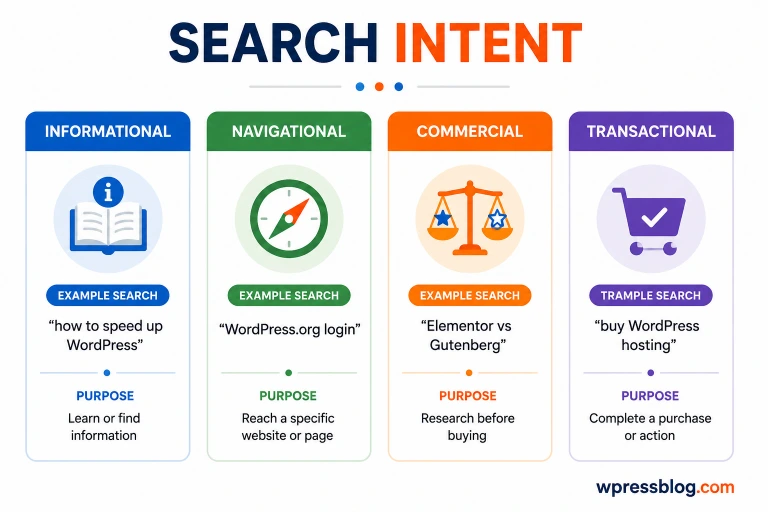
Search intent is the reason behind a search. Even if two keywords look similar, users may expect completely different answers.
The four main types of search intent are:
- Informational: The user wants to learn something.
- Navigational: The user wants to visit a specific website or page.
- Commercial: The user is comparing options before making a decision.
- Transactional: The user is ready to complete an action, such as buying a product or signing up for a service.
Always look at the pages already ranking for your target keyword. They reveal the type of content Google believes best matches that search.
How to Find Keywords
You don’t need expensive software to discover good keyword ideas. Start with topics your audience is interested in, then expand them using keyword research tools.
Some of the best sources for keyword ideas include:
- Google Autocomplete
- People Also Ask
- Related Searches
- Google Search Console
- Google Keyword Planner
- Google Trends
- Ahrefs
- Semrush
- Ubersuggest
- AnswerThePublic
When researching keywords, pay attention to:
- Monthly search volume
- Search intent
- Competition level
- Relevance to your website
- Seasonal trends
Focus on keywords that match your content and audience instead of chasing the highest search volume.
Check Keyword Competition
Keyword difficulty estimates how challenging it may be to rank for a particular keyword.
Highly competitive keywords are usually dominated by well-established websites with strong authority and many backlinks. Newer websites often have a better chance by targeting less competitive searches.
Before selecting a keyword, check:
- The websites already ranking on the first page.
- Their content quality.
- Their domain authority.
- The number of backlinks pointing to those pages.
- Whether you can create a page that’s more helpful or up to date.
A lower-difficulty keyword with clear search intent often brings better results than a highly competitive one.
Long-Tail vs Short-Tail Keywords
Keywords vary in length and specificity.
Short-tail keywords contain one or two words and usually have high search volume.
Examples:
- SEO
- WordPress
- web hosting
Long-tail keywords are longer and describe a more specific search.
Examples:
- how to improve WordPress SEO
- best managed WordPress hosting for small business
- how to speed up a WooCommerce website
Here’s a quick comparison:
| Short-Tail Keywords | Long-Tail Keywords |
|---|---|
| Higher search volume | Lower search volume |
| More competition | Less competition |
| Broader topic | More specific topic |
| Harder to rank | Easier to rank |
| Lower conversion potential | Higher conversion potential |
For most websites, long-tail keywords are a better place to start because they usually attract visitors looking for a specific answer.
Competitor Keyword Research
Looking at what your competitors rank for can reveal valuable keyword opportunities.
Identify websites that publish content similar to yours and analyze:
- Their highest-ranking pages.
- Keywords bringing them traffic.
- Topics you haven’t covered yet.
- Content gaps you can fill.
- Questions they answer well.
The goal isn’t to copy their content. Instead, look for ways to create something more useful, more current, or easier to understand.
Keyword Clustering
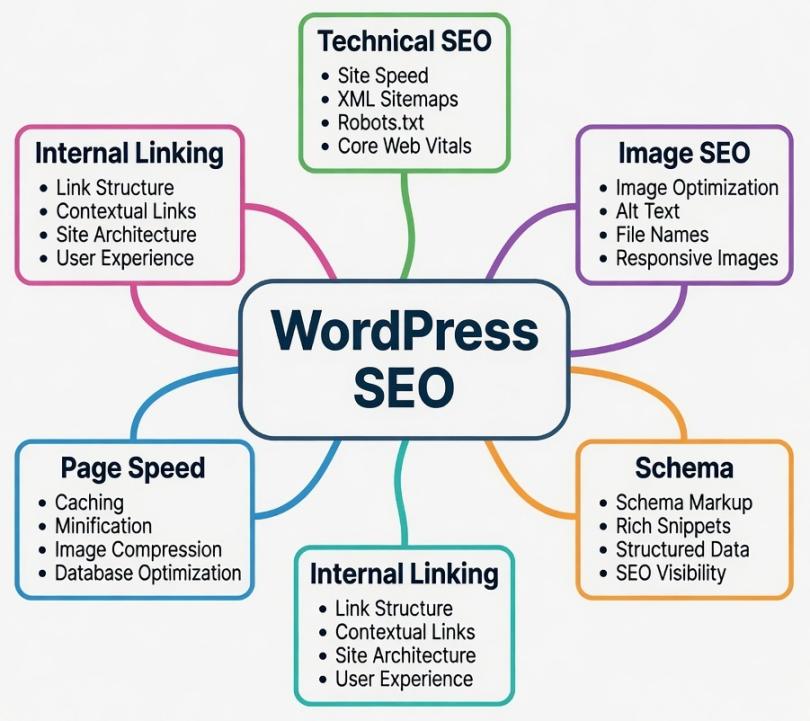
Keyword clustering is the process of grouping related keywords that share the same search intent.
Instead of creating separate pages for every similar keyword, you can cover closely related terms within one detailed article.
For example, these keywords can usually be covered together:
- WordPress SEO
- WordPress SEO guide
- SEO for WordPress
- WordPress search engine optimization
This approach helps you avoid creating multiple pages that compete with each other and gives readers a more complete resource.
Where to Use Keywords
After choosing your target keyword, place it where it naturally fits. Avoid repeating it unnecessarily or forcing it into every sentence.
Good places to include your primary keyword are:
- Page title
- URL
- Meta description
- H1 heading
- Introduction
- Relevant H2 and H3 headings
- Image alt text (when appropriate)
- Naturally throughout the content
- Conclusion
You can also include related keywords and synonyms where they make sense. This helps search engines understand your topic while keeping your writing natural and easy to read.
Content SEO
Content is the foundation of SEO. Even if your website loads quickly and has no technical issues, it won’t rank well if the content doesn’t answer what people are searching for.
The goal is simple: create pages that solve a problem, answer a question, or help someone make a decision. When your content is useful, easy to follow, and up to date, both readers and search engines are more likely to trust it.
Create Content That Matches Search Intent
Every keyword has an intent behind it. Someone searching for “how to install WordPress” expects a step-by-step tutorial, while someone searching for “best managed WordPress hosting” wants recommendations or comparisons.
Before writing, search your target keyword on Google and look at the top-ranking pages. Pay attention to:
- The type of content (guide, list, review, comparison, etc.)
- The questions they answer
- The topics they cover
- The level of detail
This gives you a clear idea of what readers expect and helps you create content that meets those expectations.
Write Helpful, Original Content
Publishing content that’s copied, rewritten, or created only to rank rarely works in the long run. Your article should provide real value and give readers a reason to choose it over similar pages.
Some ways to make your content more useful include:
- Answer common questions clearly.
- Share personal experience when relevant.
- Include examples and screenshots.
- Explain complex topics in simple language.
- Keep information accurate and up to date.
- Cover the topic completely without adding filler.
Always write for people first. If readers find your content useful, search engines are more likely to reward it.
Build Topic Clusters
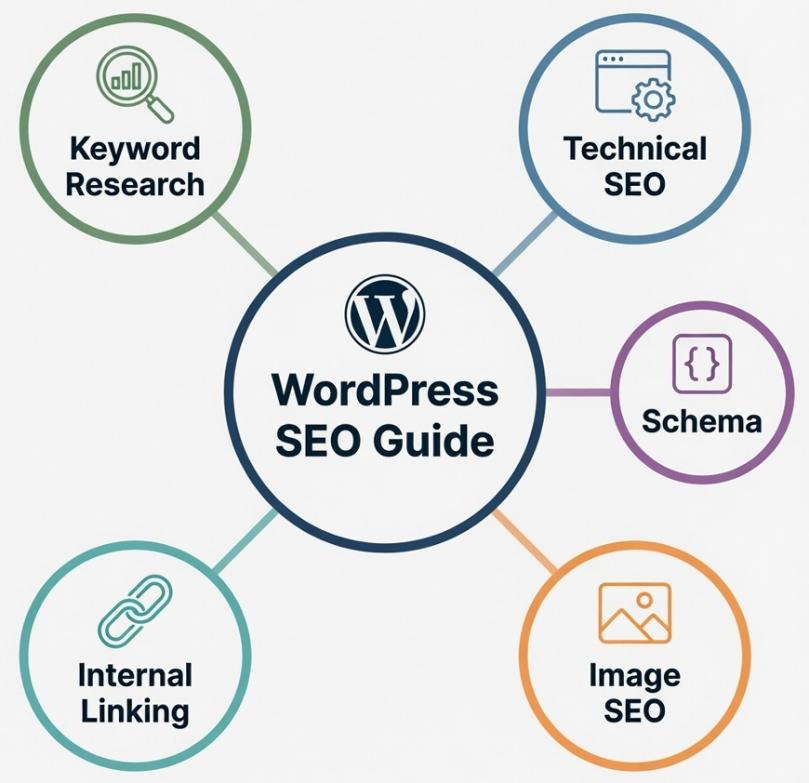
Instead of publishing unrelated articles, organize your content around a central topic.
For example, if your main topic is WordPress SEO, you can create separate articles about:
- Keyword research
- Technical SEO
- Image SEO
- Schema markup
- Internal linking
Each supporting article links back to the main guide, and the main guide links to those articles. This helps readers discover related content and makes it easier for search engines to understand the relationship between your pages.
Keep Content Up to Date
Search engines prefer content that reflects current information, especially for topics that change frequently.
Review your articles regularly and update:
- Outdated statistics
- Old screenshots
- Broken links
- Product information
- New features
- Step-by-step instructions
Instead of publishing a new article on the same topic, update the existing one whenever possible.
Make Your Content Easy to Read
Even great information can be difficult to follow if it’s presented as large blocks of text.
A few simple changes can make your content easier to read:
- Write short paragraphs.
- Use descriptive headings.
- Break long sections into bullet lists.
- Highlight important information naturally.
- Keep sentences clear and direct.
- Avoid unnecessary jargon.
Good formatting helps readers find the information they need without feeling overwhelmed.
Add FAQs
A Frequently Asked Questions section helps answer questions that may not fit naturally into the main content.
It can also help you cover related searches that people often look for after reading about the topic.
When writing FAQs:
- Answer real questions people ask.
- Keep each answer short and direct.
- Avoid repeating information already covered in detail.
- Update questions as search trends change.
Improve Your Chances of Getting a Featured Snippet
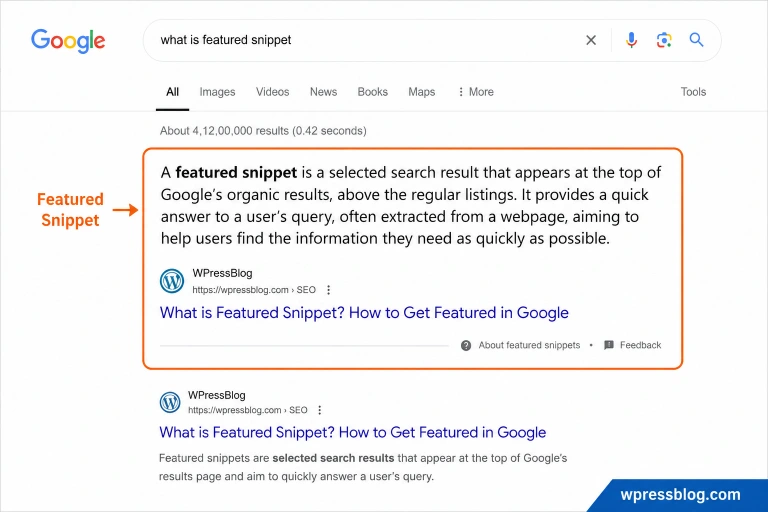
Featured snippets appear at the top of some Google search results and provide a direct answer to a user’s question.
While there’s no guaranteed way to earn one, you can increase your chances by:
- Answering the main question immediately.
- Using clear headings.
- Writing concise definitions.
- Including numbered steps for tutorials.
- Using tables for comparisons where appropriate.
- Keeping answers straightforward and easy to scan.
Google chooses featured snippets based on what best answers the search query.
Remove or Improve Low-Quality Content
Over time, websites often accumulate outdated, thin, or unused pages that no longer provide value.
Review your content periodically and decide whether to:
- Update outdated information.
- Expand pages with limited value.
- Merge similar articles.
- Redirect duplicate pages.
- Remove pages that no longer serve a purpose.
Keeping your content library clean makes it easier for readers to find useful information and helps search engines focus on your strongest pages.
On-Page SEO
On-page SEO includes everything you can improve directly on a page to help both readers and search engines understand your content. From your title and headings to images and internal links, every element helps explain what your page is about.
Small improvements across multiple elements often have a bigger impact than focusing on just one.
Write SEO-Friendly Titles
Your title is one of the first things people notice in search results. A clear and descriptive title can improve click-through rates and help search engines understand your page.
A good title should:
- Include the primary keyword naturally.
- Clearly describe the page.
- Match the user’s search intent.
- Be compelling without using clickbait.
- Stay within about 50–60 characters to avoid truncation.
Instead of:
- WordPress Tips
Use:
- 25 WordPress SEO Tips to Improve Rankings
Write Meta Descriptions
A meta description is the short summary shown below your page title in search results.
While it isn’t a direct ranking factor, a well-written description can encourage more people to click on your page.
A good meta description should:
- Summarize the page accurately.
- Include the primary keyword naturally.
- Encourage users to click.
- Stay within about 150–160 characters.
Avoid stuffing keywords or making promises your content doesn’t deliver.
Optimize Headings (H1–H6)
Headings organize your content and make it easier to read.
Use heading tags in a logical order:
- H1: Main page title (one per page)
- H2: Main sections
- H3: Subsections under H2
- H4–H6: Use only when additional levels are needed
Avoid skipping heading levels simply for styling. Use headings to reflect the structure of your content, not just to make text larger.
Create SEO-Friendly URLs
Short, descriptive URLs are easier for both users and search engines to understand.
A good URL should:
- Be easy to read.
- Include the primary keyword.
- Use hyphens between words.
- Avoid unnecessary numbers or special characters.
Good example:
example.com/wordpress-seo-guide
Poor example:
example.com/post?id=12345
Optimize Images
Images make content more engaging, but large or poorly prepared images can slow down your website.
Before uploading an image:
- Resize it to the required dimensions.
- Compress the file size.
- Choose the appropriate file format.
- Use descriptive file names.
- Avoid uploading images that are much larger than needed.
Faster-loading images improve the overall user experience.
Write Descriptive Image Alt Text
Alt text describes an image for screen readers and helps search engines understand its content.
Good alt text should:
- Describe the image accurately.
- Be short and meaningful.
- Include a keyword only when it fits naturally.
For example:
Good:
- WordPress dashboard showing SEO plugin settings
Poor:
- SEO, WordPress SEO, best SEO plugin, SEO settings
Write alt text for people first, not search engines.
Internal Linking
Internal links connect one page on your website to another.
They help visitors discover related content and allow search engines to understand how your pages are connected.
Add internal links where they genuinely help the reader.
For example, if you’re discussing website speed, linking to a detailed speed optimization guide makes sense because it provides additional information without interrupting the reading experience.
External Links
External links point to pages on other websites.
Linking to trustworthy sources can help support your content, especially when referencing statistics, research, official documentation, or industry standards.
Only link to websites that are reliable, relevant, and up to date.
Write Descriptive Anchor Text
Anchor text is the clickable text used for a link.
Readers should understand where a link leads before clicking it.
Good examples:
- WordPress security guide
- Image optimization tutorial
Avoid vague anchors like:
- Click here
- Read more
- Learn more
Use natural wording that fits the surrounding sentence.
Add a Table of Contents
A table of contents helps readers jump directly to the section they’re interested in.
It’s especially useful for long articles because it:
- Improves navigation.
- Makes the page easier to scan.
- Helps readers find information faster.
For lengthy guides, placing the table of contents near the beginning of the article works well.
Add Schema Markup
Schema markup is structured data that helps search engines understand your content more clearly.
Depending on the page, you can add schema for:
- Articles
- FAQs
- Products
- Reviews
- Recipes
- Organizations
- Breadcrumbs
While schema doesn’t guarantee rich results, it gives search engines more context about your content.
Use Breadcrumbs
Breadcrumbs show users where they are within your website.
For example:
Home → SEO → On-Page SEO
They make navigation easier, especially on larger websites, and can also appear in Google search results instead of a full URL.
Add Author Information
Showing who wrote an article helps build trust with readers.
A good author section may include:
- Author name
- Short biography
- Relevant experience
- Profile photo
- Links to other articles by the same author
For topics where expertise is important, a clear author profile adds credibility.
Show Experience and Trust
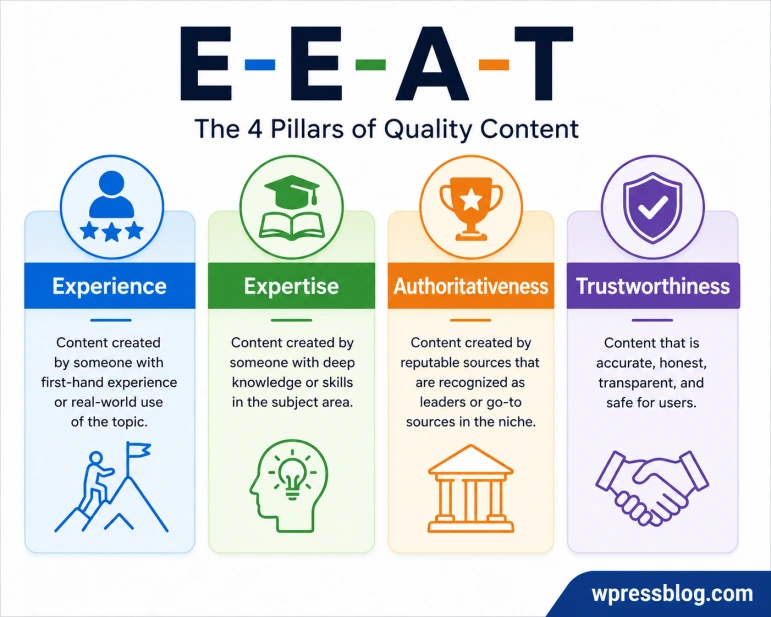
Google encourages content that demonstrates real experience, expertise, authoritativeness, and trustworthiness (E-E-A-T).
You can strengthen these signals by:
- Sharing first-hand experience where relevant.
- Keeping information accurate.
- Citing trustworthy sources when needed.
- Updating outdated content.
- Being transparent about who created the content.
- Making it easy for visitors to contact you or learn more about your website.
Rather than trying to satisfy search engines, focus on creating content that readers can trust. If your content is accurate, helpful, and written with genuine experience, you’re already moving in the right direction.
Technical SEO
Technical SEO helps search engines discover, understand, and index your website without running into unnecessary obstacles. Even the best content can struggle to rank if search engines can’t access it properly.
The good news is that most technical SEO tasks only need to be set up once and reviewed occasionally to make sure everything continues working as expected.
Website Crawlability
Crawlability refers to how easily search engines can discover and access the pages on your website.
If a page can’t be crawled, it won’t appear in search results.
To make your website easier to crawl:
- Keep your navigation simple.
- Link important pages from other pages on your website.
- Submit an XML sitemap.
- Avoid blocking important pages with robots.txt.
- Fix broken internal links.
Regularly checking your crawl reports in Google Search Console can help you spot issues before they affect your rankings.
Website Indexability
After a page is crawled, Google decides whether it should be added to its search index.
A page may not be indexed if:
- It has a
noindextag. - It’s blocked from crawling.
- It’s a duplicate of another page.
- It provides little value.
- It returns an error.
Google Search Console’s Indexing report shows which pages are indexed and highlights any problems preventing others from appearing in search results.
XML Sitemap
An XML sitemap is a file that lists the important pages on your website.
It helps search engines discover new and updated content more efficiently, especially on larger websites.
A good sitemap should:
- Include important pages only.
- Exclude duplicate or unnecessary pages.
- Update automatically when new content is published.
- Be submitted through Google Search Console and Bing Webmaster Tools.
Most WordPress SEO plugins can generate and update XML sitemaps automatically.
Robots.txt
The robots.txt file tells search engine crawlers which parts of your website they can or can’t access.
It’s commonly used to block areas that don’t need to appear in search results, such as admin pages or temporary files.
Be careful when editing this file. Accidentally blocking important sections of your website can prevent search engines from accessing your content.
Canonical URLs
Sometimes the same content can be reached through multiple URLs.
For example:
example.com/pageexample.com/page/example.com/page?ref=homepage
A canonical URL tells search engines which version should be treated as the main page.
Using canonical tags helps prevent duplicate content issues and keeps ranking signals focused on a single URL.
Redirects
Redirects automatically send visitors and search engines from one URL to another.
They’re commonly used when:
- A page is moved.
- A URL changes.
- Content is merged.
- An old page is removed.
For permanent URL changes, use a 301 redirect. This passes most ranking signals from the old URL to the new one and provides a smooth experience for visitors.
Duplicate Content
Duplicate content occurs when the same or very similar content appears on multiple URLs.
This can confuse search engines because they may struggle to decide which version should rank.
Common causes include:
- Multiple URLs for the same page.
- Printer-friendly versions.
- HTTP and HTTPS versions.
- WWW and non-WWW versions.
- Copied product descriptions.
Using canonical tags, redirects, and a consistent URL structure helps reduce duplicate content issues.
Pagination
Pagination splits large collections of content across multiple pages.
Examples include:
- Blog archives
- Product categories
- Search results
- Forum discussions
A clear pagination structure makes it easier for visitors to browse large amounts of content and helps search engines discover additional pages.
Avoid creating endless paginated pages with little value, as they can waste crawl resources.
HTTPS
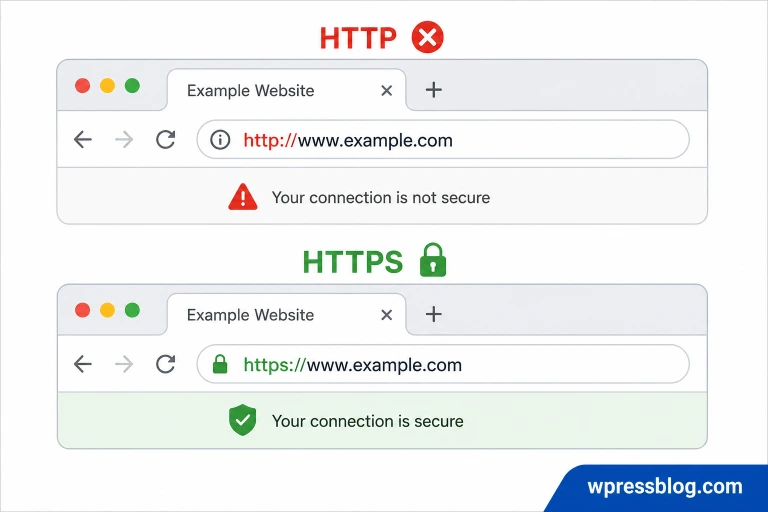
HTTPS encrypts the connection between your website and its visitors, making data more secure.
Today, every website should use HTTPS.
After enabling HTTPS:
- Redirect all HTTP URLs to HTTPS.
- Update internal links.
- Update your sitemap.
- Fix mixed-content warnings if they appear.
Most web hosting providers offer free SSL certificates, making it easy to secure your website.
Broken Links
Broken links lead to pages that no longer exist or return an error.
They create a poor user experience and make it harder for search engines to crawl your website efficiently.
Check your website regularly for:
- Broken internal links.
- Broken external links.
- Missing images.
- Redirect chains.
Fix or remove broken links as soon as you find them.
Custom 404 Pages
A 404 page appears when someone visits a URL that doesn’t exist.
Instead of showing a generic error message, create a custom 404 page that helps visitors continue exploring your website.
A useful 404 page should include:
- A clear explanation that the page couldn’t be found.
- A link to the homepage.
- Navigation to important sections.
- A search box.
- Links to popular or recent content.
A well-designed 404 page won’t improve rankings directly, but it can keep visitors on your website instead of leaving immediately.
Website Performance
Website performance affects both user experience and search rankings. People expect pages to load quickly, and they’re more likely to leave if a website feels slow or unresponsive.
A fast website helps visitors find information without delay, keeps them engaged for longer, and gives search engines a better experience when crawling your pages.
Core Web Vitals
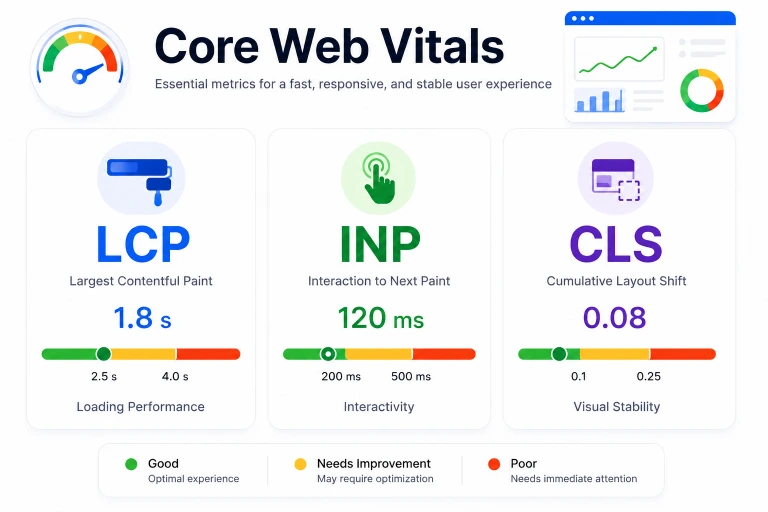
Core Web Vitals are a set of metrics Google uses to measure how users experience a web page.
The three Core Web Vitals are:
- Largest Contentful Paint (LCP): Measures how quickly the main content becomes visible.
- Interaction to Next Paint (INP): Measures how quickly the page responds when a user interacts with it.
- Cumulative Layout Shift (CLS): Measures unexpected layout movement while the page is loading.
You can check these metrics using tools like Google PageSpeed Insights or Google Search Console.
Improve Page Speed
Page speed depends on many factors, including your hosting, website theme, plugins, images, and code.
Some of the most effective ways to speed up a website include:
- Choose reliable web hosting.
- Use a lightweight theme.
- Remove plugins you no longer need.
- Minify CSS and JavaScript files.
- Reduce unnecessary third-party scripts.
- Enable browser caching.
- Use a CDN.
- Compress images.
Improving several small areas often delivers better results than focusing on a single issue.
Mobile Optimization
Most people browse the web on mobile devices, so your website should work just as well on a phone as it does on a desktop.
Check that your website:
- Adapts to different screen sizes.
- Uses readable font sizes.
- Has buttons that are easy to tap.
- Doesn’t require horizontal scrolling.
- Loads quickly on mobile networks.
Always test important pages on different screen sizes before publishing major changes.
Caching
Caching stores parts of your website so they don’t need to be generated from scratch every time someone visits.
This reduces server workload and helps pages load much faster.
Depending on your website, you may use:
- Browser caching
- Page caching
- Object caching
- Opcode caching
Most WordPress caching plugins can handle these automatically with minimal setup.
CDN
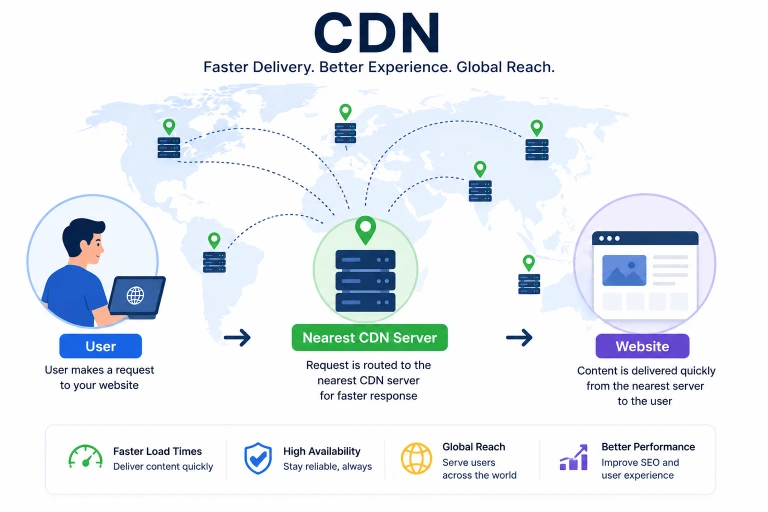
A Content Delivery Network (CDN) stores copies of your website on servers in different locations around the world.
When someone visits your website, content is delivered from the server closest to them, which can reduce loading times.
A CDN is especially helpful for:
- Websites with visitors from multiple countries.
- Large media files.
- High-traffic websites.
Many CDN providers also include security features such as DDoS protection and traffic filtering.
Image Optimization
Images are often the largest files on a web page. Optimizing images can significantly reduce loading times without noticeably affecting quality.
Before uploading images:
- Resize them to the required dimensions.
- Compress the file size.
- Choose modern formats like WebP or AVIF when supported.
- Avoid uploading images larger than necessary.
Well-optimized images help pages load faster while maintaining good visual quality.
Lazy Loading
Lazy loading delays images, videos, and other media until they’re about to appear on the user’s screen.
Instead of loading everything at once, the browser loads content as visitors scroll down the page.
This can:
- Reduce the initial page size.
- Speed up page loading.
- Save bandwidth.
- Improve the browsing experience on slower connections.
Most modern browsers support image lazy loading, and many WordPress plugins include it automatically.
JavaScript and CSS Optimization
JavaScript and CSS control how your website looks and functions, but large or poorly organized files can slow down page loading.
Some common ways to improve them include:
- Minify CSS and JavaScript files.
- Remove unused CSS.
- Delay non-essential JavaScript.
- Load important CSS first.
- Reduce the number of CSS and JavaScript files where possible.
- Remove code added by plugins you no longer use.
After making changes, test your website carefully to make sure everything still works as expected.
WordPress SEO
WordPress is built with SEO in mind, but installing WordPress alone won’t guarantee higher rankings. The choices you make from your theme and plugins to your website settings and maintenance can affect how easily search engines discover and understand your content.
The following areas are worth checking on every WordPress website.
Choose an SEO-Friendly Theme
Your theme affects your website’s speed, code quality, and mobile experience.
When choosing a WordPress theme, look for one that:
- Loads quickly.
- Works well on all screen sizes.
- Uses clean, well-structured code.
- Receives regular updates.
- Works with popular SEO plugins.
Avoid themes packed with unnecessary features you don’t plan to use, as they can slow down your website. Only choose well-coded and fast loading WordPress tehems.
Configure WordPress Settings
A few WordPress settings can directly affect how your website appears in search results.
Check these settings after installing WordPress:
- Make sure search engine visibility is enabled.
- Use an SEO-friendly permalink structure.
- Set your website title and tagline.
- Configure your homepage correctly.
- Set the preferred URL format (WWW or non-WWW).
Review these settings before publishing your website to avoid indexing issues later.
Best SEO Plugins
An SEO plugin makes it easier to manage many SEO tasks without editing code.
Most SEO plugins can help you:
- Create XML sitemaps.
- Edit SEO titles and meta descriptions.
- Add schema markup.
- Manage redirects.
- Generate breadcrumbs.
- Verify your website with search engines.
Popular WordPress SEO plugins include:
- Rank Math
- Yoast SEO
- All in One SEO
- SEOPress
- Slim SEO
Choose one plugin that meets your needs instead of installing multiple SEO plugins with overlapping features.
Optimize Categories and Tags
Categories and tags help organize your content and improve navigation.
A few simple guidelines can keep them useful:
- Use categories for broad topics.
- Use tags for specific topics.
- Don’t create dozens of tags used by only one article.
- Give categories clear names.
- Add descriptions where appropriate.
A well-organized website is easier for both visitors and search engines to understand.
Manage Archives
WordPress creates archive pages for categories, tags, authors, and dates.
Not every archive adds value to search results.
Review your archive pages and decide which ones should be indexed. If an archive contains very little content or duplicates information available elsewhere, it may be better to keep it out of search results.
Optimize Comments
Comments can make your content more valuable by adding discussion and answering additional questions.
To keep your comment section useful:
- Remove spam comments.
- Approve genuine discussions.
- Close comments on pages where they’re unnecessary.
- Keep comment moderation enabled.
A clean comment section provides a better experience for visitors.
Improve WordPress Performance
Website speed is an important part of WordPress SEO.
Some simple ways to improve performance include:
- Choose fast WordPress hosting.
- Use page caching.
- Compress and resize images.
- Use a CDN.
- Limit the number of plugins.
- Remove plugins and themes you no longer use.
- Keep your database clean.
Small improvements across your website can noticeably reduce loading times.
Secure Your Website
A hacked website can lose search rankings, traffic, and visitor trust.
Some important tips to increase website security are:
- Use strong passwords.
- Enable two-factor authentication.
- Install a trusted security plugin.
- Back up your website regularly.
- Limit login attempts.
- Use HTTPS.
Protecting your website helps keep your content available and your visitors safe.
Keep WordPress Updated
Updates often include bug fixes, security patches, performance improvements, and compatibility updates.
Keep these items up to date:
- WordPress core.
- Themes.
- Plugins.
Before installing major updates, create a backup so you can quickly restore your website if something doesn’t work as expected.
Off-Page SEO
Off-page SEO refers to activities that happen outside your website and help build its reputation. While creating great content is important, other websites and people also influence how search engines view your site.
One of the strongest signals is when trusted websites link to your content. These links act as recommendations, showing search engines that others find your pages useful.
What Is Off-Page SEO?
Off-page SEO includes actions that increase your website’s credibility and visibility beyond your own pages.
Some of the most common off-page SEO activities include:
- Earning backlinks.
- Building brand awareness.
- Getting mentioned on reputable websites.
- Appearing in industry publications.
- Taking part in online communities.
The goal is to earn recognition naturally rather than trying to manipulate search rankings.
Build High-Quality Backlinks
Backlinks are links from other websites to your content. Not all backlinks carry the same value.
A few links from trusted, relevant websites are usually more valuable than hundreds of low-quality links.
The best backlinks often come from:
- Original research.
- Detailed guides.
- Useful tools.
- Case studies.
- Statistics pages.
- Content that others naturally want to reference.
Avoid buying backlinks or joining link schemes, as they can lead to search penalties.
Guest Posting
Guest posting involves writing an article for another website in your industry.
When done thoughtfully, guest posting can help you:
- Reach a new audience.
- Build credibility.
- Earn relevant backlinks.
- Grow your brand.
Focus on websites with real readers and high editorial standards rather than websites that publish guest posts from anyone.
Digital PR
Digital PR focuses on earning attention from news websites, blogs, and industry publications.
This can include:
- Publishing original research.
- Sharing survey results.
- Launching free tools.
- Announcing new products.
- Commenting on industry news.
Interesting stories are more likely to be picked up by journalists and bloggers, leading to valuable backlinks and wider exposure.
Brand Mentions
People may mention your business, website, or products without linking to your website.
These mentions can help increase your online presence, especially when they come from trusted sources.
Monitor your brand regularly and, where appropriate, reach out to website owners if a relevant mention could also include a link.
Broken Link Building
Broken link building involves finding links on other websites that no longer work and suggesting your content as a replacement.
The process usually looks like this:
- Find broken links on relevant websites.
- Create or identify a page that covers the same topic.
- Contact the website owner.
- Suggest replacing the broken link with your working page.
Because you’re helping fix an issue on their website, this approach often receives a better response than asking for a backlink without providing value.
Resource Page Link Building
Many websites maintain resource pages that recommend useful articles, tools, or services.
If you’ve published content that genuinely helps readers, it may be a good fit for these pages.
Look for resource pages related to your niche and suggest your content only when it adds value to their existing list.
Social Signals
Social media shares aren’t considered a direct Google ranking factor, but they can help more people discover your content.
Greater visibility can lead to:
- More website visitors.
- More brand awareness.
- More natural backlinks.
- More discussions around your content.
Share your content where your audience is active instead of posting on every social platform.
Community Engagement
Taking part in online communities helps you build trust and connect with people interested in your topic.
You can contribute by:
- Answering questions.
- Sharing helpful advice.
- Joining discussions.
- Publishing useful resources when they’re relevant.
Focus on being genuinely helpful rather than promoting your website in every conversation. Over time, consistent participation can strengthen your reputation and bring steady referral traffic.
Local SEO
Local SEO helps businesses appear in search results when people look for products or services in a specific area. It’s especially important for businesses that serve customers in a city, town, or region, such as restaurants, repair services, clinics, law firms, and retail stores.
A strong local SEO strategy makes it easier for nearby customers to discover your business through Google Search and Google Maps.
Google Business Profile
A Google Business Profile is one of the most important parts of local SEO. It allows your business to appear in local search results and on Google Maps.
Make sure your profile includes:
- Business name
- Address
- Phone number
- Website URL
- Business hours
- Business category
- Photos
- Products or services
Keep your profile updated whenever your business information changes.
NAP Consistency
NAP stands for Name, Address, and Phone Number.
Your NAP details should be the same everywhere your business appears online, including:
- Your website
- Google Business Profile
- Business directories
- Social media profiles
- Local listing websites
Even small differences, such as abbreviating a street name in one place and spelling it out in another, can create confusion.
Local Citations
A local citation is any online mention of your business information.
These mentions often appear on:
- Business directories
- Industry directories
- Local business websites
- Chamber of Commerce websites
- Review platforms
Focus on listing your business on trusted and relevant websites instead of submitting it to hundreds of low-quality directories.
Customer Reviews
Reviews help potential customers decide whether they can trust your business. They also play an important role in local search visibility.
Encourage satisfied customers to leave honest reviews, and take time to respond to them.
When replying to reviews:
- Thank customers for positive feedback.
- Respond politely to negative reviews.
- Address concerns professionally.
- Never post fake reviews or pay for them.
A steady flow of genuine reviews builds trust with both customers and search engines.
Local Schema
Local schema helps search engines understand important details about your business.
Depending on your business, schema can include information such as:
- Business name
- Address
- Phone number
- Opening hours
- Website
- Geographic coordinates
- Customer ratings
Adding local schema can give search engines clearer information about your business and may help your listings qualify for additional search features.
Location Pages
If your business serves multiple cities or regions, create a dedicated page for each location.
Each location page should include:
- The location name.
- Services offered in that area.
- Business address.
- Contact information.
- Opening hours.
- A map, if applicable.
- Customer testimonials from that location.
Avoid creating nearly identical pages for different cities. Give each page unique information that is genuinely useful to people searching in that specific location.
E-commerce SEO
E-commerce SEO helps online stores attract customers through organic search. Unlike a blog, an e-commerce website often has hundreds or thousands of pages, so it’s important to organize products clearly and make them easy to discover.
From product pages to category pages, every part of your store should help shoppers find what they’re looking for quickly.
Product Page SEO
Each product page should provide enough information for customers to make a buying decision.
A well-written product page should include:
- A unique product title.
- An informative product description.
- High-quality images.
- Product specifications.
- Pricing and availability.
- Shipping and return information.
- Customer reviews.
Avoid using the same manufacturer description found on dozens of other websites. Write original descriptions that clearly explain the product and its benefits.
Category Page SEO
Category pages often target broader keywords and help shoppers browse similar products.
A good category page should include:
- A clear category title.
- A short introduction describing the category.
- Well-organized product listings.
- Helpful filters and sorting options.
- Internal links to related categories where appropriate.
Avoid creating empty category pages with only a few products, as they provide little value to visitors.
Product Schema
Product schema gives search engines additional details about your products.
Depending on the product, schema can include:
- Product name.
- Price.
- Availability.
- Brand.
- Ratings.
- Reviews.
- SKU.
Adding product schema increases the chances of your products appearing with rich results in search listings.
Customer Reviews
Customer reviews help shoppers make informed decisions and add fresh content to product pages.
Encourage customers to leave honest reviews after purchasing a product.
Reviews are most useful when they include:
- Real experiences.
- Ratings.
- Photos, when possible.
- Details about product quality or performance.
Avoid publishing fake reviews, as they reduce trust and may violate search engine guidelines.
Faceted Navigation
Faceted navigation lets shoppers narrow down products using filters such as:
- Price.
- Brand.
- Color.
- Size.
- Material.
- Rating.
While filters improve the shopping experience, they can also create many URL variations that search engines may crawl unnecessarily.
Configure your filters carefully so only valuable pages are indexed while unnecessary filtered URLs remain out of search results.
Out-of-Stock Products
Products don’t always need to be removed when they’re temporarily unavailable.
If an item will return soon, keep the product page live and clearly indicate that it’s out of stock. This allows the page to retain its search visibility and gives customers the option to return later.
If a product has been permanently discontinued:
- Redirect visitors to the most relevant replacement product, if available.
- Suggest similar products.
- Remove the page only when there’s no useful alternative.
Handling out-of-stock products properly helps preserve traffic and provides a better shopping experience.
AI and SEO
AI is changing how people search for information. Along with traditional search results, search engines now generate AI-powered answers that summarize information from multiple sources.
This doesn’t replace traditional SEO. Instead, it changes how content is discovered and presented. Websites that publish accurate, trustworthy, and well-structured content are more likely to remain visible in both traditional search results and AI-generated responses.
AI Search and Traditional Search
Traditional search usually displays a list of web pages, allowing users to choose which result to visit.
AI search often provides a direct answer while linking to the sources used to generate that response.
Although the experience is different, the goal is still the same: provide the most helpful answer to the user’s question.
To increase your chances of appearing in both types of search:
- Cover topics thoroughly.
- Answer questions clearly.
- Keep information accurate.
- Use descriptive headings.
- Update content regularly.
Creating AI Content the Right Way
AI writing tools can speed up content creation, but they shouldn’t replace human review.
Use AI to help with tasks such as:
- Brainstorming ideas.
- Creating outlines.
- Improving grammar.
- Rewriting sentences.
- Summarizing information.
Before publishing AI-assisted content:
- Check every fact.
- Add your own insights and examples.
- Remove repetitive or generic wording.
- Make sure the content matches your audience.
- Edit the final draft carefully.
Publishing unedited AI content can result in inaccurate information and a poor reading experience.
Optimize for AI Overviews
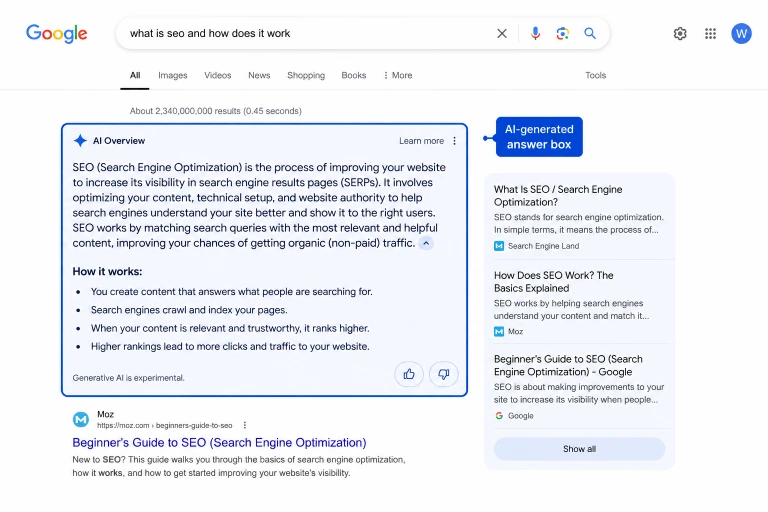
AI Overviews summarize information from multiple websites and may include links to the original sources.
While there’s no special setting that guarantees inclusion, content is more likely to be referenced when it:
- Answers questions directly.
- Covers the topic in depth.
- Uses clear headings.
- Includes helpful examples.
- Stays accurate and up to date.
- Demonstrates real experience where appropriate.
Think about answering the user’s question as clearly as possible rather than trying to write specifically for AI.
Generative Engine Optimization (GEO)
Generative Engine Optimization (GEO) focuses on making content easier for AI-powered search systems to understand and reference.
Many of the same principles used in traditional SEO also apply here.
Content is more likely to be useful for AI systems when it:
- Covers the topic completely.
- Uses clear language.
- Follows a logical structure.
- Answers related questions.
- Includes accurate and verifiable information.
As AI search continues to evolve, clear and trustworthy content is likely to remain the strongest advantage.
How AI Changes Keyword Research
AI is changing the way people search. Instead of typing short phrases, many users now ask complete questions in natural language.
For example, instead of searching for:
- WordPress SEO
They may search for:
- How can I improve SEO on my WordPress website?
Because of this shift, keyword research should focus on topics and user questions instead of individual keywords alone.
When planning content:
- Look for common questions your audience asks.
- Cover related subtopics in the same article.
- Include natural language throughout your content.
- Answer questions clearly and directly.
- Focus on solving the user’s problem rather than repeating a keyword.
The goal hasn’t changed, help people find the information they need. AI simply changes how those questions are asked and how the answers are presented.
SEO Tools
The right SEO tools can help you find keywords, track rankings, identify technical issues, and measure your website’s performance. You don’t need to use every tool on this list, but understanding what each one does can help you choose the ones that fit your needs.
Google Search Console
Google Search Console is a free tool that shows how your website performs in Google Search.
You can use it to:
- Submit XML sitemaps.
- Monitor indexing status.
- Track clicks and impressions.
- Find keywords driving traffic.
- Identify crawl errors.
- Check Core Web Vitals.
- Inspect individual URLs.
It’s one of the first tools every website owner should set up.
Google Analytics
Google Analytics helps you understand how visitors use your website.
It provides information such as:
- Number of visitors.
- Traffic sources.
- Most popular pages.
- User engagement.
- Conversions.
- Device types.
- Geographic locations.
This data helps you understand which content performs well and where improvements are needed.
Google Keyword Planner
Google Keyword Planner is designed for advertisers, but it’s also useful for keyword research.
It can help you:
- Discover keyword ideas.
- View estimated search volume.
- Compare related keywords.
- Identify seasonal trends.
It’s a good starting point for finding topics your audience is already searching for.
Google Trends
Google Trends shows how search interest changes over time.
You can use it to:
- Compare multiple keywords.
- Spot seasonal searches.
- Discover rising topics.
- Identify regional interest.
It’s especially useful when planning content around current events or recurring trends.
PageSpeed Insights
PageSpeed Insights analyzes your website’s performance on both desktop and mobile devices.
The report includes:
- Core Web Vitals.
- Performance score.
- Accessibility score.
- Loading issues.
- Suggestions for improving speed.
Use it regularly to identify pages that need attention.
Lighthouse
Lighthouse is an open-source auditing tool built into Chrome and other platforms.
It analyzes:
- Performance.
- Accessibility.
- SEO.
- Best practices.
- Progressive Web App support.
Its reports can help you identify technical issues affecting your website.
Ahrefs
Ahrefs is one of the most popular SEO platforms for website analysis.
It offers features such as:
- Keyword research.
- Backlink analysis.
- Competitor research.
- Site audits.
- Rank tracking.
- Content ideas.
It’s widely used by SEO professionals for both research and ongoing monitoring.
Semrush
Semrush is another all-in-one SEO platform with a wide range of tools.
It can help you:
- Research keywords.
- Analyze competitors.
- Audit your website.
- Track rankings.
- Monitor backlinks.
- Find content opportunities.
It’s suitable for bloggers, businesses, agencies, and online stores.
Screaming Frog
Screaming Frog is a desktop application that crawls your website much like a search engine.
It helps identify issues such as:
- Broken links.
- Redirects.
- Missing page titles.
- Missing meta descriptions.
- Duplicate content.
- Large images.
- Incorrect status codes.
It’s especially useful for auditing medium to large websites.
Bing Webmaster Tools
Bing Webmaster Tools offers many of the same features as Google Search Console but focuses on Bing Search.
It allows you to:
- Submit sitemaps.
- Monitor indexing.
- Check crawl reports.
- Analyze search performance.
- Identify technical issues.
Even if most of your traffic comes from Google, setting up Bing Webmaster Tools helps improve your visibility across another major search engine.
How to Track SEO Performance
SEO isn’t just about getting higher rankings. The real goal is to attract the right visitors and help them complete meaningful actions on your website.
Tracking a few key metrics regularly helps you understand what’s working, identify problems early, and decide where to focus your efforts next.
Organic Traffic
Organic traffic refers to visitors who find your website through unpaid search results.
A steady increase in organic traffic usually means your content is becoming more visible in search engines.
Track organic traffic to see:
- Which pages attract the most visitors.
- Which topics perform well.
- How traffic changes over time.
- Which search engines send the most visitors.
Google Analytics is one of the easiest tools for monitoring organic traffic.
Keyword Rankings
Keyword rankings show where your pages appear in search results for specific search terms.
Instead of tracking hundreds of keywords, focus on the ones that matter most to your website.
Pay attention to:
- Ranking improvements.
- Keywords moving onto the first page.
- Keywords losing positions.
- New keywords your pages begin ranking for.
Ranking changes are normal, so look for long-term trends instead of daily fluctuations.
Click-Through Rate (CTR)
Click-through rate (CTR) measures how often people click your page after seeing it in search results.
A low CTR may indicate that your title or meta description isn’t attracting attention, even if the page ranks well.
If a page has many impressions but few clicks, consider improving:
- The page title.
- The meta description.
- The search intent match.
Google Search Console provides CTR data for every page and keyword.
Conversion Rate
Getting visitors is only part of the goal. It’s equally important to know how many of them take the action you want.
Depending on your website, a conversion might be:
- Making a purchase.
- Filling out a contact form.
- Subscribing to a newsletter.
- Downloading a file.
- Creating an account.
If traffic is increasing but conversions remain low, review your content, calls to action, and overall user experience.
Bounce Rate and Engagement
Bounce rate measures how often visitors leave your website after viewing only one page.
On its own, a high bounce rate isn’t always a problem. For example, someone may find the exact answer they need on a single page and then leave.
It’s also useful to look at engagement metrics such as:
- Average engagement time.
- Pages viewed per session.
- Returning visitors.
- Scroll depth.
These metrics provide a clearer picture of how people interact with your content.
Index Coverage
Index coverage shows which pages search engines have added to their index and which pages have been excluded.
Review your indexing reports regularly to identify issues such as:
- Pages that aren’t indexed.
- Crawl errors.
- Blocked pages.
- Duplicate pages.
- Pages with a
noindextag.
Google Search Console makes it easy to monitor your website’s indexing status.
Backlink Growth
Backlinks remain an important signal of a website’s reputation.
Rather than focusing only on the total number of backlinks, also monitor:
- New referring websites.
- Lost backlinks.
- Link quality.
- Links pointing to your most important pages.
Steady growth from relevant and trustworthy websites is generally more valuable than gaining a large number of low-quality links in a short period.
Common SEO Mistakes
Even well-designed websites can lose rankings because of avoidable mistakes. Fixing these issues often has a bigger impact than constantly chasing new SEO techniques.
Review your website regularly to catch problems before they affect your search performance.
Keyword Stuffing
Adding the same keyword over and over doesn’t improve rankings. In fact, it makes your content harder to read and can send the wrong signals to search engines.
Instead of repeating a keyword unnaturally:
- Write for your readers first.
- Use the primary keyword where it fits naturally.
- Include related words and phrases when appropriate.
If a sentence sounds awkward because of a keyword, rewrite it.
Thin Content
Thin content provides very little value to readers. It often lacks useful information, answers only part of a question, or repeats what’s already available elsewhere.
Examples include:
- Very short articles with little detail.
- Empty category pages.
- Product pages with only a few lines of text.
- Pages created solely to target a keyword.
Focus on creating content that answers the user’s question completely.
Duplicate Content
Duplicate content appears when the same or very similar information exists on multiple pages.
This can happen because of:
- Multiple URLs showing the same page.
- Copied product descriptions.
- Similar articles targeting the same topic.
- Printer-friendly versions of pages.
Where possible, keep one clear version of a page and avoid publishing multiple articles that compete for the same search.
Slow Website
A slow website frustrates visitors and can reduce search visibility.
Some common causes include:
- Large images.
- Too many plugins.
- Slow web hosting.
- Unnecessary JavaScript and CSS.
- Missing caching.
Test your website regularly and fix speed issues as they appear.
Ignoring Mobile Users
Most searches now happen on mobile devices. If your website is difficult to use on a phone, visitors are unlikely to stay.
Check that your website:
- Displays correctly on different screen sizes.
- Uses readable text.
- Has buttons that are easy to tap.
- Loads quickly on mobile connections.
Always test important pages on both desktop and mobile devices.
Poor Internal Linking
Internal links help visitors discover related content and help search engines understand your website.
Common mistakes include:
- Pages with no internal links.
- Using vague anchor text like “Click here.”
- Linking to unrelated pages.
- Forgetting to link to newly published articles.
Link naturally where it helps readers learn more about a topic.
Low-Quality Backlinks
Not every backlink helps your website.
Links from spammy, irrelevant, or low-quality websites can do more harm than good.
Instead of trying to collect as many backlinks as possible, focus on earning links from websites that are trusted and relevant to your niche.
Missing Schema
Schema markup gives search engines additional information about your content.
Without it, your pages can still rank, but you may miss opportunities for enhanced search results such as:
- Review ratings.
- FAQs.
- Product details.
- Breadcrumbs.
Adding the right schema makes it easier for search engines to understand your pages.
Ignoring Search Console
Google Search Console can alert you to problems before they become serious.
If you rarely check it, you might miss issues such as:
- Pages that aren’t indexed.
- Crawl errors.
- Mobile usability problems.
- Core Web Vitals issues.
- Security warnings.
Checking Search Console regularly helps you identify and fix problems sooner.
Publishing Without Updating
SEO isn’t something you do once and forget.
Over time, content becomes outdated as products change, statistics become old, and search intent evolves.
Review your important pages regularly and:
- Update outdated information.
- Replace old screenshots.
- Fix broken links.
- Add new information.
- Remove anything that’s no longer accurate.
Keeping your content current helps maintain its usefulness for both readers and search engines.
SEO Checklist
SEO isn’t a one-time task. Some improvements should be made before you publish a page, while others require regular monitoring and updates.
Use the following checklist to stay on top of your SEO efforts throughout the year.
Before Publishing
Before publishing a page or article, make sure you’ve covered the basics.
- Choose a primary keyword.
- Match the content to the search intent.
- Write a unique SEO title.
- Write a compelling meta description.
- Use a clear heading structure (H1–H6).
- Create a short, descriptive URL.
- Add internal links to relevant pages.
- Link to trustworthy external sources where appropriate.
- Compress and optimize images.
- Add descriptive image alt text.
- Include schema markup, if applicable.
- Check spelling and grammar.
- Preview the page on mobile devices.
- Test page loading speed.
After Publishing
Publishing isn’t the end of the process.
After your content goes live:
- Submit the URL to Google Search Console for faster indexing.
- Verify that the page has been indexed.
- Share the content on social media.
- Include it in your email newsletter, if applicable.
- Add internal links from older related articles.
- Monitor keyword rankings.
- Check for indexing or crawl issues.
- Watch for user comments and respond when appropriate.
Monthly SEO Tasks
Review your website every month to catch issues early.
- Review organic traffic.
- Monitor keyword rankings.
- Check Google Search Console for errors.
- Fix broken links.
- Update outdated statistics and information.
- Improve pages with declining traffic.
- Review Core Web Vitals.
- Monitor new and lost backlinks.
- Publish fresh content regularly.
Quarterly SEO Tasks
Every few months, take a broader look at your website.
- Review your top-performing pages.
- Refresh older articles with new information.
- Improve internal linking between related pages.
- Check for duplicate content.
- Review category and tag pages.
- Remove or redirect unnecessary pages.
- Analyze competitor performance.
- Review your backlink profile.
Annual SEO Audit
Once a year, perform a complete SEO audit to identify long-term improvements.
Your audit should include:
- Technical SEO review.
- Crawl and index coverage.
- Website speed testing.
- Mobile usability.
- Core Web Vitals.
- Internal linking review.
- Broken link check.
- Schema validation.
- Content quality review.
- Backlink profile analysis.
- Keyword performance review.
- Security review (HTTPS, malware, and software updates).
An annual audit helps you identify problems that may have developed over time and ensures your website continues to meet current SEO best practices.
FAQs
What is SEO?
SEO (Search Engine Optimization) is the process of improving your website so it appears higher in search engine results. It involves creating helpful content, improving your website’s technical performance, earning quality backlinks, and providing a good user experience.
How Long Does SEO Take to Work?
SEO is a long-term strategy. While small improvements can sometimes appear within a few weeks, most websites see noticeable results after 3 to 6 months. Highly competitive keywords may take even longer.
Is SEO Free?
You don’t have to pay search engines to rank organically. Many SEO activities, such as creating quality content, improving page speed, and optimizing titles and headings, are free. However, some SEO tools and professional services require a paid subscription.
Can I Do SEO Myself?
Yes. Anyone can learn the basics of SEO and improve their website. Many bloggers and small business owners manage their own SEO using free resources and tools. As your website grows, you may choose to invest in premium tools or professional assistance.
How Many Keywords Should I Target Per Page?
It’s usually best to focus on one primary keyword along with several closely related keywords and phrases. Trying to target too many unrelated keywords on a single page can make the content less focused.
What Is the Difference Between On-Page and Off-Page SEO?
On-page SEO includes changes you make on your own website, such as optimizing content, titles, images, and internal links.
Off-page SEO focuses on activities outside your website, such as earning backlinks, increasing brand mentions, and building your online reputation.
Does Website Speed Affect SEO?
Yes. A fast website provides a better user experience and can improve your search performance. While speed is only one ranking factor, slow websites often have higher bounce rates and lower user satisfaction.
How Important Are Backlinks?
Backlinks remain one of the strongest signals of a website’s reputation. Quality matters far more than quantity. A few links from trusted and relevant websites are generally more valuable than hundreds of low-quality links.
Which SEO Plugin Is Best for WordPress?
Rank Math, Yoast SEO, and All in One SEO are the popular WordPress SEO plugins. Each plugin offers similar core features, including XML sitemaps, schema support, meta tag management, and SEO analysis. The best choice depends on your preferences and workflow.
How Often Should I Update Content?
Review your most important pages every few months and update them whenever information becomes outdated. Regular updates help keep your content accurate, useful, and competitive in search results.
Is AI-Generated Content Good for SEO?
AI can help with brainstorming, outlining, drafting, and editing content. However, content should always be reviewed by a human before publishing. Accuracy, originality, and usefulness matter far more than whether AI was used during the writing process.
What Are Core Web Vitals?
Core Web Vitals are performance metrics that measure how users experience your website. They focus on:
Loading speed.
Interactivity.
Visual stability.
Improving these metrics can create a better experience for visitors and may also support your SEO efforts.
Does Changing URLs Hurt SEO?
Changing URLs can temporarily affect rankings if done incorrectly. If you need to change a URL, always create a 301 redirect from the old URL to the new one and update any internal links that point to the old address.
What Is E-E-A-T in SEO?
E-E-A-T stands for Experience, Expertise, Authoritativeness, and Trustworthiness.
Google uses these concepts to assess the overall quality and credibility of content, particularly for topics related to health, finance, and other areas where accuracy is especially important. Demonstrating real experience, publishing accurate information, and building trust with your audience can strengthen your website over time.
Final Thoughts
SEO isn’t about finding a shortcut to the top of Google. It’s about building a website that answers people’s questions, loads quickly, works well on every device, and earns trust over time.
If you’re new to SEO, don’t feel like you need to do everything at once. Start with the basics, choose the right keywords, create helpful content, improve your on-page SEO, and fix any technical issues. As your website grows, you can focus on earning quality backlinks, expanding your content, and improving your overall SEO strategy.
Remember that SEO is a long-term investment. Rankings won’t improve overnight, but consistent effort can bring steady organic traffic for years.
Use this guide as a reference whenever you publish new content or review existing pages. Keep learning, keep testing, and keep improving. Over time, those small improvements can make a significant difference to your website’s visibility and success.
Why SEO Is an Ongoing Process
SEO isn’t something you finish once and forget. Search engines regularly update their algorithms, competitors publish new content, and the information people search for changes over time. A page that ranks well today may gradually lose visibility if it’s left untouched.
Keeping your SEO efforts active helps you stay competitive and continue attracting organic traffic.
To maintain and improve your rankings:
- Publish new, helpful content regularly.
- Update older articles with accurate information.
- Monitor your rankings and organic traffic.
- Fix technical SEO issues as they appear.
- Improve page speed and user experience.
- Earn high-quality backlinks naturally.
- Keep WordPress, themes, and plugins up to date.
The websites that perform best in search results are usually the ones that continue improving over time. Treat SEO as an ongoing part of maintaining your website, not as a one-time project.
Next Steps to Improve Your Website’s Rankings
Now that you understand the fundamentals of SEO, it’s time to put them into practice. You don’t need to implement every strategy at once. Start with the improvements that will have the biggest impact, then continue building on them over time.
A good place to begin is by:
- Researching the right keywords for your audience.
- Creating helpful, original content.
- Optimizing your titles, headings, and meta descriptions.
- Improving your website’s speed and mobile experience.
- Fixing technical SEO issues.
- Strengthening your internal linking.
- Monitoring your performance with Google Search Console and Google Analytics.
- Updating older content regularly.
SEO rewards consistency more than quick wins. Every improvement you make helps search engines better understand your website and provides a better experience for your visitors.
As you continue publishing quality content and refining your website, you’ll build a stronger foundation for long-term organic growth.
SEO is changing quickly, especially with AI search becoming part of the search experience. I liked that this guide doesn’t focus only on keywords and backlinks but also explains search intent, content quality, technical SEO, and keeping information updated. The practical approach makes it useful for someone trying to build a long-term SEO strategy.
Thanks! I really appreciate you taking the time to share this. SEO is changing fast, especially with AI becoming part of search, so I wanted the guide to go beyond just keywords and backlinks. Glad you found the practical tips useful!
Thank you for putting together such a comprehensive SEO guide. I really liked that you covered both on-page and technical SEO instead of focusing on just one area. It’s a great reminder that consistent optimization and high-quality content go hand in hand. This was a very informative read.