
DreamHost has been in the web hosting industry for years, but that doesn’t automatically make it the right choice today. With so many hosting providers offering faster infrastructure, AI tools, managed WordPress features, and better value than ever before, it’s fair to ask whether DreamHost is still keeping up or simply benefiting from its long-standing reputation.
To find out, I took a closer look at what DreamHost actually offers in 2026. In this review, I’ll cover everything that matters, from performance, ease of use, and security to pricing, support, and the limitations you won’t notice until you start using the platform.
Quick Summary of DreamHost Review
| Category | Details |
|---|---|
| Founded | 1997 |
| Company Type | Independently owned web hosting company |
| Websites Hosted | 1.5+ million |
| Hosting Types | Shared Hosting, WordPress Hosting, DreamPress (Managed WordPress), WooCommerce Hosting, VPS Hosting, Managed VPS, Dedicated Servers, DreamCompute Cloud |
| Starting Price | From $2.89/month (introductory) |
| Renewal Pricing | Displayed upfront before purchase |
| Money-Back Guarantee | 30 days (eligible hosting plans) |
| Uptime Guarantee | 100% Uptime Guarantee (SLA) |
| Control Panel | Custom DreamHost Control Panel (No cPanel) |
| Website Builder | Remixer AI Website Builder |
| Free Starter Website | Yes (handcrafted starter website) |
| AI Features | AI Website Builder, Business Planner, Business Advisor, AI Traffic Insights, AI Log Summaries |
| Storage | NVMe SSD Storage |
| Bandwidth | Unmetered |
| Websites Allowed | Depends on the hosting plan |
| Monthly Visits | Plan-based visitor limits |
| Free Domain | Yes (eligible annual plans) |
| Domain Privacy | Free WHOIS Privacy (eligible domains) |
| Free SSL | Unlimited Let’s Encrypt SSL Certificates |
| Email Hosting | Business Email available; included on several plans |
| Free Email Trial | 3 months on selected plans |
| CDN | Bunny CDN (Essential CDN) |
| CDN Network | 120+ CDN PoPs |
| Data Centers | Ashburn (Virginia, USA) and Hillsboro (Oregon, USA) |
| One-Click WordPress | Yes |
| Managed WordPress | DreamPress |
| WooCommerce Hosting | Yes |
| WordPress Staging | One-click staging (DreamPress) |
| WordPress Caching | Built-in server-level caching (DreamPress) |
| Failover Protection | Available on DreamPress |
| Automatic WordPress Updates | Yes (DreamPress) |
| Traffic Dashboard | Built-in server-side traffic analytics |
| Daily Backups | Yes |
| On-Demand Backups | Yes (DreamPress) |
| Locked Backups | Yes (DreamPress) |
| Backup Retention | Up to 14 days on DreamPress |
| Website Migration | Free WordPress migration and professional migration on eligible plans |
| Free Website Migration | Yes |
| Security | Free SSL, MFA, WAF (DreamPress), Malware Removal (higher DreamPress plans), Domain Privacy |
| Malware Removal | DreamPress Plus & Pro |
| Web Application Firewall | DreamPress |
| Multi-Factor Authentication | Yes |
| Developer Features | SSH, SFTP, Git, WP-CLI, Cron Jobs, Multiple PHP Versions |
| PHP Version Switching | Yes |
| Database Support | MySQL |
| DNS Management | Yes |
| VPS Options | Managed VPS and Self-Managed VPS |
| Root Access | Self-Managed VPS |
| Supported Operating Systems | Ubuntu, Debian, AlmaLinux (Self-Managed VPS) |
| Docker Support | Self-Managed VPS |
| Dedicated Hosting | Yes |
| Cloud Hosting | DreamCompute |
| Performance Features | NVMe SSD, Bunny CDN, Server-level Caching, High Availability (DreamPress), Failover Protection |
| Support Channels | 24/7 Live Chat, Ticket Support, Knowledge Base |
| Phone Support | Callback support only (not standard phone support) |
| Best For | Bloggers, WordPress websites, WooCommerce stores, freelancers, agencies, developers, and growing businesses |
| Visit | DreamHost Website |
About DreamHost
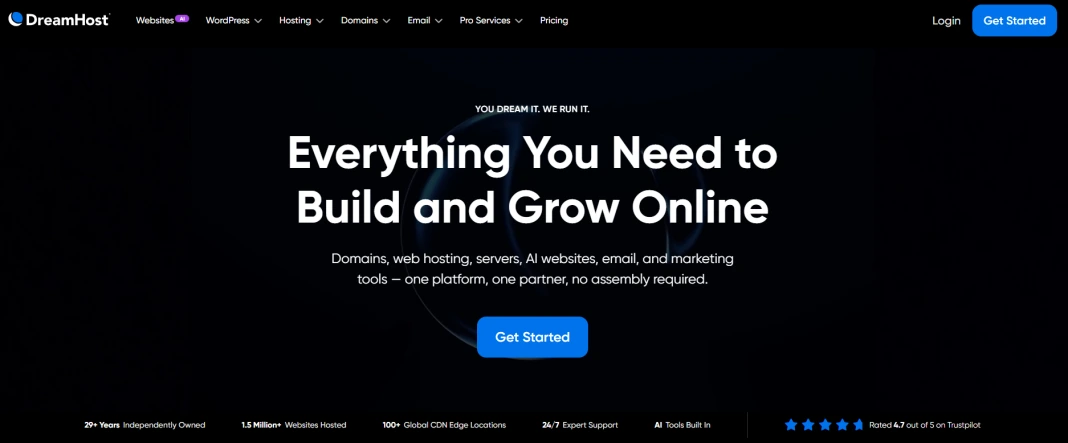
DreamHost is one of the oldest independent web hosting companies, serving website owners since 1997. Unlike many popular hosting brands, it hasn’t become part of a larger hosting group and continues to build and manage its own hosting platform.
Today, DreamHost hosts more than 1.5 million websites and offers much more than shared hosting. Its portfolio includes managed WordPress hosting (DreamPress), VPS hosting, dedicated servers, WooCommerce hosting, domains, business email, and AI-powered website tools.
Another thing that sets DreamHost apart is its custom control panel. Instead of using cPanel, the company has developed its own dashboard for managing websites, domains, email, databases, and hosting services from a single place.
Key Features
- Custom DreamHost control panel (no cPanel)
- AI-powered website builder
- Managed WordPress hosting (DreamPress)
- One-click WordPress staging
- Built-in server-side caching (DreamPress)
- Free website migration
- Global CDN integration
- Built-in Traffic Dashboard with bot analytics
- Daily automated backups
- On-demand and locked backups (DreamPress)
- Free SSL certificates
- NVMe SSD storage
- Unlimited bandwidth on eligible shared plans
- Free domain for the first year (annual eligible plans)
- WordPress pre-installed on WordPress hosting plans
- WooCommerce-ready hosting
- VPS and Managed VPS hosting
- Dedicated server hosting
- Business email hosting
- 100% uptime guarantee
- 97-day money-back guarantee on shared hosting
- 24/7 in-house customer support
What Makes DreamHost Stand Out?
DreamHost offers many of the features you’d expect from a modern hosting provider, but a few things genuinely set it apart from the competition.
- Custom-built hosting platform: Instead of licensing cPanel or Plesk, DreamHost has developed its own control panel for managing websites, domains, email, databases, SSL certificates, and billing from a single dashboard. This gives the platform a very different user experience compared to most shared hosting providers.
- Built-in Traffic Dashboard: DreamHost includes its own traffic analytics tool that shows visitor trends, bot traffic, top pages, geographic data, CDN usage, and AI-generated log summaries. Unlike Google Analytics, it works at the server level and doesn’t require adding tracking scripts to your website.
- AI beyond website creation: Most hosts limit AI to generating websites. DreamHost has expanded AI across its platform with AI-powered website creation, log summaries, and business insights that are available directly from the hosting dashboard.
- In-house U.S.-based support: DreamHost emphasizes that its customer support team is in-house rather than outsourced. It also has WordPress specialists, including contributors to the WordPress project, for WordPress-related assistance.
- Professional website setup included with eligible plans: Several hosting plans include a free handcrafted starter website, giving beginners a ready-to-customize website instead of just an empty WordPress installation.
- Performance features included with managed WordPress: DreamPress plans bundle features like one-click staging, on-demand backups, failover protection, and an integrated Bunny CDN instead of requiring separate premium add-ons.
Performance & Speed
DreamHost has upgraded its infrastructure over the years, and the improvements are noticeable across its hosting lineup. Instead of relying on one headline feature, it combines faster storage, a global CDN, WordPress-specific optimizations, and high-availability infrastructure to improve both speed and reliability.
Faster Server Infrastructure
DreamHost uses NVMe SSD storage, which delivers faster data access than older SATA-based storage. Combined with modern PHP support and an optimized server stack, websites can respond more quickly, especially for dynamic applications like WordPress.
Global Content Delivery
DreamHost integrates Bunny CDN to deliver static content from edge locations around the world. This reduces latency for international visitors and helps images, CSS, JavaScript, and other static assets load faster.
Optimized for WordPress
DreamPress isn’t just WordPress pre-installed, it includes server-level caching, staging, automated backups, and performance optimizations managed by DreamHost. That means you spend less time configuring optimization plugins and more time focusing on your website.
Better Stability During Traffic Spikes
DreamPress runs on a high-availability architecture that can automatically move websites to healthy servers if hardware issues occur. This helps maintain uptime and provides a more stable experience during unexpected traffic surges.
Built-in Performance Insights
The Traffic Dashboard gives you server-side insights into visitors, bots, requests, and CDN usage without relying solely on third-party analytics tools. It’s a useful addition if you want to understand how your website is performing from the hosting side.
Uptime & Reliability
A reliable hosting provider should do more than keep your website online, it should also recover quickly if something goes wrong. DreamHost addresses this through its uptime commitment and high-availability infrastructure rather than relying on marketing claims alone.
100% Uptime Guarantee
DreamHost is one of the few hosting providers that backs its service with a 100% uptime guarantee. If your website experiences qualifying downtime caused by DreamHost’s network or infrastructure, you may be eligible for service credits under its Service Level Agreement. (Certain exclusions apply, such as scheduled maintenance.)
High Availability on DreamPress
Managed WordPress websites hosted on DreamPress run on a high-availability platform. If the underlying server encounters an issue, DreamHost can automatically shift your website to healthy infrastructure, helping reduce service interruptions.
Stable Hosting Environment
DreamHost monitors and manages its hosting platform to provide a consistent experience across its services. Combined with its uptime commitment and resilient architecture, the platform is designed to keep websites available even during unexpected hardware issues.
Data Center Locations
DreamHost keeps its hosting infrastructure simple by operating data centers in the United States. During signup, you can choose the server location that best matches your primary audience.
- Ashburn, Virginia (US East) – A good choice if most of your visitors are from the eastern United States, Canada, Europe, or nearby regions.
- Hillsboro, Oregon (US West) – Better suited for websites targeting the western United States, Canada, Australia, New Zealand, and parts of Asia-Pacific.
If your audience is spread across multiple countries, DreamHost recommends using its integrated CDN to serve static content from edge locations around the world. This helps reduce latency for international visitors even though your website is hosted in a U.S. data center.
At the moment, DreamHost doesn’t offer data center locations in Europe, Asia, or other regions. If hosting your website outside the United States is a strict requirement for compliance or latency reasons, this is something to consider before choosing the platform.
CDN & Caching Technology
DreamHost includes several technologies to improve website loading speeds, but the exact features depend on the hosting plan you choose.
Bunny CDN Integration
DreamHost’s CDN is powered by Bunny.net, one of the top CDN providers relied on by hosting companies, allowing static assets such as images, CSS, JavaScript, and fonts to be delivered from edge locations closer to your visitors. This helps reduce latency and improves loading times for users around the world.
Built-in WordPress Caching
DreamPress includes server-level caching that speeds up WordPress websites without requiring a separate caching plugin. Since caching is handled by the hosting platform, there’s less configuration and maintenance for site owners.
Object Caching with Redis
Managed VPS plans support Redis object caching, which stores frequently accessed database queries in memory. This can significantly improve the performance of dynamic applications like WordPress, WooCommerce, and membership websites.
Cache Management
DreamHost gives you control over cache settings where applicable, making it easy to clear cached content after updating your website. This helps ensure visitors always see the latest version of your pages.
Ease of Use and Dashboard
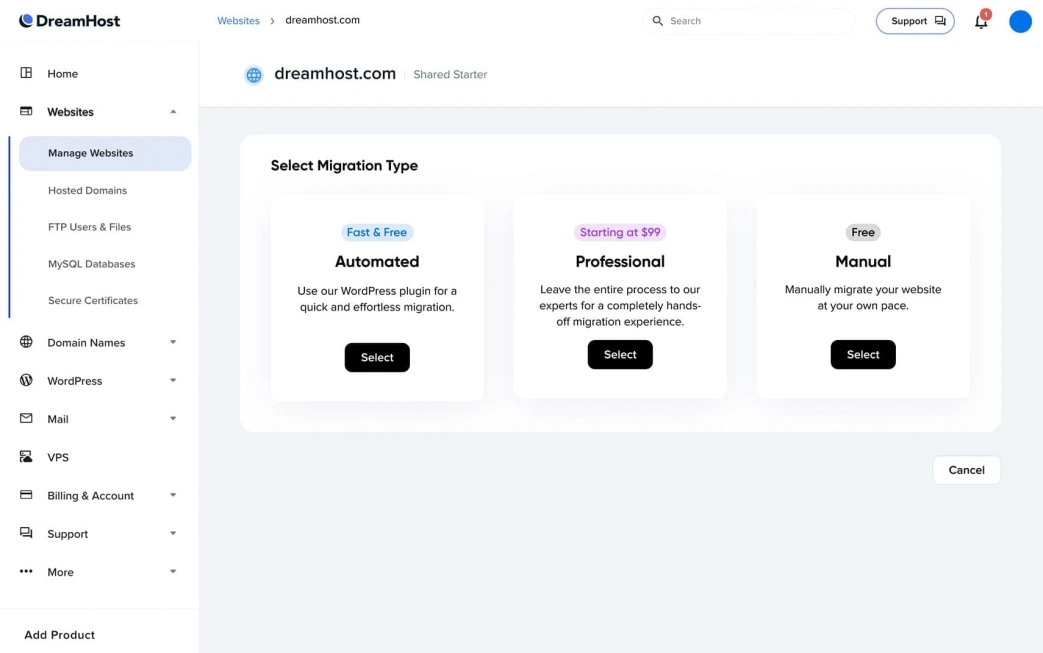
DreamHost takes a different approach from most hosting providers by using its own custom control panel instead of cPanel. While the layout may look unfamiliar at first, it’s designed to keep everyday website management simple.
From the dashboard, you can:
- Manage websites, domains, and hosting plans from one place.
- Install WordPress and other applications in just a few clicks.
- Create and manage email accounts.
- Add SSL certificates and manage DNS records.
- Access databases, PHP settings, SSH, SFTP, and cron jobs.
- Monitor website traffic through the built-in Traffic Dashboard.
- Manage billing, renewals, and support requests without leaving the dashboard.
One thing I like is that everything is integrated into a single interface. You don’t have to switch between cPanel, your domain registrar, or separate analytics tools to manage your website.
Security and Backup
DreamHost includes a solid mix of security features to protect your website, account, and data. While the core protections are available on most hosting plans, DreamPress adds several advanced security and recovery features.
Website Security
DreamHost includes the following security features to help protect your website:
- Free Let’s Encrypt SSL certificates
- Automatic SSL renewal
- Built-in Web Application Firewall (DreamPress)
- Malware removal on DreamPress Plus and Pro plans
- Automatic WordPress updates (DreamPress)
- Dedicated security team (Nightmare Labs) that helps protect the hosting platform
Account Security
To keep your hosting account secure, DreamHost provides:
- Multi-Factor Authentication (MFA)
- Free domain privacy (WHOIS Privacy) on eligible domain registrations
- Secure account and billing management through the DreamHost dashboard
Backup & Recovery
DreamHost offers multiple backup options depending on your hosting plan:
- Automated daily backups (DreamPress)
- On-demand backups before major website changes (DreamPress)
- Locked Backups to preserve a restore point until you delete it (DreamPress)
- One-click restore from available backup points (DreamPress)
For standard shared hosting, DreamHost also maintains account backups for disaster recovery. However, these backups aren’t designed to replace the steps you’d take backing up your WordPress site yourself, or provide user-managed restore points.
Developer Tools
DreamHost isn’t built only for beginners. If you prefer managing your website through the command line or need more control over your hosting environment, it includes a good set of developer-friendly tools.
Command Line & Server Access
- SSH access for secure server management
- SFTP for file transfers
- WP-CLI pre-installed on DreamHost servers
- Git version control support for deployment workflows
- Custom cron jobs through the DreamHost control panel or SSH
- Multiple PHP versions with easy switching from the dashboard
- MySQL database management
Domain & DNS Management
- Manage DNS records (A, AAAA, CNAME, MX, TXT, SRV, etc.)
- Custom nameserver support
- Domain redirects and subdomain management
Developer-Friendly Features
- One-click staging for DreamPress websites
- REST API support through WordPress
- PHP configuration management
- Shell access for automation and scripting
- Ability to create multiple SFTP and shell users for different projects
Customer Support & Quality
Getting help with DreamHost is straightforward, but the support experience is a little different from many hosting providers. Instead of offering a traditional phone support line, DreamHost focuses on live chat, tickets, and an extensive knowledge base.
Support Channels
- 24/7 live chat support
- 24/7 ticket (email) support
- Callback support available on request (not a standard free phone support line)
- Comprehensive knowledge base with step-by-step guides and tutorials
- AI-powered support assistant to help answer common questions before connecting you with an agent.
Response Time
According to DreamHost, live chat typically connects you with an agent within a few minutes, while email tickets generally receive a response within one to two hours. More complex technical issues may take longer if they require additional investigation.
Support Quality
What I like is that support isn’t limited to quick replies. When an issue can’t be resolved over live chat, the team escalates it through the ticket system instead of ending the conversation. The knowledge base is also well organized, making it easy to find solutions for common hosting, WordPress, domain, and email issues.
Things to Keep in Mind
- There is no direct phone support number for technical assistance.
- Phone callbacks are available, but they’re an optional paid service for most customers.
- Live chat cannot handle certain account verification or sensitive billing requests, which are processed through tickets instead.
Pricing & Plans
DreamHost keeps its pricing relatively simple compared to many hosting providers. Instead of dozens of overlapping plans, it offers a focused lineup that scales from personal websites to high-traffic business projects. One thing to keep in mind is that the advertised prices are introductory rates, so renewals cost more.
| Hosting Type | Best For | Starting Price |
|---|---|---|
| Web Hosting | Blogs, portfolios, small business websites | From $2.89/month |
| DreamPress | Managed WordPress websites | From $14.99/month |
| VPS Hosting | Growing websites needing dedicated resources | From $13.75/month |
| Dedicated Servers | High-traffic and resource-intensive websites | Custom pricing |
| Domains | Domain registration and transfers | Varies by extension |
What’s Included
Most hosting plans include:
- Free domain for the first year on eligible annual plans
- Free SSL certificates
- Unmetered bandwidth
- NVMe SSD storage
- AI Website Builder trial
- Free handcrafted starter website
- 30-day money-back guarantee
- Access to DreamHost’s custom control panel
Which Plan Should You Choose?
- Web Hosting – Best for beginners, bloggers, and small websites.
- DreamPress – Ideal if you want managed WordPress hosting with built-in performance and WordPress-specific tools.
- VPS Hosting – Suitable for growing businesses, agencies, and websites that need isolated resources.
- Dedicated Server – Designed for enterprise projects and applications that require an entire physical server.
Is DreamHost Good Value?
DreamHost offers competitive introductory pricing, but you should compare the renewal cost before making a decision. The inclusion of free SSL, a free domain (on eligible annual plans), NVMe storage, unmetered bandwidth, and bundled website tools helps offset the higher renewal rates, making it a solid value for long-term users.
Pros and Cons
After reviewing DreamHost’s features, platform, and hosting plans, here’s where it performs well and where it could improve.
Pros
- Independently owned hosting company with over two decades of industry experience.
- Custom control panel that’s clean and easy to navigate.
- Wide range of hosting options, including Shared, DreamPress, VPS, Managed VPS, Dedicated Servers, and WooCommerce hosting.
- NVMe SSD storage for improved performance.
- Built-in Bunny CDN integration.
- AI-powered website builder and business tools.
- Built-in Traffic Dashboard with server-side analytics.
- Free SSL certificates on hosting plans.
- One-click WordPress installation and managed DreamPress plans.
- Support for SSH, SFTP, WP-CLI, Git, cron jobs, and multiple PHP versions.
- 100% uptime guarantee backed by a service level agreement.
- 30-day money-back guarantee on eligible hosting plans.
Cons
- Data centers are limited to the United States.
- Uses a custom control panel instead of cPanel, which may require an adjustment period.
- Phone support isn’t available as a standard support channel; callbacks are limited.
- Advanced security features like WAF and malware removal are mainly available on higher-tier DreamPress plans.
- Some performance and WordPress features are exclusive to DreamPress rather than standard shared hosting.
- Renewal prices are higher than introductory promotional rates.
Real User Reviews & Ratings
DreamHost receives mostly positive feedback across major review platforms, with users frequently praising its reliability, ease of use, and helpful support. At the same time, some long-time customers mention higher renewal pricing and occasional delays in resolving complex support or billing issues.
| Platform | Rating | Common Feedback |
|---|---|---|
| Trustpilot | 4.5/5 | Reliable hosting, responsive support, easy-to-use platform, good long-term experience. Negative reviews mainly mention billing disputes, account suspensions, and renewal pricing. |
| G2 | 4.0/5 | Appreciated for WordPress hosting, uptime, and ease of use. Some users would like more advanced features and faster support for technical issues. |
What Users Like Most
- Stable hosting with good uptime.
- Beginner-friendly custom control panel.
- Helpful live chat and ticket support for most issues.
- Easy WordPress setup and management.
- Good value during the introductory pricing period.
Common Complaints
- Higher renewal prices after the initial term.
- No traditional phone support.
- Some billing or account-related issues can take longer to resolve.
- Advanced features are concentrated in DreamPress rather than standard shared hosting.
Alternatives to DreamHost
DreamHost is a solid all-round hosting provider, but it won’t be the best choice for everyone. If you’re looking for lower pricing, a different control panel, more global data centers, or stronger developer features, these alternatives are worth considering.
| Provider | Starting Price | Best For | Why Choose It Instead of DreamHost? |
|---|---|---|---|
| Hostinger | $2.99/mo | Beginners & budget users | Lower pricing, LiteSpeed hosting, AI tools, and global data centers. |
| Bluehost | $1.99/mo | WordPress beginners | Easier onboarding, AI site creation, and official WordPress recommendation. |
| HostArmada | $2.49/mo | Performance-focused websites | Cloud hosting, cPanel, daily backups, and more server locations. |
| InMotion Hosting | $2.24/mo | Businesses & developers | Better VPS & dedicated hosting, developer tools, and business scalability. |
Hostinger
Hostinger is a better choice if you’re looking for the best value for money. It combines affordable pricing with LiteSpeed-powered hosting, AI tools, and a wider network of global data centers.
- Lower introductory pricing.
- LiteSpeed Web Server with LiteSpeed Cache.
- AI Website Builder and other AI-powered tools.
- Multiple global server locations.
If you’re deciding between these two providers, check out our DreamHost vs Hostinger comparison for a detailed feature-by-feature breakdown.
Bluehost
Bluehost is ideal for first-time WordPress users who want a simple setup process and guided website creation.
- Officially recommended by WordPress.org.
- AI-powered website creation.
- Beginner-friendly dashboard.
- Phone, chat, and ticket support.
Still unsure which one suits your website? Read our DreamHost vs Bluehost comparison to see how they compare in pricing, features, and performance.
InMotion Hosting
InMotion Hosting is better suited for developers, agencies, and businesses that expect to scale over time. Its VPS and dedicated hosting lineup is more extensive than DreamHost’s.
- Powerful VPS and dedicated servers.
- Developer-friendly environment.
- cPanel hosting.
- Strong business-focused infrastructure.
If you’re comparing these two for a growing website, our DreamHost vs InMotion Hosting comparison covers the key differences in detail.
HostArmada
HostArmada focuses on performance and reliability while offering the familiar cPanel experience. It’s a great option if you want daily backups and more flexibility when choosing a server location.
- Cloud SSD hosting.
- cPanel included.
- Daily backups on all shared plans.
- Multiple worldwide data centers.
Who Should Choose DreamHost?
DreamHost is a great fit for many website owners, but it isn’t the right hosting provider for every use case. Here’s a quick way to decide whether it’s the right choice for you, especially if you’re still weighing your options for choosing the right web host.
Choose DreamHost If
- You want a reliable hosting provider with a long track record.
- You prefer a clean custom dashboard instead of cPanel.
- You’re building a WordPress website and want access to DreamPress.
- You need shared, VPS, managed VPS, or dedicated hosting from the same provider.
- You want built-in AI tools and a Traffic Dashboard.
- You value a 100% uptime guarantee.
- Your target audience is primarily in the United States.
- You want an easy-to-manage hosting platform without unnecessary complexity.
Avoid DreamHost If
- You need data centers outside the United States.
- You specifically want cPanel hosting.
- You rely on phone support as your primary support channel.
- You need advanced security features on entry-level shared hosting plans.
- You want LiteSpeed Web Server or LiteSpeed Cache.
- You’re looking for the absolute lowest introductory pricing.
- Your website requires a provider with a larger global infrastructure.
Is DreamHost Worth It?
Yes, DreamHost is worth considering if you’re looking for a reliable hosting provider with a proven track record, especially for WordPress websites, blogs, portfolios, and small to medium-sized business sites.
What stands out is its custom hosting platform, NVMe storage, managed WordPress solution (DreamPress), built-in Traffic Dashboard, AI-powered tools, and 100% uptime guarantee. It also offers a straightforward hosting experience without overwhelming users with unnecessary complexity.
That said, DreamHost isn’t the perfect choice for everyone. If you need data centers outside the United States, prefer cPanel, or want the lowest possible introductory pricing, providers like Hostinger or HostArmada may be a better fit.
Final Verdict
DreamHost continues to be one of the most dependable web hosting providers in 2026. Instead of chasing flashy marketing features, it focuses on delivering a stable hosting platform with solid performance, reliable uptime, an easy-to-use custom dashboard, and a strong managed WordPress experience.
It’s particularly well suited for bloggers, small businesses, freelancers, and WordPress users who want a hosting provider that’s easy to manage and backed by years of industry experience. Features like NVMe storage, DreamPress, Bunny CDN integration, the Traffic Dashboard, and built-in AI tools add genuine value without making the platform feel complicated.
However, it’s not the ideal choice for everyone. If you need global data center locations, cPanel, or the lowest introductory pricing, you’ll likely find better options elsewhere.
FAQs
Is DreamHost good for beginners?
Yes. DreamHost’s custom control panel, one-click WordPress installation, and straightforward plan selection make it easy for beginners to launch and manage a website without needing advanced technical skills.
Is DreamHost officially recommended by WordPress?
No. DreamHost is no longer listed on WordPress.org’s recommended hosting page. However, it still offers dedicated WordPress hosting, managed DreamPress plans, one-click WordPress installation, automatic updates, and tools designed specifically for WordPress users.
Does DreamHost use cPanel?
No. DreamHost uses its own custom-built hosting control panel instead of cPanel. While the interface is different, it provides tools to manage websites, domains, email, databases, and hosting services from one dashboard.
Does DreamHost offer free website migration?
Yes. DreamHost provides free website migration options, including an automated WordPress migration plugin and expert migration services for eligible hosting plans.
Where are DreamHost’s data centers located?
DreamHost currently operates data centers in Ashburn, Virginia, and Hillsboro, Oregon, allowing customers to choose the location closest to their primary audience.
Does DreamHost include email hosting?
Yes, but it depends on the hosting plan. Email hosting is included with some plans, while others require it as an optional add-on. Business email services are also available separately.
Does DreamHost offer a free domain?
Yes. Eligible annual hosting plans include a free domain registration for the first year. Domain renewals are charged at the standard renewal rate after the promotional period.
Does DreamHost provide a CDN?
Yes. DreamHost integrates Bunny CDN to help deliver static content from edge locations worldwide, improving website performance for visitors in different regions.
Does DreamHost offer a money-back guarantee?
Yes. DreamHost offers a 30-day money-back guarantee on eligible hosting plans, while refund eligibility varies for some other products and services.
Is DreamHost worth it in 2026?
If you want dependable hosting, a custom control panel, strong WordPress support, and solid performance, DreamHost remains a worthwhile option. However, users needing cPanel or data centers outside the United States may find other providers more suitable.
The pricing of Dreampress is affordable compared to other WP hosting service so I would like to choose Dreampress hosting plan for my website.
Yes, their pricing is cheaper than other WP hosting services and also WordPress recommended hosting provider so it will be the best choice for you.
Got the Dreampress hosting plan for my WordPress website and now my website loads faster than before.
That’s great!
It’s going to be end of my day, except before finish I am reading this fantastic piece of dreamhost review.