
WP Rocket Black Friday Deals
Single
60% OFF
Starting at
$1.95/mo
1 website
Plus
60% OFF
Starting at
$3.91/mo
3 websites
Multi
60% OFF
Starting at
$9.79/mo
50 websites
Rocket Insights FREE with all plans
Claim WP Rocket Black Friday Deal NowWP Rocket’s Black Friday sale is officially live, and this year’s biggest discount comes with a three-year license.
If you’ve been planning to speed up your WordPress website, this is a good opportunity to get WP Rocket at a lower price. The sale covers all three license types, including options for individual bloggers, website owners, and agencies.
I’ll break down the latest WP Rocket Black Friday deals for 2026, compare the license prices, and explain how to claim the discount.
WP Rocket Black Friday 2026 – Quick Overview
WP Rocket is offering discounts on both one-year and three-year licenses. The longer subscription provides the biggest savings.
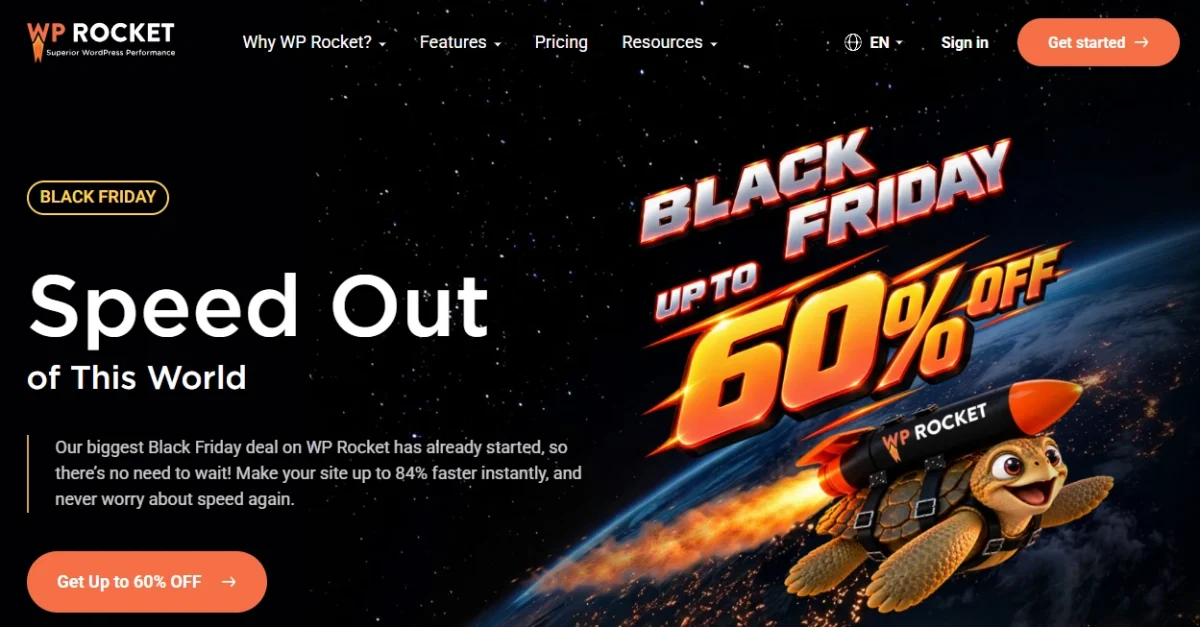
Here are the confirmed Black Friday 2026 offer details:
| Offer Details | Information |
|---|---|
| Black Friday Sale | Live |
| Sale Starts | November 5, 2026 |
| Sale Ends | December 2, 2026 |
| Maximum Discount | Up to 60% OFF |
| 1-Year License | 40% OFF |
| 3-Year License | 60% OFF |
| Eligible Licenses | Single, Plus, Multi |
| Additional Bonus | Rocket Insights included free |
| Coupon Code | Not required |
| Free Trial | 14 days |
The promotional discount applies automatically to new license purchases. You can choose your preferred license duration directly from WP Rocket’s pricing page.
WP Rocket Black Friday Deals 2026 – All License Offers
WP Rocket has three license options: Single, Plus, and Multi. Each includes the plugin’s performance optimization features, regular updates, and technical support during the active license period.
The difference between them is the number of websites you can activate.
WP Rocket Black Friday Pricing Comparison
Here is the complete pricing comparison for one-year and three-year subscriptions.
| License | Websites | Regular Price | 1-Year Deal (40% OFF) | 3-Year Deal (60% OFF) |
|---|---|---|---|---|
| Single | 1 | $5/mo | $3/mo | $1.95/mo |
| Plus | 3 | $10/mo | $6/mo | $3.91/mo |
| Multi | 50 | $25/mo | $15/mo | $9.79/mo |
Important: These are equivalent monthly prices, not monthly billing options. The one-year license is billed annually, while the three-year license requires payment for all three years upfront.
1. WP Rocket Single License
The Single license is designed for anyone running one WordPress website.
It includes the complete WP Rocket plugin, so you don’t need a more expensive license to access advanced caching or performance optimization settings.
This is a practical choice for personal blogs, affiliate websites, online portfolios, and small business websites.
If you manage only one website, the Single license gives you everything needed without paying for additional website activations.
2. WP Rocket Plus License
The Plus license is a better fit if you manage multiple WordPress websites under one account.
For example, if you run a personal blog alongside a business website and a niche affiliate site, you can use the same license across all three.
You get the same performance tools as the Single license, with the additional flexibility to activate WP Rocket on separate installations.
It also keeps license management simple because your websites share one WP Rocket subscription.
3. WP Rocket Multi License
The Multi license is intended for freelancers, web designers, and agencies that manage larger collections of WordPress websites.
It’s useful when you provide website maintenance, development, or performance optimization services for clients.
The default Multi license covers 50 websites, but WP Rocket also offers 100-website and 500-website options through the website-count selector.
Those higher website limits have their own pricing.
For WordPress professionals managing numerous client projects, the Multi license removes the need to purchase a separate Single license for every installation.
WP Rocket 1-Year vs. 3-Year Black Friday Deal: Which Is Better?
WP Rocket’s pricing gives you two different ways to save, but the right choice depends on how long you plan to use the plugin.
Choose the 1-year license if:
- You’re purchasing WP Rocket for the first time.
- You want a lower upfront payment.
- You’re building a new website and prefer an annual commitment.
- You want flexibility before committing to a longer subscription.
Choose the 3-year license if:
- You plan to keep your WordPress website active for several years.
- You’re already committed to using WP Rocket.
- You manage established websites that need ongoing optimization.
- You prefer paying upfront instead of making annual payments during the initial term.
I recommend the three-year option for established websites because it provides the lowest equivalent monthly cost.
However, the discount covers only your initial license period. After that period ends, WP Rocket renews annually at its regular renewal price.
What Do You Get With WP Rocket?
WP Rocket is a premium WordPress caching and performance optimization plugin. It handles several important speed improvements from one dashboard.
Here are the main features included with your license.
Page Caching and Cache Preloading
WP Rocket creates cached versions of your WordPress pages so your server doesn’t have to generate the same content from scratch for every visitor.
Its cache preloading feature also prepares cached pages in advance, helping visitors receive optimized content without needing to trigger the cache generation themselves.
CSS and JavaScript Optimization
WP Rocket includes tools to reduce unnecessary file loading and improve how your website renders.
You can:
- Minify CSS and JavaScript files.
- Remove unused CSS.
- Defer JavaScript loading.
- Delay JavaScript execution until user interaction.
- Optimize the delivery of important page resources.
These options help address performance problems caused by render-blocking resources and unnecessary JavaScript execution.
Lazy Loading for Images and Videos
WP Rocket delays loading offscreen images, videos, and iframes until visitors approach them.
For content-heavy blogs with numerous screenshots, featured images, and embedded videos, this reduces the amount of content loaded during the initial page request.
It also prioritizes critical above-the-fold images instead of delaying content visitors need to see immediately.
Core Web Vitals Optimization
WP Rocket includes features that target important Google Core Web Vitals metrics.
For example, its critical image optimization prioritizes the main visible image for Largest Contentful Paint (LCP), while automatic lazy rendering helps improve Interaction to Next Paint (INP).
These optimizations address specific loading and responsiveness problems rather than simply reducing file sizes.
WooCommerce Optimization
WP Rocket works with WooCommerce websites and automatically excludes sensitive pages, including cart and checkout pages, from normal page caching.
This helps store owners improve browsing performance while keeping shopping cart and checkout functionality working correctly.
Rocket Insights – Included Free
WP Rocket is also including Rocket Insights at no additional cost with its Black Friday licenses.
Rocket Insights is a built-in performance monitoring hub that provides:
- Performance scores for important website pages.
- Recommendations for improving website speed.
- Guidance on which optimization features to enable.
- Performance retesting to track improvements.
Instead of relying only on external speed-testing tools, you can monitor website performance and review optimization recommendations directly from your WordPress dashboard.
How to Claim WP Rocket Black Friday Discounts 2026
Claiming the WP Rocket Black Friday deal is simple. The discount is automatically applied at checkout, so you don’t need to enter a coupon code manually.
Follow these steps to purchase your discounted WP Rocket license.
Step 1: Visit the WP Rocket Black Friday Sale Page
Click this WP Rocket Black Friday Deal link.
You’ll land directly on WP Rocket’s Black Friday pricing page, where you can see the available licenses and discounted prices.
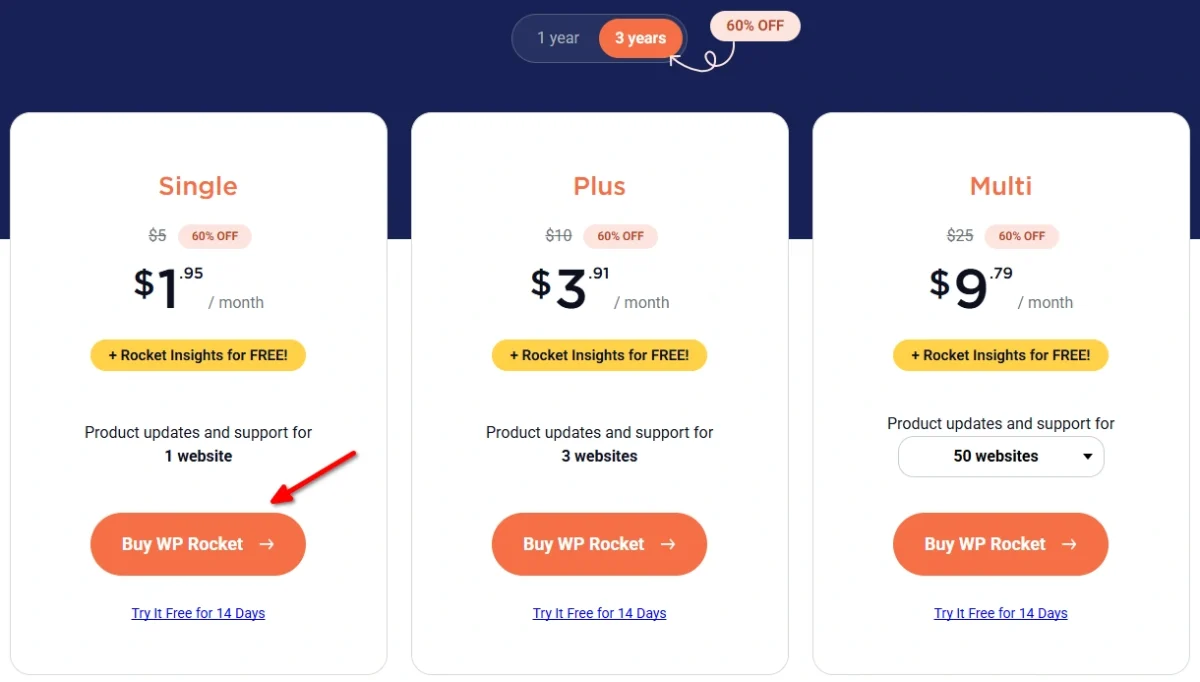
Step 2: Choose Your License Duration and Plan
At the top of the pricing section, you’ll find two subscription options:
- 1 Year: Get 40% OFF on your selected license.
- 3 Years: Get 60% OFF and the lowest monthly equivalent price.
Select your preferred subscription duration. The prices will update automatically based on your selection.
Next, choose from the three available licenses:
- Single: For 1 WordPress website.
- Plus: For 3 WordPress websites.
- Multi: For 50 websites, with options to increase the website limit.
Once you’ve selected your license, click the orange Buy WP Rocket button below your chosen plan.
Step 3: Fill Out Your Billing Information
After clicking the purchase button, you’ll be redirected to WP Rocket’s secure checkout page.
Complete the billing form with the following information:
- Email address
- First and last name
- Country or region
- State
- Street address
- Town or city
- ZIP code
- Company name (optional)
Make sure your email address is correct, as you’ll use it to access your WP Rocket account and purchase details.
Step 4: Select Your Payment Method and Review the Discount
Below the billing form, choose your preferred payment method:
- Credit or debit card
- PayPal
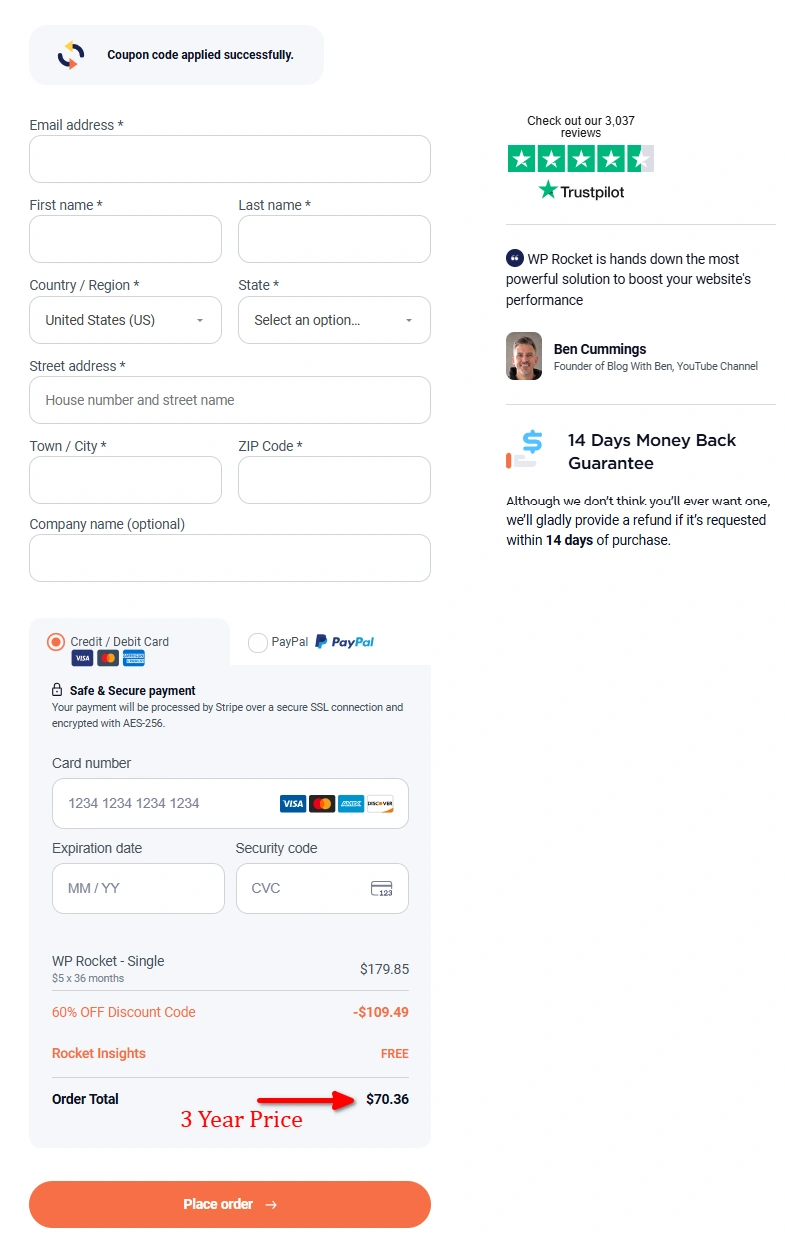
Before placing your order, review the pricing summary.
For example, if you choose the Single license for 3 years, the checkout displays:
| Order Details | Amount |
|---|---|
| Single License (36 Months) | $179.85 |
| Black Friday Discount (60% OFF) | -$109.49 |
| Rocket Insights | FREE |
| Final Order Total | $70.36 |
You’ll also see a confirmation message stating “Coupon code applied successfully.”
This means your Black Friday discount is already active, and no additional coupon code is required.
Step 5: Complete Your Purchase and Install WP Rocket
After reviewing your order, click the orange Place Order button at the bottom of the checkout page.
Once your payment is successful, access your WP Rocket account and download the plugin ZIP file.
To install it on your WordPress website:
- Log in to your WordPress dashboard.
- Navigate to Plugins → Add New Plugin → Upload Plugin.
- Upload the WP Rocket ZIP file.
- Click Install Now, then Activate Plugin.
That’s it! WP Rocket will automatically enable its default caching optimizations, and you can configure additional performance settings from your WordPress dashboard.
WP Rocket 14-Day Free Trial and Refund Policy
WP Rocket provides a 14-day free trial for users who want to try the plugin before purchasing a license.
The trial includes access to all plugin features and technical support.
You need to provide a valid credit card or PayPal account to activate the trial. If you don’t cancel before the trial ends, WP Rocket automatically charges your payment method for the license.
For direct purchases, WP Rocket also provides a 14-day refund policy.
If you’re planning to use the Black Friday promotion, complete your discounted purchase during the sale rather than assuming the promotional price will remain available after the deadline.
Frequently Asked Questions
Does the WP Rocket Black Friday discount apply to existing customers?
The 2026 Black Friday promotion is intended for first-time license purchases. Existing license renewals do not receive the promotional discount.
Does WP Rocket offer a lifetime license?
No. WP Rocket uses time-based licenses for ongoing updates, support, and cloud-based optimization services. The three-year option is a prepaid subscription, not a lifetime purchase.
Can I upgrade my WP Rocket license later?
Yes. You can upgrade from Single to Plus or Multi by paying the applicable price difference. Upgrading increases your website allowance but doesn’t extend the expiration date of your existing subscription.
Can I use WP Rocket on client websites?
Yes. Freelancers and agencies can install WP Rocket on client websites using an appropriate Multi license. Hosting companies offering WP Rocket to their customers must use WP Rocket’s separate reseller program.
What happens if my WP Rocket license expires?
The installed plugin continues running, but you lose access to plugin updates, technical support, and certain cloud-based optimization features. Renewing your license restores those services.
Does WP Rocket guarantee a 100/100 PageSpeed Insights score?
No. WP Rocket improves website performance through caching and resource optimization, but the final score also depends on your hosting server, website content, images, third-party scripts, and other resources.
Final Verdict: Is the WP Rocket Black Friday Deal Worth It?
WP Rocket’s Black Friday 2026 offer is worth considering if you want a premium caching plugin that handles important WordPress performance optimizations without requiring custom code.
For a single blog or business website, the Single license is the most practical purchase. Plus makes more sense for a small collection of websites, while Multi is designed for professionals managing client projects.
My recommendation is the three-year license if you plan to use WP Rocket long-term. It provides the strongest discount and covers your initial subscription period in one purchase.
If you prefer a smaller upfront payment, the one-year deal is still a solid option.
You can also explore my best Black Friday deals for bloggers and WordPress users to find discounts on other WordPress plugins, themes, and web hosting services.