


WPX costs more than SiteGround’s introductory offer, but does it deliver better performance and support for your money?
At WPressBlog, we compared both on speed, ease of use, customer support, and pricing to find out which hosting provider offers more value.
Here’s what we wanted to find out:
- Which hosting provider delivers faster website performance?
- Does WPX justify its higher price with better support and features?
- Is SiteGround worth choosing for its lower introductory price?
Let’s look at the test results, features, and real hosting costs to see why I recommend one over the other.
WPX vs SiteGround 2026: Side-by-Side Comparison
Here’s a complete side-by-side comparison for WPX vs SiteGround, that covers main features, infrastructure, WordPress tools, security, backups, developer features, support, and pricing.
| Feature | WPX | SiteGround |
|---|---|---|
| Founded | 2013 (named WPX in 2016) | 2004 |
| Based in | Sofia, Bulgaria | Sofia, Bulgaria |
| Owned by | Terry Kyle and Georgi Petrov (independent) | Private, still founder-run |
| Hosting type | Managed WordPress and WooCommerce | Shared, cloud, and a website builder |
| Servers | Own servers | Google Cloud Platform |
| Server software | LiteSpeed Enterprise, MariaDB, OPcache | NGINX, SSD, Ultrafast PHP, MySQL, Linux containers |
| Data centers | 3 Data centers | 11 Data centers |
| CDN | XDN CDN, 43+ endpoints | Free CDN, 170+ edges |
| Uptime | 99.95% | 99.9% |
| Status page | None | None |
| Caching | LiteSpeed Cache + OPcache. Redis on Woo plans | SuperCacher: static files, page HTML, Memcached |
| Free migration | Unlimited, done within 24 hours | Free plugin. Staff migration is paid (€30) |
| Staging | One-click, then push live | GrowBig and GoGeek only. Not on StartUp |
| Automatic updates | Manual, same as a normal WordPress site | Core updates itself. You can delay or skip a version |
| Control panel | WPX panel, rebuilt in 2025. Not cPanel | Site Tools. Not cPanel |
| Website builder | No | Yes. Drag-and-drop, templates, AI tools, ecommerce |
| One-click install | Yes | Yes |
| Free email | Yes (except base plan) | Yes |
| Email storage | Shared with the plan disk | Up to 10 GB shared by all mailboxes |
| Email limits | 50 emails / 30 minutes, 49 recipients | 400/hour on StartUp and GrowBig. 800/hour on GoGeek and Cloud. 50 MB attachments |
| WooCommerce | Separate Woo plans, Redis included | Same plans, one-click install. A WooCommerce-labelled version of those plans |
| Free SSL | Yes | Yes. Wildcard available |
| Malware | Daily scans, free removal | Security Optimizer plugin. No cleanup guarantee |
| Firewall | Managed WAF | Custom WAF, plus anti-bot rules |
| DDoS | Origin protection, plus XDN | Network level, plus the WAF |
| Backups | Daily, every plan | Daily, every plan. Files, database, and email |
| Backup frequency | Daily. Personal backup on demand, kept 24 hours | Daily. On-demand on GrowBig and GoGeek |
| Backup retention | 28 days | 30 days on shared, 7 days on Cloud |
| SSH / SFTP | SFTP on every plan. SSH available, more limited | SSH and SFTP on every plan, limited to your account |
| Git | SSH or SFTP only. No push-to-deploy | SG-Git on GoGeek and Cloud |
| WP-CLI | If SSH is on | Yes, every plan |
| Cron | Mostly WP-Cron. No crontab screen | Yes, in Site Tools |
| Support | 24/7 chat and tickets. No phone | 24/7 chat, tickets, and phone. |
| Support speed | Within 15 seconds | Within 2 minutes |
| Starting price | $17.99/mo (monthly billing) $14.99/mo (annual billing) $11.99/mo (5-year billing) | $24.99/mo (monthly billing) $3.99/mo (annual billing) |
| Entry sites / storage | 1 Website, 10 GB storage, 100 GB bandwidth | 1 Website, 10 GB storage, 10K Visits |
| Renewal Price | No change | $24.99/mo (monthly billing) $17.99/mo (annual billing) |
| Money-back | 30 days | 30 days on Shared, 14 days on Cloud |
| Free domain | No | Yes, for first year only |
About WPX and SiteGround
WPX
WPX started in 2013 as Traffic Planet Hosting before changing its name to WPX. It provides managed WordPress and WooCommerce hosting, with data centers in Chicago, London, and Sydney.
One thing I like about WPX is that you get more than server space for your website. Its support team can migrate your site for free, remove malware, and help fix speed issues. You also get LiteSpeed Enterprise servers and WPX’s own CDN, called WPX XDN.
Unique Features of WPX
- LiteSpeed Enterprise servers for WordPress websites.
- WPX XDN to deliver website content through a global network.
- Free website migrations handled by its support team.
- Free malware removal and website speed fixes.
- 24/7 live chat support.
- A custom dashboard for managing your hosting account.
SiteGround
SiteGround has been in the hosting business since 2004. Along with WordPress hosting, it sells shared hosting, cloud hosting, and WooCommerce hosting. You can also get email hosting and domain registration.
What makes SiteGround appealing is the number of useful tools included with its shared hosting plans. You get Google Cloud infrastructure, SuperCacher, daily backups, a free CDN, and the Site Tools dashboard without having to buy separate services for each of these features.
Unique Features of SiteGround
- Google Cloud infrastructure with 11 data center locations.
- SuperCacher for static and dynamic content caching.
- Free CDN to serve website content from locations closer to visitors.
- Email hosting included with shared hosting plans.
- Site Tools dashboard for managing websites and hosting settings.
- Daily backups and free SSL certificates.
Performance and Speed
In our WPressBlog performance tests, WPX delivered faster response times than SiteGround across all three tests. It also recorded less downtime during 2026. Here’s how the two hosts compare and where the differences matter.
Infrastructure
WPX runs on LiteSpeed Enterprise servers with MariaDB and OPcache. Its LiteSpeed Cache helps serve stored pages without rebuilding them for every visitor. Each hosting plan also comes with a set number of PHP workers, which handle requests that need server-side processing.
SiteGround uses Google Cloud infrastructure with NGINX and MySQL. Its SuperCacher handles static files, dynamic page caching, and database queries through Memcached. The Speed Optimizer plugin adds tools such as image compression and lazy loading.
There’s also a plan difference worth knowing: SiteGround’s Ultrafast PHP is available on GrowBig and higher plans, but not StartUp.
| Feature | WPX | SiteGround |
|---|---|---|
| Server software | LiteSpeed Enterprise | NGINX |
| Database | MariaDB | MySQL |
| Page caching | LiteSpeed Cache | Dynamic Cache |
| Object caching | Redis on WooCommerce plans | Memcached |
| PHP workers | 9 on Starter; 15 on Business | Worker count not published |
| Extra speed features | Support-assisted speed fixes | Ultrafast PHP on GrowBig and above |
Time to First Byte (TTFB)
WPX recorded an average US TTFB of 569 ms in 2025, compared with 632 ms for SiteGround. The gap was even larger in the global cached test.


| Test | WPX | SiteGround |
|---|---|---|
| Average US TTFB (2025) | 569 ms | 632 ms |
| Global cached test | 240 ms | 1,200 ms |
| Load test response time | 45 ms | 170 ms |
| Load test errors | 0% | 0% |
WPX returned a faster response in every test listed above. Its global cached result was 240 ms, while SiteGround took 1,200 ms. During the load test, WPX recorded 45 ms compared with SiteGround’s 170 ms. Neither host recorded errors in that test.
These numbers give WPX a clear advantage in this comparison. Your own results may differ depending on your theme, plugins, caching settings, and website traffic.
Uptime
A website also needs to stay available when visitors want to use it. Our 2026 monitoring figures show less downtime for WPX.
| Uptime metric | WPX | SiteGround |
|---|---|---|
| Uptime in 2026 | 99.9969% | 99.9629% |
| Total recorded downtime | 16 minutes | 3 hours 13 minutes |
| Recorded outages | 9 | 44 |
| Uptime guarantee | 99.95% | 99.9% |
WPX recorded just 16 minutes of downtime across nine outages. SiteGround recorded 3 hours and 13 minutes across 44 outages. Both stayed above their published uptime guarantees during this period, but WPX had the stronger result.
These figures cover the monitoring period used for this comparison; they don’t guarantee that either host will deliver the same uptime in the future.
Which is faster, WPX or SiteGround?
WPX comes out ahead in our tests, with lower response times across all three performance checks and substantially less recorded downtime in 2026.
SiteGround can still work well for a blog or small business website, especially if you’re trying to keep hosting costs down. Its GrowBig plan also includes Ultrafast PHP, which isn’t available on StartUp.
However, if you’re running an established WordPress website where speed and uptime matter, WPX has the stronger results in this comparison.
Ease of Use
WPX and SiteGround both make it easy to get WordPress running, but the differences show up once you start managing your website. WPX handles free migrations for you, while SiteGround gives you more built-in tools, including email hosting and a website builder.
WordPress Management
WPX keeps things simple with its custom hosting dashboard. You can manage your websites, backups, SSL certificates, and other hosting settings without dealing with cPanel. If you’re moving an existing WordPress site, its support team handles the migration for free.
SiteGround uses its Site Tools dashboard for similar tasks. It also provides a WordPress installation wizard, automatic core updates, and WP-CLI. However, staging is available only on GrowBig and GoGeek, so StartUp users don’t get the same convenience when testing changes.
| Feature | WPX | SiteGround |
|---|---|---|
| WordPress installation | One-click installation | One-click installation |
| Free website migration | Handled by its team | Free migration plugin |
| Managed migration service | Yes | Paid service available |
| Staging | Yes | GrowBig and GoGeek |
| Automatic WordPress core updates | Standard WordPress update process | Available |
Control Panel
WPX uses its own dashboard rather than cPanel. The main hosting tasks are straightforward, and you can manage your sites without navigating a complicated set of server options.
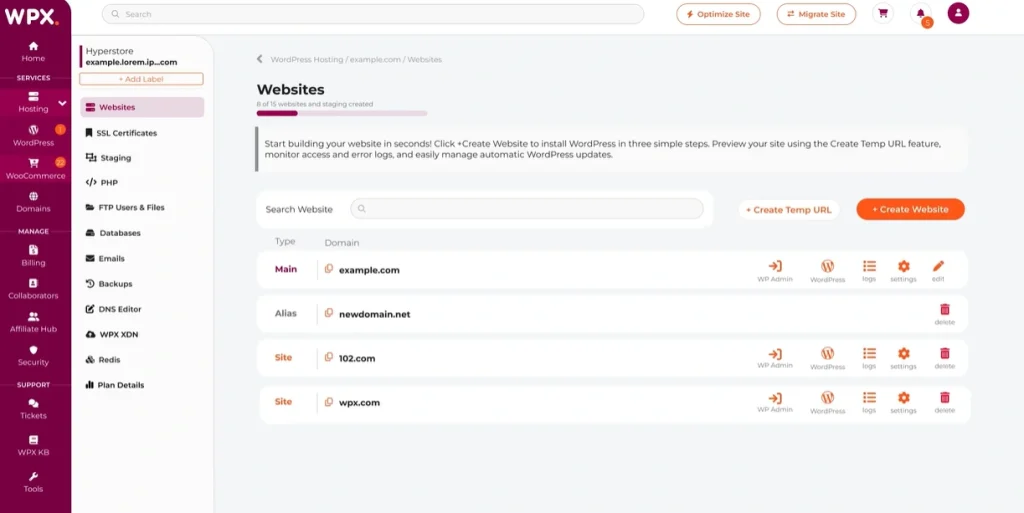
SiteGround’s Site Tools dashboard is also easy to use. It gives you access to website files, databases, backups, email accounts, and WordPress settings from one place.

If you’re new to hosting, neither dashboard should take long to learn. The choice mostly comes down to which layout you prefer.
Website Builder
WPX doesn’t include a separate drag-and-drop website builder. You’ll build your site using WordPress, whether that’s the block editor, GeneratePress, or a page builder plugin.
SiteGround includes its own website builder with templates and drag-and-drop editing. You can use it to create a website without installing WordPress, which is handy if you don’t need WordPress-specific features.
For a WordPress blog, this extra builder probably won’t make much difference. But if you want to create a basic website without learning WordPress, SiteGround has an advantage.
Email Hosting
This is one area where the two providers differ considerably.
WPX doesn’t include email hosting on its Starter plan. You’ll need a higher plan if you want to create email accounts using your domain.
SiteGround includes email hosting with its shared hosting plans, so you can create addresses such as you@yourdomain.com without paying separately for a basic email service.
| Feature | WPX | SiteGround |
|---|---|---|
| Email hosting | Yes (except basic plan) | Yes |
| Custom-domain email | Yes (except basic plan) | Yes |
| Webmail | Yes | Roundcube |
| Email storage | Uses hosting disk space | Shared hosting disk space |
WooCommerce
WPX offers dedicated WooCommerce hosting plans, including Redis on those plans. Its support team can also help with common hosting-related problems that affect your store.
SiteGround supports WooCommerce on its WordPress hosting plans and includes SSL certificates. However, the resources and features you get still depend on your selected plan.
If you’re running an established store and want hands-on help with hosting issues, WPX is worth considering.
Data Centers and CDN
Data Center Locations
WPX lets you choose between Chicago, London, and Sydney when setting up your hosting account. That’s enough to cover major markets in North America, Europe, and Australia, but you have fewer options if most of your visitors are in Asia or elsewhere.
SiteGround gives you more flexibility with 11 locations. You can choose a server closer to your main audience instead of being limited to three cities.
| Data Center Locations | WPX | SiteGround |
|---|---|---|
| Total locations | 3 | 11 |
| United States | Chicago | Ashburn, Council Bluffs, Dallas, Los Angeles |
| Europe | London | London, Madrid, Eemshaven, Frankfurt, Paris |
| Asia-Pacific | Sydney | Sydney, Singapore |
| Choose location at signup | Yes | Yes |
If most of your readers are in the US, UK, or Australia, either host has a suitable location. SiteGround has the advantage if you want more choices, particularly for European traffic or visitors in Asia who may benefit from its Singapore location.
CDN
WPX includes its own CDN, called WPX XDN, with more than 43 endpoints. The important part is that it can cache entire pages, not just images, CSS, and JavaScript files. That means visitors can receive cached page content from the CDN rather than always requesting it from your hosting server.
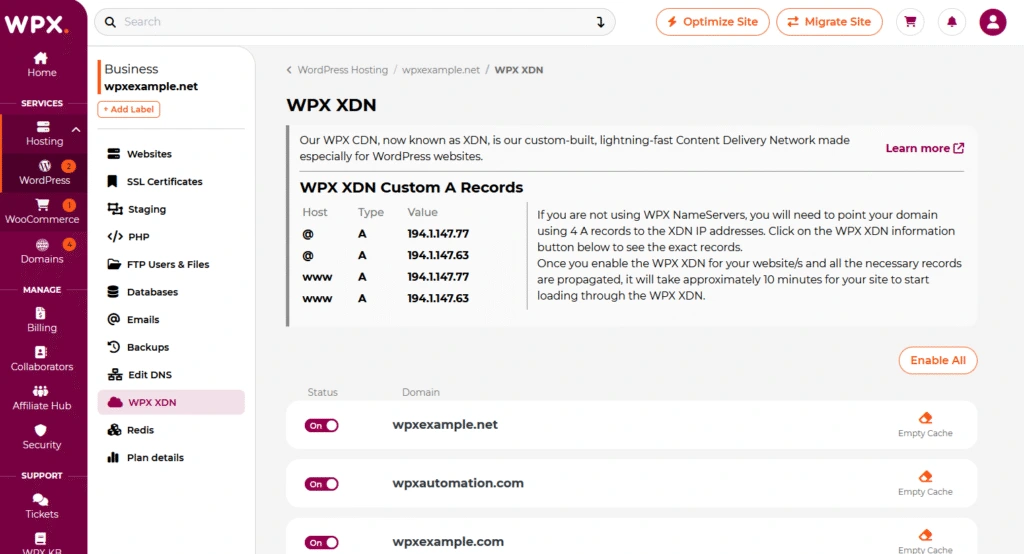
SiteGround also includes a CDN on its hosting plans, with more than 170 edge locations. However, its free CDN mainly caches static files. If you want full-page caching at the edge, you need its paid Premium CDN.
| CDN Feature | WPX | SiteGround |
|---|---|---|
| CDN | WPX XDN | SiteGround CDN |
| Network coverage | 43+ endpoints | 170+ edge locations |
| Included CDN | Yes | Yes |
| Static file caching | Yes | Yes |
| Full-page edge caching | Included | Requires Premium CDN |
Don’t assume that more CDN locations automatically make a website faster. What gets cached matters, too. WPX includes full-page caching through XDN, while SiteGround requires a paid upgrade for that feature.
You can also use a third-party CDN service if you need more control over caching or global delivery.
Security and Backups
Security
WPX scans websites for malware daily and removes infections for free. It also includes a managed web application firewall (WAF) and DDoS protection for its servers and XDN network. If malware gets onto your WordPress site, you can contact support and ask them to clean it up.
SiteGround provides a custom firewall, AI-powered anti-bot protection, account isolation, and its Security Optimizer plugin. It also handles server security updates and automatically renews SSL certificates.
The important difference is malware removal. WPX includes cleanup as part of its service, while SiteGround doesn’t promise to remove every infection for you.
| Security Feature | WPX | SiteGround |
|---|---|---|
| Free SSL | Yes | Yes, with automatic renewal |
| Malware scanning | Daily scans | Security tools; no daily-scan promise |
| Malware removal | Free | No guaranteed cleanup service |
| Firewall | Managed WAF | Custom WAF |
| DDoS protection | Server and XDN network | Network-level protection and WAF |
| Bot protection | Not listed as a separate tool | AI anti-bot protection |
| Security updates | Managed hosting stack | Server patching and Security Optimizer |
WPX is the better choice if you want the hosting team to handle malware cleanup.
Backups
Both hosts create daily backups automatically, so you have a way to recover if an update breaks your website or you accidentally delete important files. The differences are in retention, restoration options, and which plans let you create backups on demand.
WPX keeps daily backups for 28 days on a separate server. You can restore a copy from its control panel or create a personal backup before making major changes. Personal backups are kept for 24 hours.
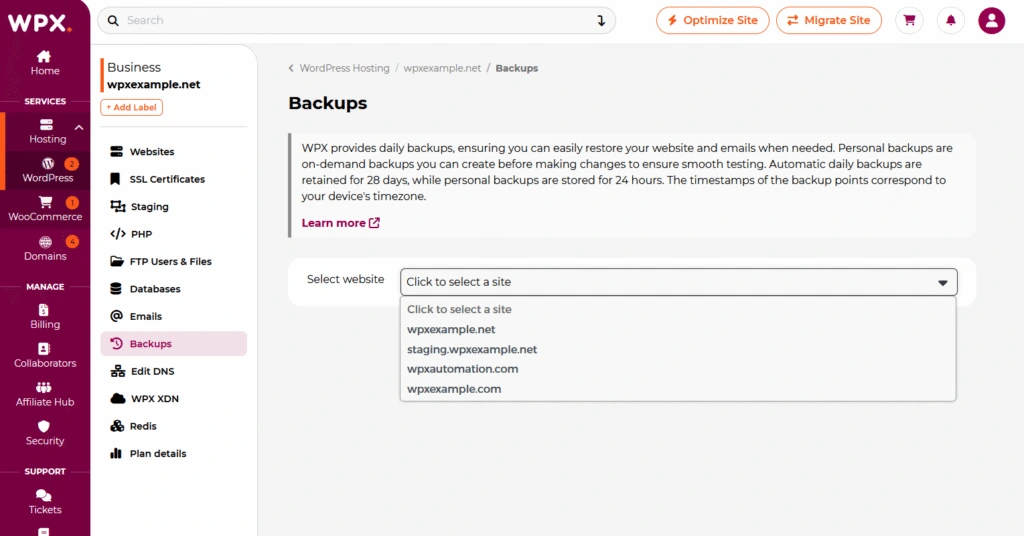
SiteGround keeps daily backups for 30 days on shared hosting plans, including website files, databases, and email. You can restore the entire website or select individual files, a database, or a mailbox through Site Tools. Cloud hosting plans have a shorter seven-day retention period.
| Backup Feature | WPX | SiteGround |
|---|---|---|
| Automatic backups | Daily | Daily |
| What is backed up | Website files and database | Files, database, and email |
| Retention | 28 days | 30 days on shared plans; 7 days on Cloud |
| Backup storage | Separate server | Off the live server |
| On-demand backups | Personal backups, kept 24 hours | GrowBig and GoGeek; not StartUp |
| Restore options | Through WPX control panel | Full or individual-item restoration |
| Hourly backups | Not included | Available with paid Premium Backup |
SiteGround has a slight advantage in standard backup retention, keeping shared-hosting backups for 30 days instead of WPX’s 28. It also lets you restore individual items, which is useful if you delete one file or need to recover a mailbox rather than roll back the entire website.
However, on-demand backups aren’t available on SiteGround’s StartUp plan. If you want to take a backup before every major plugin update, that limitation is worth considering.
Regardless of your host, keep an additional backup somewhere outside your hosting account. If you ever lose access to your hosting account, an independent copy gives you another way to recover your website.
Which Is Better for Security and Backups?
WPX is the better fit if you want free malware removal and a support team that will help clean an infected website. SiteGround offers more flexibility when restoring individual files, databases, and emails, along with slightly longer backup retention on shared plans.
Developer Tools
WPX and SiteGround give you the tools needed to manage a WordPress website, but SiteGround has a few extras for developers. If you mainly publish blog posts and manage plugins, you probably won’t notice much difference. If you work with custom code or manage multiple websites, SiteGround has more to offer.
| Developer Feature | WPX | SiteGround |
|---|---|---|
| SSH Access | Yes | Yes |
| SFTP | Yes | Yes |
| WP-CLI | Yes | Yes |
| Git Integration | No built-in Git deployment workflow | Available on GoGeek and Cloud |
| Staging | Available on WordPress plans | Available on GrowBig and GoGeek |
| Cron Jobs | Limited server-side control | Manageable through Site Tools |
| Database Access | Yes | Yes |
| PHP Configuration | Options available through hosting tools | Managed through Site Tools |
WPX Developer Tools
WPX covers the basics with SSH, SFTP, WP-CLI, and database access. You can transfer files, run WordPress commands, and handle routine maintenance without doing everything through the WordPress dashboard.
The main drawback is Git integration. WPX doesn’t provide a built-in Git deployment workflow, so you’ll need to manage code deployments yourself if you regularly update custom themes or plugins through a repository.
For bloggers and website owners who only need occasional technical access, WPX should be enough.
SiteGround Developer Tools
SiteGround offers SSH, SFTP, and WP-CLI, along with Git integration on its GoGeek and Cloud plans. This is useful if you work with a Git repository and want a more convenient way to manage code deployments.
You can also manage cron jobs, adjust PHP settings, and access your databases through Site Tools. GrowBig and GoGeek include staging, so you can test plugin updates or code changes before applying them to your live website.
Keep in mind that some features depend on your plan. If you need Git integration or staging, check the plan details before signing up.
Customer Support
When your website goes down or a plugin causes an error, you want support that can help fix the problem, not just send you a link to a tutorial. WPX and SiteGround both provide 24/7 support, but they differ in the help they offer and how you can contact them.
Support Channels
WPX provides 24/7 live chat and ticket support. It doesn’t offer phone support, so you’ll need to contact the team online.
SiteGround offers live chat, tickets, and phone support around the clock. If you’d rather explain a problem over the phone, that’s a useful advantage. SiteGround also provides priority support on its GoGeek plan.
| Support Channel | WPX | SiteGround |
|---|---|---|
| Live Chat | 24/7 | 24/7 |
| Support Tickets | Yes | Yes |
| Phone Support | No | Yes |
| Priority Support | No separate priority queue | Available on GoGeek |
| Support Availability | 24/7 | 24/7 |
Support Quality
WPX can help with more than hosting account questions. Its support team handles website migrations, malware removal, and speed-related problems without charging extra for these services. That’s particularly helpful if you’re not comfortable troubleshooting WordPress issues yourself.
SiteGround’s team can help with hosting settings, WordPress errors, DNS problems, and backup-related questions. You can also call support if you prefer speaking to someone directly. However, its support offering doesn’t include the same free malware-removal service that WPX advertises. See below what users say about SiteGround.

Which Has Better Customer Support?
I’d choose WPX if I wanted help fixing website problems without handling all the technical work myself. Free malware removal, migrations, and speed-related assistance are useful extras, especially for website owners without technical experience.
SiteGround is a good option if phone support is important to you or you mainly need help with hosting and WordPress issues. Its range of contact options gives you more flexibility when asking for assistance.
Pricing
WPX costs more upfront, while SiteGround is much cheaper for the first year. But don’t choose SiteGround based on its introductory price alone. Its StartUp plan renews at $17.99/month, which is the same as WPX’s monthly price.
| Pricing Detail | WPX | SiteGround |
|---|---|---|
| Monthly Plan | $17.99/mo | $24.99/mo |
| Annual Plan | $14.99/mo | $3.99/mo for the first year |
| 5-Year Option | $11.99/mo | Not available |
| Renewal Price | Same rate | StartUp renews at $17.99/mo (annual) |
| Free Domain | No | Yes, for the first year |
| Money-Back Guarantee | 30 days | 30 days on shared hosting |
WPX Pricing
WPX Starter costs $17.99 per month if you pay monthly. You can bring that down to $14.99 per month with annual billing or $11.99 per month by paying for five years.
The biggest advantage is price consistency. WPX doesn’t increase the hosting rate when your introductory period ends, so you don’t have to budget for a sudden renewal-price jump.
You also get a 30-day money-back guarantee, but WPX doesn’t include a free domain. Remember that the $11.99 rate requires a five-year commitment, so you’ll be paying for several years of hosting upfront.
SiteGround Pricing
SiteGround StartUp costs $3.99 per month for the first 12 months, paid upfront. It also includes a free domain for the first year, which helps reduce your initial website costs.
The renewal price is $17.99 per month. That’s a substantial increase from the introductory rate, so check the regular price before signing up.
SiteGround also offers a 30-day money-back guarantee on its shared hosting plans. If you’re considering GrowBig or GoGeek for features such as staging, check their introductory and renewal prices separately.
Pros and Cons
WPX Pros
- Fast website performance: LiteSpeed Enterprise servers and the built-in XDN CDN help deliver pages quickly.
- Free website migrations: The WPX team handles migrations for you, saving you the trouble of moving your site yourself.
- Free malware removal: If your website gets infected, WPX will remove the malware without charging extra.
- Long backup retention: Daily backups are kept for 28 days, giving you more options when you need to restore an older version.
- Hands-on technical support: The team can help fix website speed problems instead of leaving you to troubleshoot everything alone.
- Consistent pricing: WPX doesn’t increase your hosting rate at renewal.
- WooCommerce hosting: Separate WooCommerce plans include Redis caching.
WPX Cons
- Only three data centers: You can choose Chicago, London, or Sydney, but there are fewer locations than SiteGround offers.
- No phone support: You must contact the support team through live chat or tickets.
- No free domain: You’ll need to register your domain separately.
- Email isn’t included on Starter: You need a higher WPX plan if you want hosting email.
- Limited developer tools: WPX doesn’t provide built-in Git deployment or a dedicated cron job manager.
SiteGround Pros
- Low introductory price: StartUp costs $3.99 per month for the first year when paid upfront.
- Free domain for the first year: Shared hosting plans include a domain, reducing your initial website costs.
- More data center locations: You can choose from 11 locations across the US, Europe, and Asia-Pacific.
- Free CDN: SiteGround includes a CDN with more than 170 edge locations.
- Email hosting: You can create domain-based email accounts without buying a separate email service.
- Useful WordPress tools: SuperCacher, Speed Optimizer, and automatic WordPress core updates help with site management.
- Phone support available: You can contact support by phone, live chat, or tickets.
- Developer features: SSH, WP-CLI, and cron jobs are available, while Git integration is offered on higher plans.
SiteGround Cons
- Higher renewal costs: The regular monthly price is $24.99, while the annual renewal rate is $17.99 per month.
- Paid expert website migration: SiteGround charges for its team to migrate your website, while WPX handles website migrations for free. SiteGround does offer a free migration plugin, but you’ll need to transfer the site yourself.
- No staging on StartUp: You’ll need GrowBig or GoGeek if you want to test changes on a staging copy.
- Some features cost extra: Premium CDN and hourly backups require paid add-ons.
- Less hands-on malware cleanup: SiteGround provides security tools, but it doesn’t promise the same free malware-removal service as WPX.
- Plan restrictions: Features such as Git integration, staging, and on-demand backups depend on which plan you choose.
- Introductory pricing can be misleading: The low first-year rate doesn’t reflect what you’ll pay for the full term of hosting.
Which One Should You Choose, WPX or SiteGround?
After looking at speed, support, features, and pricing, I’d make the decision based on two things: how much help you need with your website and what you’re willing to pay for hosting.
Choose WPX If…
WPX would be my choice for a website that’s already getting traffic or making money. Its performance results were better in our tests, and the support team can handle tasks such as website migrations and malware removal without charging extra.
WPX is a good choice if you:
- Want the hosting team to handle website migrations for you.
- Don’t want to deal with malware cleanup on your own.
- Care about website speed and uptime.
- Prefer predictable hosting costs without a renewal price increase.
The downside is the upfront cost. WPX doesn’t include a free domain, and you won’t get phone support. If you’re running a small blog that doesn’t need much technical help, you might not need to spend this much on hosting.
Choose SiteGround If…
SiteGround is worth considering if you’re starting a blog or building your first business website. Its introductory offer costs less than WPX, and you also get email hosting and a free domain for the first year.
SiteGround is a good choice if you:
- Want to spend less when launching your website.
- Need email accounts using your own domain.
- Prefer calling customer support when you need help.
- Want more data center locations to choose from.
- Need developer tools such as Git integration on a higher-tier plan.
There’s one thing I’d check before signing up: the renewal price. SiteGround’s monthly rate is $24.99, while annual billing renews at $17.99 per month. You can move your website using its free migration plugin, but if you want its team to handle the transfer, you’ll have to pay extra.
Best Alternatives to WPX and SiteGround
WPX and SiteGround won’t suit every website. You might want more control over server resources, a different managed WordPress platform, or hosting with tools for a growing business. These four providers are worth looking at before you make your final decision.
| Host | Starting price (annual) | Sites | Storage | Best for |
|---|---|---|---|---|
| ScalaHosting (Entry Cloud) | $14.95/mo | Unlimited | 50 GB NVMe | A managed VPS when shared plans get tight |
| Pressable | $20.83/mo | 1 | 20 GB | Managed WordPress on Automattic’s platform |
| Kinsta | $30/mo | 1 | 10 GB | One fast site on Google Cloud |
| WP Engine | $26/mo | 1 | 10 GB | A managed WordPress platform with agency tools |
ScalaHosting
If your website is outgrowing shared hosting, ScalaHosting is worth a look. Its managed VPS plans give you dedicated CPU and RAM, so you’re not relying on the same shared server resources as a typical shared hosting plan.
You also get SPanel for managing your hosting and SShield security. ScalaHosting handles server management, which means you get more resources without having to manage the entire server yourself.
The main reason to choose ScalaHosting over WPX or SiteGround is its managed VPS hosting. It’s particularly worth considering for websites that need more resources, though you should check the plan limits and renewal prices before buying.
Check these too: ScalaHosting vs WPX and ScalaHosting vs SiteGround
Pressable
Pressable is a good alternative if you want hosting built specifically for WordPress. It’s part of Automattic, the company behind WordPress.com and WooCommerce, and its plans include managed WordPress features such as backups, staging, and website migrations.
I’d consider Pressable if you run a business website or WooCommerce store and want a hosting service that takes care of much of the technical work. You don’t need to manage a VPS or configure server software yourself.
Check this too: Pressable vs WPX
Kinsta
If you’re willing to pay more for premium managed WordPress hosting, take a look at Kinsta. It includes a custom hosting dashboard, staging environments, backups, and tools for monitoring website performance.
Kinsta is worth considering if you manage a business website and want a managed platform with useful development and site-management tools. However, its entry-level plan costs more than WPX’s Starter plan, so check how many websites, visits, and resources are included before making the switch.
For a small blog, that extra cost may not be necessary. But if your website is important to your business and you want a premium hosting service, Kinsta deserves a place on your shortlist.
Check this too: Kinsta vs WPX
WP Engine
WP Engine is another option for businesses and WordPress developers. Its managed hosting plans include staging, backups, and development tools that help you test changes before they go live.
I’d look at WP Engine if you regularly update a custom WordPress website or need a managed hosting platform for business projects. Just check the plan limits carefully, because sites, storage, and visits are restricted according to the plan you choose.
WP Engine isn’t the cheapest option, so it may be more than you need for a basic blog. If you want managed WordPress hosting with development tools, though, it’s worth comparing with WPX.
Check this too: WP Engine vs WPX
If you need affordable or high performance managed WordPress host, you should check these best WPX alternatives for 2026.
FAQs
Is WPX better than SiteGround?
I recommend WPX if you want a fast website, free website migration, and help fixing technical problems. SiteGround is a good option if you want a lower starting price, free domain registration for the first year, and email hosting.
Is SiteGround cheaper than WPX?
SiteGround is cheaper during the introductory period at $3.99/month with annual billing. At renewal, its annual rate is $17.99/month, while WPX’s annual rate is $14.99/month. SiteGround’s regular monthly rate is $24.99.
Which is faster, WPX or SiteGround?
In our WPressBlog performance tests, WPX recorded faster response times and less downtime than SiteGround. Your website’s actual speed will also depend on your theme, plugins, caching, and traffic.
Does SiteGround offer free website migration?
SiteGround offers a free WordPress migration plugin, but you need to move the website yourself. If you want its team to handle the transfer, you’ll have to pay for the service. WPX migrates your website for free.
Which has better customer support, WPX or SiteGround?
WPX is a good choice if you need help with website migration, malware removal, or speed problems. SiteGround offers live chat, tickets, and phone support, while WPX doesn’t offer phone support.
Is WPX worth the price?
WPX is worth considering if your website is important to your business and you want fast performance and help with technical problems. If you’re starting a small blog and want to spend less initially, SiteGround may be a better fit.
Which is better for beginners, WPX or SiteGround?
SiteGround is a good option for beginners who want to keep their initial costs low. It includes email hosting and a free domain for the first year. I recommend WPX if you’d rather have the hosting team handle website migration and help with technical issues.
Final Verdict
After comparing performance, support, security, and pricing, I recommend WPX over SiteGround for most established WordPress websites.
Based on our testing at WPressBlog, WPX recorded faster response times and less downtime. It also includes free expert website migrations and malware removal, so you don’t have to handle every technical problem yourself. Another advantage is its pricing: WPX doesn’t increase your hosting rate at renewal.
SiteGround has its advantages, especially if you’re starting a new website on a tight budget. Its introductory offer is cheaper, and you get email hosting, a free domain for the first year, and phone support. However, the regular monthly price is $24.99, and you’ll need to pay extra if you want its team to migrate your website.