


If you’re confused between Cloudways and InMotion Hosting, the main difference comes down to what you need from your hosting.
Cloudways is a great choice if you want fast, scalable cloud hosting with more control over your website. InMotion Hosting, on the other hand, is better suited for beginners and small businesses looking for affordable, easy-to-manage hosting.
In this Cloudways vs InMotion Hosting comparison, I’ll break down their pricing, speed, features, security, and support to help you pick the right one.
Cloudways vs InMotion Hosting: Side-by-Side Compared
Before getting into the details, here’s how Cloudways and InMotion Hosting compare on price, speed, features, and support.
| Feature | Cloudways | InMotion Hosting |
|---|---|---|
| Hosting type | Managed cloud (Flexible) or autoscaling WordPress (Autonomous) | Shared, WordPress, VPS, and dedicated |
| Founded | 2011, Mosta, Malta | 2001, Los Angeles |
| Owned by | DigitalOcean (since 2022) | Founder-led, privately held |
| Standout features | Choice of 5 clouds, no-downtime scaling, Breeze + Object Cache Pro, Autonomous autoscaling | 90-day refund, UltraStack, 100–300 GB NVMe, unlimited email, SSH/Git/WP-CLI on shared |
| Infrastructure | DigitalOcean, Vultr, Linode (Akamai), AWS, or Google Cloud | Independently owned US company |
| Caching | Varnish, Redis, Memcached, Nginx, Breeze. Object Cache Pro on 4 GB+ and Autonomous | UltraStack cache on all plans. Advanced cache from Power up. Redis on UltraStack WordPress VPS |
| Uptime | 99.9–99.99% | 99.99% guarantee |
| Current Status | status.cloudways.com | status.inmotionhosting.com |
| Site migration | Unlimited DIY via Migrator. First expert migration free | Yes. Unlimited migration by team |
| Staging | Yes, One-click. File or table push/pull. | On WP Launch, WP Power, and WP Pro. Playground on UltraStack WordPress VPS |
| Automatic updates | Manual by default. SafeUpdates tests on staging first | Optional core, plugin, and theme updates on WordPress plans |
| Control panel | Cloudways Platform | cPanel + AMP |
| Website builder | No | Yes (BoldGrid) |
| One-click installer | WordPress, WooCommerce, Magento, Laravel, Drupal, Joomla, and more | WordPress + Softaculous |
| Free email | No. Rackspace add-on ($1.50/mailbox/mo) | Yes. Unlimited mailboxes |
| WooCommerce | Official Woo host. Redis and Object Cache Pro on higher plans | Ready from Power / WP Power. VPS or dedicated for larger stores |
| Data centers | 150+ locations in 50+ countries | 3: Los Angeles, Ashburn, Amsterdam. Singapore coming soon |
| CDN | Cloudflare Enterprise: $4.99/domain/mo on Flexible. Free on Autonomous | None on shared. Add Cloudflare yourself. |
| Free SSL | Yes | Yes |
| Malware protection | Imunify360 included. Cleanup is self-serve. Malcare from $4/app/mo | Included (Monarx on some plans). Full repair is stronger on Care plans |
| Firewall | Server firewall + Imunify360. Cloudflare WAF paid on Flexible, Free on Autonomous | ModSecurity / WAF on shared. ThreatShield + SmartWAF fleet-wide |
| DDoS protection | Basic at the server. Stronger with Cloudflare Enterprise | Included. Corero on dedicated / high-end plans |
| Automatic backups | Yes, every server | Shared: Backup Manager $2.99/mo for 10 GB. Included on WordPress plans |
| Backup frequency | Hourly to weekly. Default daily | You set it in Backup Manager. Care: 24h / 12h / 6h / realtime |
| Backup retention | 1–4 weeks. Default 7 days. | Backup Manager: as many as fit. Care: 30 / 90 / 180 / 365 days |
| SSH | Yes, all plans (master + app users) | Yes. SSH and SFTP on web and WordPress plans |
| Git | Dashboard deploy + Git over SSH | Included. Also Node.js, Python, and Ruby (Hosting Plus) |
| WP-CLI | Preinstalled | Enabled on shared and WordPress plans |
| Cron jobs | Cron Manager + Cron Optimizer (real server cron) | cPanel cron. Not WP-Cron only |
| Support channels | 24/7 chat + tickets. Advanced $25/mo promo ($100 regular). Premium $500/mo: phone, Slack, account manager | 24/7 chat + tickets. Phone from Power / Pro and matching WordPress plans |
| Support quality | Standard is mixed. Advanced is stronger. Premium is the senior tier | US-based human support. Mixed quality. Pro-level help on higher plans |
| Starting price | $11/mo. Autonomous from $100/mo | Shared Launch $4.79/mo. WP Launch $5.29/mo |
| Renewal price | No change | Shared Launch $14.99/mo. WP Launch $15.49/mo |
| Money-back guarantee | No 3-day free trial available | 90 days |
| Free domain | No | Yes, 1 year on longer terms |
| Best for | Cloud server, steady price, growing or dynamic sites | Small sites that want cPanel, email, and a long refund |
About Cloudways and InMotion Hosting
Cloudways

Cloudways started in 2012 as a managed cloud hosting platform and was acquired by DigitalOcean in 2022. It lets you run WordPress websites on cloud servers without having to manage the entire server setup yourself.
Unique Features of Cloudways
- Multiple cloud providers: Choose from DigitalOcean, Vultr, Linode (Akamai), AWS, and Google Cloud.
- Server-level caching: Uses Nginx, Apache, Varnish, and other caching technologies to help websites load faster.
- Redis support: Redis is available for object caching to reduce repeated database work.
- Flexible server resources: Choose a server size based on your website’s traffic and resource needs.
InMotion Hosting

InMotion Hosting was founded in 2001 and offers web hosting for individuals, bloggers, and businesses. Its hosting options range from shared hosting to managed WordPress hosting, VPS, and dedicated servers.
Unique Features of InMotion Hosting
- Different hosting plans: Choose from shared, WordPress, VPS, and dedicated hosting.
- Managed WordPress hosting: WordPress hosting options are available for users who want help with hosting management.
- VPS and dedicated servers: You can move to a higher-resource hosting plan as your website grows.
- Website migration assistance: InMotion offers migration services to help users move their websites from another host.
Performance and Speed
Both Cloudways and InMotion Hosting offer good performance, but there are some important differences.
Cloudways Performance
Cloudways uses cloud servers from providers like DigitalOcean, Vultr, AWS, and Google Cloud.
This means your website runs on cloud infrastructure with dedicated server resources based on the plan you choose.
Cloudways also includes several features to improve website speed:
- SSD Storage: Helps load website files and databases faster.
- Built-in Caching: Uses Varnish, Redis, and Memcached to reduce server load and improve loading times.
- CloudwaysCDN: Helps deliver website content faster to visitors from different locations.
- Optimized Stack: Uses technologies like Nginx, Apache, and PHP-FPM for better performance.
- Latest PHP Versions: Supports modern PHP versions that can improve WordPress performance.
- Server Scaling: Lets you increase server resources when your website needs more power.
- Multiple Data Centers: Allows you to choose a server location closer to your visitors.
One thing I like about Cloudways is its flexibility.
If your website starts getting more traffic, you can upgrade your server resources without moving to a completely different hosting platform.
This makes Cloudways a good option for growing blogs, WooCommerce stores, and websites with higher traffic.
InMotion Hosting Performance
InMotion Hosting also offers good website speed, especially for small and medium-sized websites.
It uses modern hardware and performance technologies to keep websites running smoothly.
Here are some of its main performance features:
- NVMe SSD Storage: Available on selected plans to improve file and database performance.
- UltraStack Technology: An optimized server setup designed to improve website speed.
- Server Caching: Helps reduce loading times by serving cached content.
- PHP Optimization: Supports modern PHP versions for better WordPress performance.
- Data Center Options: Lets you choose from available server locations depending on your plan.
- VPS and Dedicated Hosting: Offers more powerful hosting options when your website grows.
For a new blog, portfolio, or small business website, InMotion Hosting can provide more than enough performance.
However, if you choose shared hosting, your website shares server resources with other websites.
Because of this, performance may be less consistent during heavy traffic or when the server is under load.
Side-by-Side Compared
| Performance Feature | Cloudways | InMotion Hosting |
|---|---|---|
| Hosting Infrastructure | Managed cloud servers | Shared, VPS, and dedicated servers |
| Storage | SSD-based cloud storage | SSD and NVMe SSD on selected plans |
| Caching | Varnish, Redis, Memcached | Caching options vary by plan |
| CDN | CloudwaysCDN available | CDN can be configured |
| Server Scaling | Easy cloud resource scaling | Plan upgrades available |
| Data Centers | Multiple global locations | Selected data center locations |
| High-Traffic Websites | Strong option | Better with VPS or dedicated plans |
| Performance Control | More server-level options | Depends on hosting plan |
Which Hosting Provider Is Faster?
Cloudways has an advantage when it comes to performance flexibility.
Its cloud servers, built-in caching, and easy scaling make it a strong choice for websites that need more resources.
InMotion Hosting also delivers good performance, especially for smaller websites. However, its shared hosting plans may not handle heavy traffic as well as a properly configured cloud server.
Keep in mind that actual website speed depends on your hosting plan, server location, website design, plugins, and caching setup. Without testing both hosts using the same website, it’s not possible to say exactly how much faster one is.
Ease of Use
Both Cloudways and InMotion Hosting make website management easy, but they work differently.
Cloudways Dashboard
Cloudways comes with its own custom dashboard instead of the traditional cPanel.
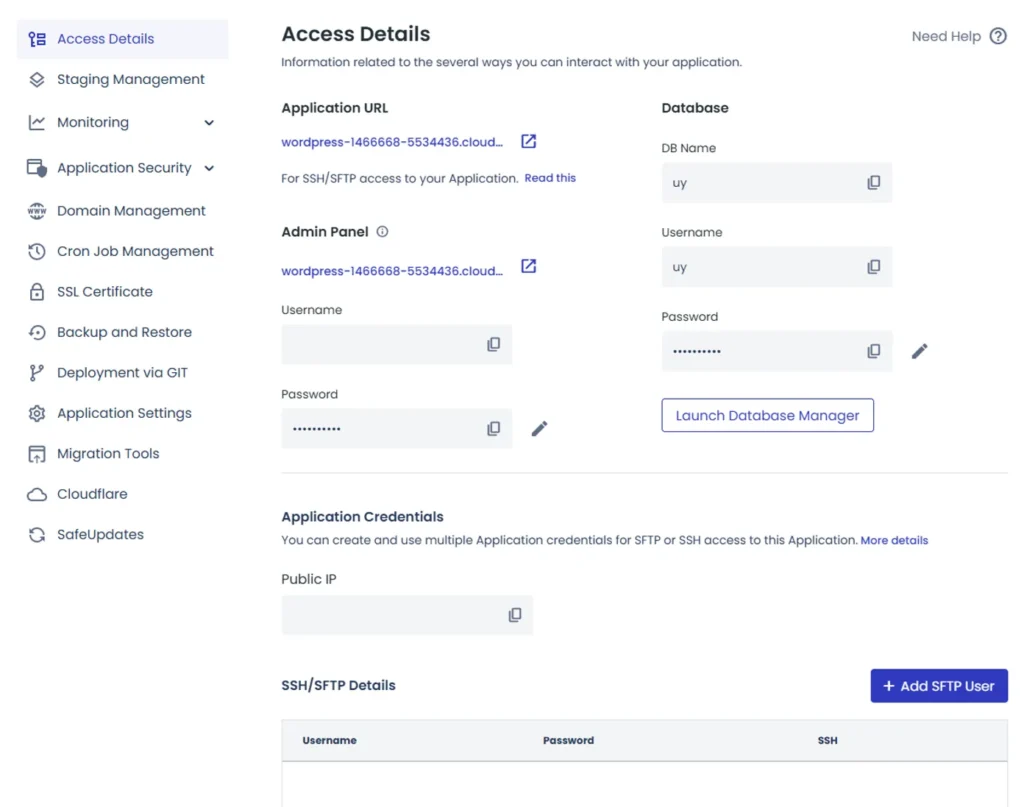
The dashboard is clean and gives you easy access to important features, such as:
- One-click WordPress installation
- Automatic backups
- Website staging
- Server monitoring
- SSL certificate management
- Easy server scaling
However, if you’re new to cloud hosting, it may take some time to understand all the options.
InMotion Hosting Dashboard

InMotion Hosting, on the other hand, uses the popular cPanel on many of its hosting plans.
With cPanel, you can easily:
- Install WordPress
- Manage domains and emails
- Upload website files
- Create databases
- Set up SSL certificates
- Manage website backups
The interface is simple, especially if you’ve used traditional web hosting before.
Which Is Easier to Use?
InMotion Hosting is the winner for beginners. Its familiar cPanel interface makes everyday website tasks easier.
Cloudways is also user-friendly, but it’s better suited for users who want more control over their cloud hosting.
Data Centers and CDN
Cloudways
Cloudways offers data center locations worldwide through DigitalOcean, Vultr, AWS, and Google Cloud.
You can choose server locations in:
- North America: USA and Canada
- Europe: UK, Germany, Netherlands, and more
- Asia: India, Singapore, Japan, and more
- Australia: Selected locations
- South America: Selected locations
Available locations depend on your cloud provider.
For CDN, Cloudways offers a Cloudflare Enterprise add-on, which includes:

- Global content delivery
- Static content caching
- DDoS protection
- Image optimization
- Reduced server load
The Cloudflare Enterprise add-on starts at $4.99/month per domain, with pricing dropping to $1.99/month per domain for 25 or more domains.
InMotion Hosting

InMotion Hosting offers data center locations in the United States and Europe, depending on your hosting plan.
Its location options are more limited than Cloudways.
For CDN, InMotion Hosting supports third-party services like Cloudflare.
You can use Cloudflare’s free or paid plans to improve content delivery and reduce server load.
Side-by-Side Compared
| Feature | Cloudways | InMotion Hosting |
|---|---|---|
| Data Centers | Multiple global locations | 2 in USA, 1 in Europe |
| Asian Servers | Yes | Limited |
| CDN | Cloudflare Enterprise add-on | Third-party Cloudflare |
| Free CDN Option | Not included in Enterprise add-on | Cloudflare Free plan |
| CDN Setup | Integrated add-on | Separate configuration |
| Global Reach | Better | More limited |
Cloudways wins because it offers more data center locations and an integrated Cloudflare Enterprise CDN option.
InMotion Hosting is suitable for websites targeting US and European visitors, but Cloudways gives you more flexibility for a global audience.
Security and Backups
Cloudways
Cloudways provides server-level security, malware protection, and automated backups.

Its main security features include:
- Free SSL: Let’s Encrypt SSL certificates for every application.
- Firewall: Dedicated server firewall to block unauthorized traffic.
- Malware Protection: Malware scanning and vulnerability detection tools. MalCare is available as an additional security service.
- DDoS Protection: Cloudflare Enterprise adds advanced DDoS protection and a Web Application Firewall (WAF).
- Two-Factor Authentication: Protects your Cloudways account from unauthorized logins.
- IP Whitelisting: Restricts SSH and SFTP access to approved IP addresses.
- Security Updates: Cloudways manages operating system security patches.
Cloudways also offers flexible backup options:
- Automatic Backups: Schedule backups every hour, daily, or weekly.
- Backup Retention: Choose between 1 and 4 weeks, with 7 days as the default.
- On-Demand Backups: Create a backup before making website changes.
- Off-Site Backups: Store backups separately from your hosting server.
- Easy Restoration: Restore applications and server data from available backups.
On Cloudways Flexible, off-site backup storage costs $0.033 per GB per month, with a $0.50 minimum monthly charge. Cloudways Autonomous includes backup storage in its plan pricing.
InMotion Hosting
InMotion Hosting includes security features such as malware protection, firewalls, and DDoS mitigation.
Its main security features include:
- Free SSL: SSL certificates included with hosting plans.
- Malware Protection: Monarx-based malware protection on supported hosting plans.
- Firewall: ModSecurity and web application firewall protection on shared hosting.
- DDoS Protection: Network-level DDoS mitigation, with Corero protection on supported dedicated server services.
- Server Security: Security monitoring and server protection tools based on the hosting service.
- Managed Security: Additional malware cleanup and website repair services through eligible Care plans.
For backups, InMotion Hosting offers:

- Backup Manager: Automated backups for supported hosting plans.
- Backup Scheduling: Configure backup schedules using Backup Manager.
- Backup Retention: Keep backup copies within your purchased storage allowance.
- Website Restoration: Restore website files and databases from saved backups.
- Managed Backups: Advanced backup schedules and longer retention through eligible Care plans.
On supported shared hosting plans, Backup Manager starts at approximately $2.99/month for 10 GB of storage.
InMotion’s managed Care services offer backup frequencies as short as 6 hours and longer retention periods, depending on the selected tier.
Side-by-Side Compared
| Feature | Cloudways | InMotion Hosting |
|---|---|---|
| Free SSL | Yes | Yes |
| Malware Protection | Scanning + optional tools | Monarx on supported plans |
| Firewall | Server firewall + Cloudflare WAF | ModSecurity + plan-specific WAF |
| DDoS Protection | Cloudflare Enterprise option | Network-level mitigation |
| Two-Factor Authentication | Yes | Account-dependent |
| Automatic Backups | Included | Backup Manager or eligible plans |
| Backup Frequency | Hourly to weekly | Configurable; Care tier-dependent |
| Backup Retention | 1–4 weeks | Storage-based or Care tier-dependent |
| Off-Site Backups | Yes | Available |
| Backup Pricing | $0.033/GB/month on Flexible | From approximately $2.99/month for 10 GB |
Cloudways wins for security and backups because it includes automated backups, flexible scheduling, and dedicated server-level security controls.
InMotion Hosting also offers strong protection, but its backup services and advanced security features depend more on the hosting plan and paid add-ons.
For users who want flexible backups and more control over website security, Cloudways is the better choice.
Developer Tools
Cloudways
Cloudways offers a wide range of developer tools, making it a good choice for developers, agencies, and advanced WordPress users.
Its main developer features include:
- SSH and SFTP Access: Securely access server files and manage applications.
- Git Integration: Deploy website code directly from Git repositories using SSH.
- Staging Environment: Create a staging copy of your website to test changes before publishing.
- WP-CLI: Manage WordPress plugins, themes, and updates through the command line.
- PHP Version Control: Choose from supported PHP versions for your applications.
- Database Management: Manage MySQL databases through the built-in database manager.
- Cron Jobs: Schedule automated tasks directly from the dashboard.
- Team Collaboration: Give team members controlled access to servers and applications.
- API Access: Automate server and application management using the Cloudways API.
- Server Monitoring: Track server resources, application performance, and PHP activity.
Cloudways also supports multiple applications on a single server, making it useful for developers managing several client websites.
However, Cloudways Flexible doesn’t provide full root access because it uses a managed server environment.
InMotion Hosting
InMotion Hosting also offers developer-friendly tools, especially on its VPS and dedicated hosting plans.
Its main developer features include:
- SSH Access: Secure command-line access on supported hosting plans.
- Git Support: Manage and deploy code through Git tools and SSH.
- WP-CLI: Manage WordPress websites through the command line.
- PHP Version Selection: Switch between supported PHP versions using hosting tools.
- Database Management: Manage MySQL databases through phpMyAdmin.
- Cron Jobs: Automate scheduled website tasks through cPanel.
- Staging Tools: Available through supported WordPress tools and hosting plans.
- Root Access: Full root access on eligible unmanaged VPS and dedicated server plans.
- cPanel and WHM: Manage websites, hosting accounts, and server settings on supported plans.
One advantage of InMotion Hosting is its root access on unmanaged server plans.
This gives experienced developers more freedom to install custom software, configure server settings, and manage their hosting environment.
Side-by-Side Compared
| Feature | Cloudways | InMotion Hosting |
|---|---|---|
| SSH/SFTP Access | Yes | Yes |
| Git Integration | Built-in Git deployment | Git support |
| WP-CLI | Yes | Yes |
| Staging Environment | Built-in | Plan/tool-dependent |
| PHP Version Selection | Yes | Yes |
| Cron Jobs | Yes | Yes |
| Database Management | Built-in tools | phpMyAdmin |
| API Access | Cloudways API | Depends on hosting environment |
| Root Access | No on Flexible | Yes on eligible unmanaged plans |
| Team Collaboration | Built-in | cPanel/WHM account controls |
| Server Monitoring | Built-in dashboard | Depends on hosting plan |
Cloudways wins for developer tools because it offers built-in Git deployment, staging environments, SSH access, team collaboration, and API-based automation.
These features make managing multiple WordPress websites and client projects easier.
InMotion Hosting is a better option for developers who need full root access and complete control over their server configuration.
For most WordPress developers and agencies, Cloudways offers a more convenient development workflow.
Customer Support
Both Cloudways and InMotion Hosting offer 24/7 customer support, but their support channels and level of assistance are different.
Cloudways Customer Support
Cloudways provides 24/7 live chat and ticket support with all hosting plans. You also get access to its knowledge base and community forum.
For more technical assistance, Cloudways offers two paid support options:

- Advanced Support: Starts at $100/month and includes faster response times and deeper application troubleshooting.
- Premium Support: Starts at $500/month and adds priority assistance, a private Slack channel, and phone support.
Standard support is included at no extra cost and covers everyday server and hosting issues.
InMotion Hosting Customer Support

InMotion Hosting offers 24/7 live chat, support tickets, and phone support on eligible plans.
Its support team helps with WordPress installation, cPanel, email setup, website migrations, and general hosting issues.
InMotion also provides a detailed knowledge base and Launch Assist on eligible VPS and dedicated hosting plans for additional setup and migration assistance.
Which Offers Better Customer Support?
InMotion Hosting has the edge for beginners because it offers more direct ways to contact support, including phone assistance on eligible plans.
Cloudways is a strong choice for cloud hosting users, but its advanced technical support comes at an additional cost.
Pricing
Cloudways Pricing
Cloudways uses a pay-as-you-go pricing model, so you pay for the server resources you use without committing to a yearly contract.
Its Flexible hosting starts at $11/month on DigitalOcean, while Autonomous hosting starts at $99/month.
Here are some Cloudways DigitalOcean plans:
| Plan | RAM | Storage | Monthly Price |
|---|---|---|---|
| DO 1GB | 1 GB | 25 GB | $11 |
| DO 2GB | 2 GB | 50 GB | $24 |
| DO 4GB | 4 GB | 80 GB | $46 |
| DO 8GB | 8 GB | 160 GB | $88 |
Cloudways also offers a 3-day free trial without a credit card.
Keep in mind that some services cost extra:
- Cloudflare Enterprise CDN: From $4.99/month per domain
- Off-site Backups: $0.033/GB per month
- Email Hosting: From $1/month
- SafeUpdates: From $3/month
The biggest advantage is that you can scale your server resources and pay based on usage without a long-term hosting commitment.
InMotion Hosting Pricing
InMotion Hosting is more affordable for beginners, with shared hosting starting at $4.79/month on a 3-year plan.
Here’s a breakdown of its shared hosting plans:
| Plan | Websites | Storage | Starting Price | Renewal Price |
|---|---|---|---|---|
| Launch | 2 | 100 GB NVMe | $4.79/mo | $14.99/mo |
| Power | 10 | 200 GB NVMe | $5.79/mo | $18.99/mo |
| Pro | 40 | 300 GB NVMe | $10.59/mo | $25.99/mo |
InMotion Hosting also offers:
- WordPress Hosting: From $5.29/month
- VPS Hosting: From $9.99/month
- Dedicated Hosting: From $35/month
Shared hosting plans include free SSL, email accounts, a first-year domain credit on eligible terms, and website migration.
However, the main downside is the renewal pricing. For example, the Launch plan increases from $4.79/month to $14.99/month after the introductory term.
Which Offers Better Value?
InMotion Hosting wins on affordability, especially if you’re starting a blog or small business website.
Cloudways costs more upfront but offers flexible billing, dedicated cloud resources, and easier server scaling.
If you’re on a tight budget, I’d go with InMotion Hosting. But if you want managed cloud hosting without a long-term contract, Cloudways is worth the extra cost.
Pros and Cons
Cloudways Pros
- Fast cloud hosting with dedicated server resources.
- Multiple cloud providers, including DigitalOcean, Vultr, AWS, and Google Cloud.
- Easy server scaling as your website grows.
- Built-in caching, staging, and Git deployment.
- Automated backups with flexible scheduling.
- Multiple global data center locations.
- Pay-as-you-go pricing without long-term contracts.
Cloudways Cons
- More expensive than basic shared hosting.
- No traditional cPanel or full root access.
- Email hosting, CDN, and some security tools cost extra.
- Beginners face a learning curve.
- Advanced support plans are expensive.
InMotion Hosting Pros
- Affordable introductory shared hosting plans.
- Beginner-friendly cPanel interface.
- Free SSL and email hosting on eligible plans.
- 24/7 customer support with phone assistance on supported plans.
- NVMe SSD storage and UltraStack performance technology.
- Shared, WordPress, VPS, and dedicated hosting options.
- Full root access on eligible unmanaged server plans.
InMotion Hosting Cons
- Higher renewal prices after introductory offers.
- Limited data center locations compared to Cloudways.
- Shared hosting resources are shared with other websites.
- Backup Manager costs extra on standard shared hosting.
- Advanced developer features depend on the hosting plan.
- Less flexible server scaling on shared hosting.
Which One Should You Choose?
The right choice depends on your budget, technical experience, and the type of website you’re running.
Choose Cloudways If:
- You want fast, scalable cloud hosting for a growing website.
- You run a high-traffic WordPress site, WooCommerce store, or business website.
- You need advanced features like staging, Git deployment, and server-level caching.
- You want more control over server resources and data center locations.
- You prefer flexible, pay-as-you-go billing instead of long-term contracts.
Cloudways is my recommendation for growing websites that need stronger performance flexibility, developer tools, and easy scalability.
Choose InMotion Hosting If:
- You’re a beginner launching your first blog or website.
- You want affordable hosting with a familiar cPanel dashboard.
- You need email hosting and other essential features included in your plan.
- You prefer phone support on eligible plans.
- You’re running a personal blog, portfolio, or small business website with a limited budget.
InMotion Hosting is the better choice for beginners and budget-conscious users who want straightforward hosting without paying for advanced cloud features.
My Final Recommendation
If I had to choose between the two, I’d pick Cloudways for performance, scalability, and long-term website growth.
However, if you’re just starting out and want to keep hosting costs low, InMotion Hosting offers better value for money.
Best Alternatives to Cloudways and InMotion Hosting
If neither Cloudways nor InMotion Hosting meets your needs, there are four other hosting providers worth considering: ScalaHosting, WPX, Kinsta, and Pressable.
Each offers something different, whether you’re looking for affordable WordPress hosting, better hands-on support, or a fully managed hosting experience.
| Hosting | Starting Price (Annual) | Sites | Storage | Best For |
|---|---|---|---|---|
| ScalaHosting | $2.95/mo | 1 | 10 GB NVMe | Budget WordPress hosting |
| WPX | $14.99/mo | 1 | 10 GB | Affordable WordPress hosting |
| Kinsta | $30/mo | 1 | 15 GB | Managed WordPress sites |
| Pressable | $20.83/mo | 1 | 20 GB | Managed WordPress hosting |
ScalaHosting
ScalaHosting is a strong alternative if you want affordable WordPress hosting with useful management tools.
Its entry WordPress plan starts at $2.95/month and includes one website with 10 GB NVMe storage.
You also get free website migration, email hosting, malware protection, automatic WordPress updates, and developer tools such as SSH and WP-CLI.
Unlike Cloudways, ScalaHosting also offers traditional hosting options, making it suitable for beginners who don’t need a dedicated cloud server.
Related: ScalaHosting vs Cloudways
WPX
WPX focuses on managed WordPress hosting with hands-on technical support.
Its entry plan starts at $14.99/month and includes one WordPress website with 10 GB storage.
WPX includes daily backups, free website migration, malware scanning and removal, a CDN, and 24/7 customer support.
One important difference is that WPX focuses on WordPress rather than general-purpose cloud server management. You don’t need to configure server caching or manage cloud infrastructure yourself.
However, email hosting isn’t included, so you’ll need a separate email provider.
Related: WPX vs Cloudways
Kinsta
Kinsta is a premium managed WordPress hosting provider built for businesses, publishers, and agencies.
Its entry Launch plan starts at $30/month and includes one WordPress installation, 15 GB storage, and 15 GB server bandwidth.
Kinsta handles server management and provides automatic backups, staging environments, CDN integration, free migrations, and 24/7 expert support.
Compared with Cloudways, Kinsta gives you a more WordPress-focused hosting experience. You don’t have to choose a cloud provider or manage server resources through a separate cloud dashboard.
The main drawback is its higher starting price.
Related: Kinsta vs Cloudways
Pressable
is another managed WordPress hosting alternative, backed by Automattic, the company behind WordPress.com and WooCommerce.
Its entry plan starts at $20.83/month and includes one WordPress website with 20 GB storage.
Pressable provides automatic backups, staging environments, free migrations, built-in caching, CDN integration, and WordPress-focused support.
It is particularly attractive for WooCommerce stores and business websites that want a managed WordPress environment without dealing with server administration.
Unlike Cloudways, Pressable is designed specifically for WordPress rather than hosting different types of applications.
FAQs
Is Cloudways better than InMotion Hosting?
Cloudways is better for growing websites that need scalable cloud hosting, advanced caching, and flexible server resources. InMotion Hosting is better for beginners looking for affordable hosting, cPanel, and easy website management.
Which is faster, Cloudways or InMotion Hosting?
Cloudways offers greater performance flexibility with dedicated cloud resources, built-in caching, and multiple cloud providers. InMotion Hosting uses NVMe SSD storage and UltraStack technology. Actual website speed depends on the hosting plan, server location, and website optimization.
Is Cloudways more expensive than InMotion Hosting?
Yes, Cloudways generally costs more than InMotion Hosting’s introductory shared hosting plans. However, Cloudways offers pay-as-you-go billing, while InMotion Hosting’s lowest prices typically require long-term commitments.
Does Cloudways use cPanel like InMotion Hosting?
No. Cloudways uses its own custom dashboard for managing servers, applications, backups, and security. InMotion Hosting provides cPanel on supported plans, making it more familiar to traditional web hosting users.
Which hosting is better for WordPress, Cloudways or InMotion Hosting?
Cloudways is better suited for growing WordPress websites that need advanced caching, staging, and scalable resources. InMotion Hosting is a good option for beginners, personal blogs, and small business websites.
Does Cloudways offer free email hosting?
No. Cloudways does not include traditional email inbox hosting with its standard server plans. You can purchase the Rackspace Email add-on or use a third-party email provider.
Which offers better customer support, Cloudways or InMotion Hosting?
InMotion Hosting has an advantage for users who prefer phone assistance, available on eligible plans, alongside live chat and ticket support. Cloudways provides 24/7 live chat and ticket support, with paid options for advanced assistance.
Can I migrate my website from InMotion Hosting to Cloudways?
Yes. You can migrate a WordPress website from InMotion Hosting to Cloudways using the free Cloudways WordPress Migrator plugin. Cloudways also provides migration assistance for eligible websites.
Conclusion
After comparing Cloudways and InMotion Hosting on pricing, performance, features, security, and customer support, both are good hosting providers, but they serve different needs.
Cloudways is my top choice overall because it offers scalable cloud hosting, dedicated server resources, advanced caching, and more control over website performance. It’s a better fit for growing WordPress websites, WooCommerce stores, and businesses that need flexibility.
InMotion Hosting is the better choice for beginners and budget-conscious users. It offers affordable introductory plans, cPanel, email hosting on eligible plans, and accessible customer support.
So, if performance, scalability, and flexibility are your priorities, go with Cloudways. But if you want affordable, beginner-friendly hosting for a blog or small business website, InMotion Hosting is a solid choice.